
Why Choosing the Right Automated Home Security System Can Make or Break Your Peace of Mind
Automated home security systems have come a long way — but with dozens of options on the market, picking the right one is genuinely confusing.
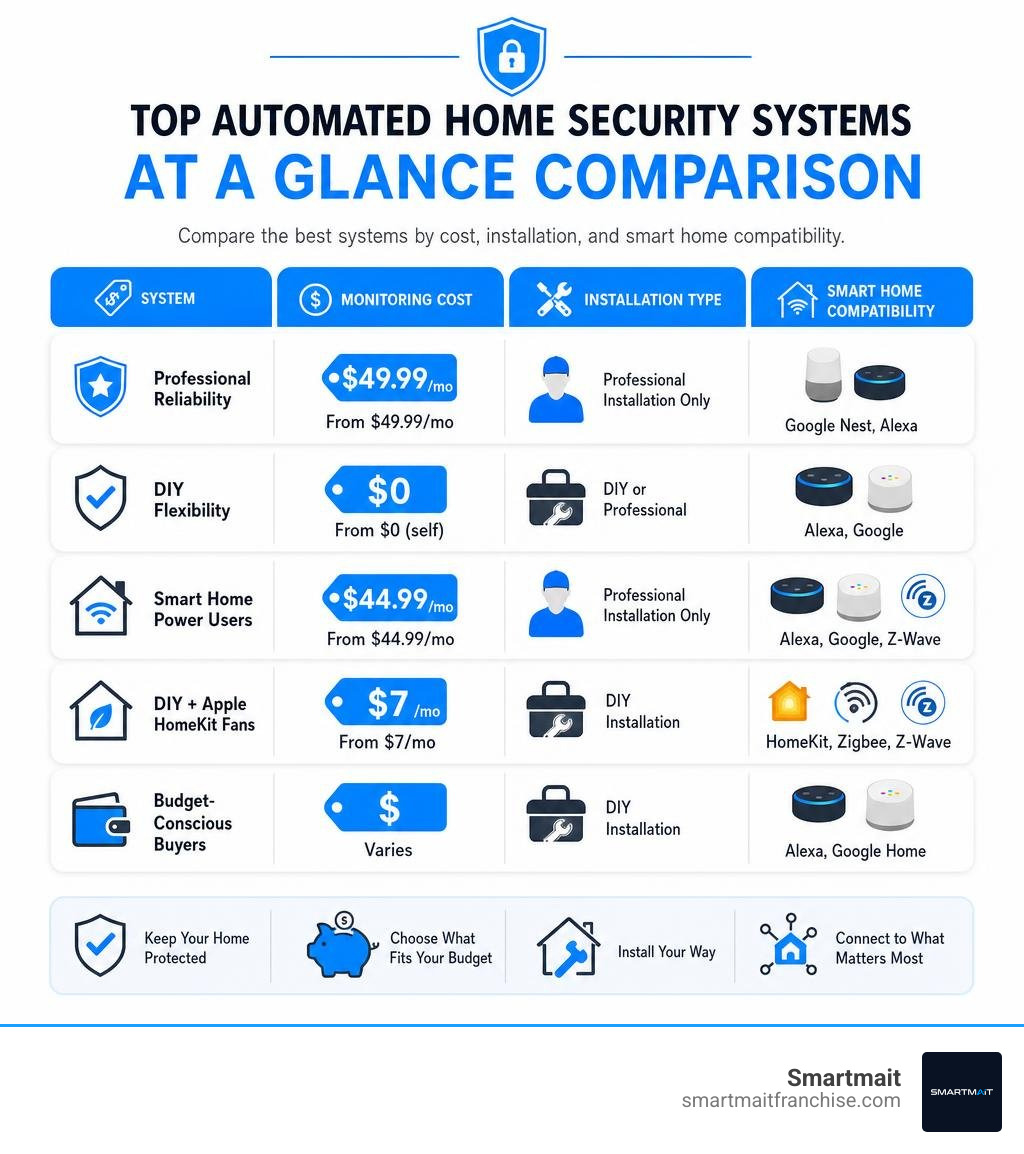
Here’s a quick breakdown to help you compare the main types of systems at a glance:
| System Type | Best For | Installation | Maintenance | Smart Home Integration |
|---|---|---|---|---|
| Traditional Pro-Install | Basic reliability | Pro only | High monthly fees | Limited |
| Basic DIY Kits | Budget-conscious users | DIY | Self-maintained | App-level only |
| Integrated Smart Security | Power users & automation | Pro or DIY | Managed support | Deep protocol-level (Z-Wave, Zigbee) |
The hard truth? Most people don’t struggle to find a system — they struggle to keep it working.
False alarms, dead sensors, apps that don’t talk to each other, and zero support when something breaks. These are the real problems homeowners and small business operators face after the install truck drives away.
Over 77 million U.S. homes now use smart devices. But a device sitting in a drawer or throwing errors at 2 a.m. isn’t protecting anyone.
This guide cuts through the noise. It compares the major systems on what actually matters — features, costs, integration, reliability, and long-term support — so you can make a decision you won’t regret.
I’m Dominic Hesano, founder of SmartMait, a home and business automation company built around professional installation, integration, and ongoing support for automated home security systems. My background in franchise operations and local service businesses has shown me what separates systems that look good in a brochure from ones that actually perform day after day.
Why Professional Installation Beats DIY for Automated Home Security Systems
We live in a golden age of “peel-and-stick” technology. You can order a security kit online, unbox it on a Saturday morning, and theoretically have a fully functioning alarm system by lunchtime. But there is a massive difference between a system that is mounted and one that is truly secured, integrated, and optimized.

While DIY systems offer low upfront costs and immediate gratification, they often leave homeowners with a false sense of security. Let’s look at how DIY setups stack up against professional installation and ongoing maintenance.
| Feature | DIY Security Setups | Professional Installation & Maintenance |
|---|---|---|
| Physical Mounting | Peel-and-stick tape (prone to falling) | Anchored, hardwired, or professionally placed |
| Sensor Placement | Trial and error (leads to dead zones) | Engineered for maximum coverage & pet bypass |
| Ecosystem Integration | Limited to basic app-level handshakes | Deep, protocol-level smart home automation |
| Power & Connectivity | Relies entirely on home Wi-Fi and batteries | Cellular backup, dual-path routing, power optimization |
| Ongoing Health Checks | Up to the homeowner (often ignored) | Proactive remote diagnostics and physical maintenance |
The Hidden Risks and Limitations of DIY Security Setups
The most common issue we see with DIY systems is physical failure. Those convenient double-sided adhesive strips that hold entry sensors to your doors and windows? They hate humidity, temperature fluctuations, and heavy door slams. When a peel-and-stick sensor falls off a window pane at 3:00 a.m., it doesn’t just wake up your family—it triggers a false alarm that can result in hefty municipal fines.
Furthermore, DIY systems often suffer from significant self-monitoring gaps. If you opt out of a professional monitoring plan to save a few dollars, you are entirely responsible for responding to emergency alerts. If your phone is on “Do Not Disturb,” if you are on an airplane, or if you are simply in a meeting, a critical notification about a water leak or an intruder could go completely unnoticed.
Finally, there’s the headache of troubleshooting. When a camera drops offline or a motion sensor stops communicating, you become the IT department. You’ll find yourself climbing ladders, resetting routers, and spending hours on hold with customer support.
The Benefits of Professionally Installed and Maintained Systems
When you choose a professionally installed and maintained system, you are paying for expertise and engineering. Professional installers don’t just stick sensors on doors; they analyze your home’s layout, identify vulnerable entry points, and place sensors where they cannot be easily bypassed.
For example, a professional will install a glassbreak sensor in a room with multiple windows rather than cluttering every pane with individual contacts. They will set up pet-friendly motion detectors that ignore your 50-pound golden retriever but trigger instantly if a human heat signature crosses their path.
Most importantly, professional installation ensures robust, hardwired, or securely wireless connectivity that doesn’t rely solely on a consumer-grade Wi-Fi router. By working with certified Integrators, you ensure that your security system is woven seamlessly into the physical and digital architecture of your property.
How Professional Integration and Maintenance Keep Your System Reliable
Getting your security system up and running is only step one. The real challenge is keeping it running flawlessly for years to come. In the smart home industry, we call this “lifecycle reliability.”

Preventing System Downtime and False Alarms
A security system is only as good as its weakest link. If a backup battery dies, a firmware update fails, or a camera lens gets covered in spiderwebs, your protection drops to zero.
That is why proactive maintenance is so critical. A professionally managed system includes:
- Regular Diagnostics: Remote system health checks to ensure all nodes, sensors, and cameras are communicating properly with the central hub.
- Preventative Battery Replacements: Swapping out backup batteries before they fail and start chirping in the middle of the night.
- Firmware and Security Patches: Keeping your devices updated to protect against both software bugs and cybersecurity vulnerabilities.
- Sensor Calibration: Re-testing motion and glassbreak sensors to ensure they remain highly accurate without triggering false alarms.
When your system is optimized and maintained by experts, you eliminate the friction of smart home ownership. You don’t have to worry about whether your backup cellular connection is active or if your outdoor cameras are recording; the system simply works.
Key Features to Look For in a Smart Security System
If you are shopping for a new system in June 2026, you shouldn’t settle for a basic “beeps-and-sirens” alarm. Modern automated home security systems are highly sophisticated smart home hubs capable of managing everything from your door locks to your thermostat.
Essential Sensors and Cameras
To build a comprehensive security shield, you need a mix of physical intrusion sensors and environmental detectors. Here are the core components you should look for:
- Entry Sensors: These magnetic contacts monitor when doors and windows open.
- Motion Sensors: Advanced motion detectors should feature pet-immunity technology, which distinguishes between human heat signatures and domestic animals.
- Glassbreak Sensors: These listen specifically for the high-frequency sound of shattering glass, protecting large window arrays.
- Environmental Sensors: Water leak detectors, smoke alarms, and carbon monoxide listeners are just as important as burglar alarms. A burst pipe can cause far more financial damage than a typical break-in.
If you are looking for highly reliable, pre-configured hardware packages to build upon, several excellent options exist. For a solid mid-sized setup, a standard 9-piece hardware kit is an excellent starting point that balances entry protection with environmental awareness. If you want maximum coverage for a larger property, a comprehensive 16-piece package provides an expansive suite of sensors.
For specialized needs, packages focused heavily on environmental disaster prevention are ideal, while setups featuring advanced outdoor camera integration help deter threats before they reach your front door.
Smart Home Integration and Compatibility
A truly automated security system doesn’t operate in a vacuum. It should integrate seamlessly with your existing smart home devices. This allows you to create automated routines that make your life easier and safer.
For example, when you arm your system to “Away” mode:
- Your smart locks automatically bolt.
- Your smart thermostat drops to an energy-saving temperature.
- Your interior smart lights turn off, while your exterior lights set to a schedule that mimics occupancy.
To achieve this level of automation, look for systems that support open communication protocols like Zigbee, Z-Wave, and the rapidly growing Matter standard. These protocols allow devices from different manufacturers to speak directly to one another without relying on cloud-to-cloud integrations.
If you are a dedicated Google Home user, choosing a system that offers tight ecosystem integration allows you to control your security directly through the Google Home app and Nest displays. On the other hand, if you prefer the Apple ecosystem, look for platforms that offer native Apple HomeKit integration alongside Zigbee and Z-Wave support to ensure all your devices work in harmony.
Understanding Costs, Maintenance Plans, and Long-Term Value
When evaluating the cost of automated home security systems, it is easy to get hyper-focused on the upfront price of the equipment. However, the true cost of ownership includes three distinct layers:
- Equipment Costs: The physical hardware (sensors, cameras, keypads, and hubs).
- Installation Costs: The one-time fee to have a professional install, calibrate, and integrate the system.
- Ongoing Maintenance & Support: The cost to keep the system healthy, updated, and functional over time.
While some traditional security companies try to lock you into rigid, multi-year monitoring contracts with high monthly fees, modern consumers prefer flexibility.
Investing in a professionally installed and maintained system also offers a direct financial return: homeowners insurance discounts. Most insurance providers offer premium discounts of up to 20% to 30% for homes equipped with professionally installed security and environmental monitoring systems. Because these systems dramatically reduce the risk of both theft and catastrophic water or fire damage, insurance companies are happy to reward proactive homeowners. In many cases, these annual savings can offset a significant portion of your system’s maintenance costs.
Privacy, Cybersecurity, and Data Protection
As security systems become more connected, they also become potential targets for digital intruders. Your security cameras see inside your home, and your system knows exactly when you are away. Therefore, digital security is just as important as physical security.
When choosing and configuring your system, keep these cybersecurity best practices in mind:
- Two-Factor Authentication (2FA): Always enable 2FA on your security app accounts. This ensures that even if someone steals your password, they cannot access your camera feeds or disarm your system.
- Data Encryption: Ensure that all wireless signals—both from your sensors to your local hub, and from your hub to the cloud—are protected by deep, military-grade encryption.
- Local Storage vs. Cloud Storage: Some users prefer cameras that store video locally on an encrypted SD card or local drive rather than streaming everything to the cloud. This keeps your private footage inside your physical walls.
- Secure Camera Placement: Avoid placing indoor cameras in highly private spaces like bedrooms. Instead, focus them on primary entry points like the foyer, back door, and garage.
Frequently Asked Questions about Automated Security
Do smart security systems work during a power outage?
Yes, provided they are designed with proper redundancies. High-quality systems feature built-in backup batteries in their central hubs that can keep the system fully operational for up to 24 hours during a blackout.
Additionally, to prevent cellular or internet outages from disconnecting your home, look for systems that utilize dual-path routing (both Wi-Fi and cellular backup). If your home internet goes down or your power cuts out, the system automatically switches to a cellular network to send critical alerts.
Can I integrate my security system with other smart home devices?
Absolutely. This is the core benefit of modern automated home security systems. Through platforms like Apple HomeKit, Google Home, Alexa, or native Z-Wave/Zigbee hubs, you can link your security sensors to smart locks, lighting, smart blinds, and thermostats. This allows you to create elegant automations, such as having your hallway lights turn on automatically if a motion sensor detects you walking to the kitchen at night.
How much can I save on homeowners insurance with a professionally installed system?
While exact savings vary by carrier and location, most major insurance providers offer discounts ranging from 5% to 30% on your homeowners or renters insurance premiums. To qualify for the maximum discount, you typically need a professionally installed system that features both security (intrusion) and environmental (smoke, fire, and water leak) protection. Your installation provider can supply a safety certificate to submit to your insurance agent.
Conclusion: Take Control of Your Home’s Security and Automation
Choosing from the sea of automated home security systems doesn’t have to be a stressful ordeal. By focusing on professional installation, seamless smart home integration, and proactive, ongoing maintenance, you can build a system that protects your property without becoming a daily chore.
At Smartmait, we believe that technology should serve you—not the other way around. Our franchise model is built specifically to handle the heavy lifting of smart home ownership. We don’t just install your tech; we provide the ongoing maintenance, diagnostics, and optimization required to keep your automated systems running flawlessly year after year.
Ready to experience true peace of mind with a system customized for your lifestyle? Head over to our Home page to explore our services, check out our Integrators to see how we work, or reach out directly through our Contact page to schedule a customized consultation. Let us build and maintain a smarter, safer space for you.
For more information on how we can help you optimize your home security, visit https://smartmaitfranchise.com/.