

Why Planning Home Automation in New Construction Changes Everything
Home automation in new construction is one of the smartest investments you can make during a build — and the timing matters more than most people realize.
Here is a quick answer if you are short on time:
The most important things to know about home automation in new construction:
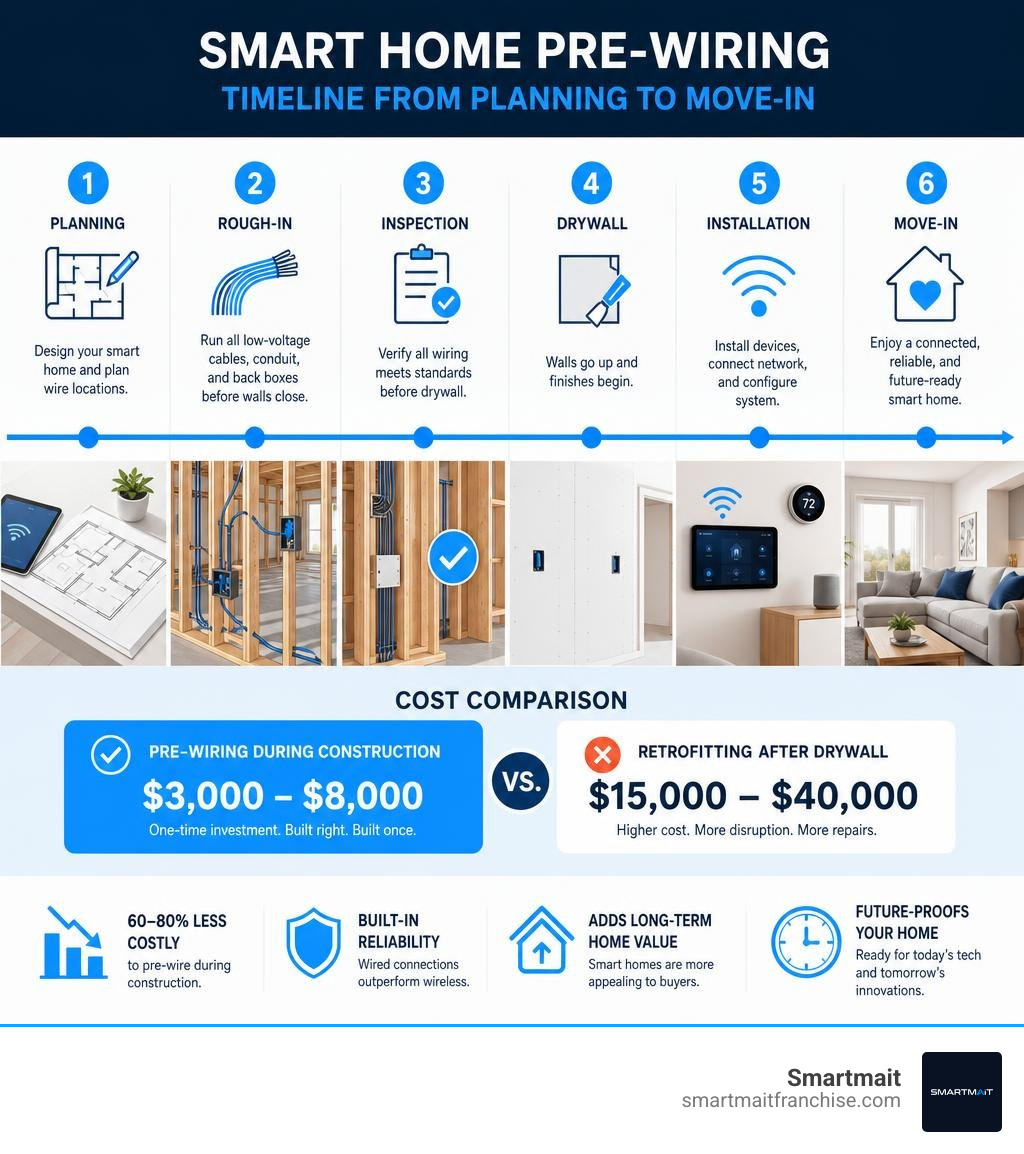
- Plan before walls close. Pre-wiring during the rough-in phase costs 60–80% less than retrofitting after drywall.
- Run Cat6a Ethernet everywhere. Every room, every camera location, every access point — wired is always more reliable than wireless.
- Pull a neutral wire to every switch box. Without it, most smart switches simply will not work.
- Pre-wire for EV charging. A 240V/50A circuit during construction costs $300–$600. After the fact, it can cost $2,500 or more.
- Choose an open platform. Look for Matter-compatible systems so your devices work together regardless of brand.
- Budget $3,000–$8,000 for pre-wiring. A full retrofit of the same scope runs $15,000–$40,000.
The window is short. Once drywall goes up, that window closes — and every cable you did not run becomes an expensive, wall-cutting problem later.
Smart home features are no longer a luxury. According to industry data, 1 in 5 Americans would pay an extra $10,000 for smart home features, and homes with smart technology sell for 3–5% more than comparable non-smart homes. Buyers in 2026 expect connected technology the same way they expect granite countertops or an open floor plan.
The difference between a home that feels modern for five years and one that feels modern for twenty often comes down to what happens behind the walls — before anyone moves in.
I’m Dominic Hesano, and through building SmartMait, a home and business automation franchise, I’ve developed a deep practical understanding of what separates a frustrating smart home experience from one that just works — including what home automation in new construction decisions you truly cannot afford to get wrong. In this guide, I’ll walk you through everything you need to plan, wire, and future-proof your smart home from the ground up.
The Core Infrastructure of Home Automation in New Construction
When we think about a smart home, we often picture sleek touchscreens, voice-activated assistants, and motorized shades gliding silently into place. But those are just the visible layers. The true heart of any high-performing system is the physical infrastructure built directly into the framing.
If you do not lay a solid physical foundation, even the most expensive wireless gadgets will struggle to perform.

Why Pre-Wiring Before Drywall is Critical
There is a golden rule in home building: wires age better than wireless. While wireless standards like Wi-Fi, Bluetooth, and Thread evolve every few years, a high-quality copper cable run through a wall can easily last several decades.
The rough-in phase — after framing is complete but before the drywall is hung — is your one-time opportunity to install this physical network. During this window, running a cable is as simple as walking through open studs and securing the wire. It takes minutes and costs very little in labor.
Once the drywall is up, running that same cable requires cutting holes in your brand-new walls, fishing wires through tight insulation, and paying for expensive drywall patching and painting.
According to industry data, installing low-voltage wiring during the rough-in phase is five to ten times cheaper than retrofitting the same scope after the home is finished. To understand how to approach this phase step-by-step, you can read more in this Smart Home Wiring for New Construction: Planning Guide | HomeSyncd.
Structured Cabling Requirements: Cat6a, Conduit, and Speaker Runs
To build a truly robust smart home, you need to move away from the idea of relying solely on Wi-Fi. A structured cabling approach routes all your low-voltage lines back to a single, centralized location — typically a climate-controlled utility room or a dedicated network closet.
Here is what we recommend including in every new construction pre-wiring checklist:
- Cat6a Ethernet Cables: Do not settle for older Cat5e or standard Cat6. Cat6a supports speeds up to 10 Gigabits per second and features superior shielding against electrical interference. You should run Cat6a to every major television location (aim for 3–4 drops behind the main living room TV), every home office desk, and every stationary smart device.
- Power over Ethernet (PoE) Camera Runs: Run a Cat6a cable to every planned exterior corner, entry point, and garage overhang. PoE allows a single cable to provide both high-speed data and electrical power to your outdoor security cameras, eliminating the need for nearby power outlets or batteries.
- Empty Conduit (Conduit Runs): Install 1-inch or 2-inch flexible PVC conduit (often called “smurftube”) between your central network closet and key locations, such as behind the living room mantel, the attic, and the crawlspace. If a new cabling standard is invented ten years from now, you can easily pull the new wires through this empty conduit without opening a single wall.
- Speaker Wire: Run 16-gauge or 14-gauge multi-conductor speaker wire from your central rack to the ceilings of your kitchen, primary suite, patio, and main living areas. It is much easier to run these wires now, even if you do not plan to install the actual in-ceiling speakers until years down the road.
For a deeper dive into specifying these cables for your construction team, check out this comprehensive Smart Home Pre-Wiring Guide 2026: What to Install During Build.
Wired vs. Wireless Systems for Modern Builds
A common misconception is that because wireless protocols have improved, physical wires are obsolete. In reality, the best smart homes use a hybrid architecture: wired for high-bandwidth, stationary devices, and wireless for mobile devices and lightweight sensors.
By hardwiring your stationary devices, you free up valuable wireless bandwidth. This prevents the classic “smart home lag” where your smart lights take several seconds to respond because your wireless network is congested with streaming video, gaming consoles, and smart appliances.
Electrical, Climate, and High-ROI Smart Systems for Rough-In
To turn a standard new build into an intelligent home, your electrical, HVAC, and low-voltage systems must be designed to work in harmony. This requires coordinating with multiple trades during the early phases of construction.

Are you looking for professional guidance to coordinate these trades? Learn more about how we help on our Smartmait Integrators page.
High-Voltage Electrical Requirements and EV Charging
Many homeowners focus entirely on low-voltage cables and completely overlook the standard electrical rough-in. However, several critical high-voltage decisions must be made early on:
- Neutral Wires in Every Switch Box: Historically, electricians only ran a hot wire and a ground wire to light switches. However, smart switches are essentially miniature computers that require constant power to stay connected to your network. To power themselves, they require a neutral wire. Ensure your electrical contractor pulls a neutral wire to every single switch box in the house.
- Deep Electrical Boxes: Smart switches and dimmers are significantly bulkier than traditional mechanical switches. Request deep plastic electrical boxes (at least 21 cubic inches) throughout the home to give your smart switches plenty of room and prevent wires from being dangerously pinched.
- Whole-Home Surge Protection: A single lightning strike or utility power surge can instantly destroy thousands of dollars of smart home processors, amplifiers, and switches. Install a high-quality, Type 2 whole-house surge protector directly at your main electrical panel during rough-in.
- 240V EV Charging Circuit: Even if you do not currently drive an electric vehicle, pre-wiring a dedicated 240V, 50-amp circuit to your garage using 6-gauge wire is highly recommended. Doing this during construction costs roughly $300 to $600. Retrofitting this same circuit later often requires trenching, drywall destruction, or even an expensive electrical panel upgrade, costing upwards of $2,500.
For more technical details on coordinating electrical systems with your builder, see this guide on Smart Home Technology in New Construction: What to Wire for in 2026.
Smart HVAC Integration, Zoning, and Ventilation
Modern homes are built tighter and more insulated than ever before, which makes precise climate control and proper ventilation essential for comfort and health.
- The Critical C-Wire: Every smart thermostat requires a dedicated “Common” wire (C-wire) to provide continuous 24V power. Ensure your HVAC contractor runs a minimum of an 18/5 (or ideally an 18/8) thermostat wire from your furnace or heat pump to every thermostat location.
- Multi-Zone Climate Control: Instead of relying on a single thermostat to control an entire multi-story home, plan for a zoned system. This uses motorized dampers in your ductwork and remote temperature sensors in individual bedrooms to deliver precise heating or cooling only where it is needed, significantly reducing utility bills.
- ERV/HRV Integration: To maintain excellent indoor air quality in a tightly sealed modern home, builders use Energy Recovery Ventilators (ERVs) or Heat Recovery Ventilators (HRVs) to constantly exchange stale indoor air for fresh outdoor air. Your smart home system can be programmed to run these ventilation cycles automatically based on indoor carbon dioxide ($CO_2$) or humidity levels.
Designing a Scalable Lighting Control System
Lighting sets the mood, enhances security, and improves energy efficiency. When planning lighting for a new build, you generally choose between two architectures:
- Smart Switches (Highly Recommended): Replace traditional switches with smart switches (like Lutron Caseta or RadioRA3). This allows you to use standard, inexpensive light bulbs while still maintaining full control via app, voice, or automation. If a guest flips the physical switch, the system still works perfectly.
- Centralized Lighting Panels: For larger custom homes, we often recommend centralizing all the dimming modules in a utility room panel. This eliminates “wall acne” — those confusing banks of four or five light switches in a row. Instead, you place a single, elegant keypad on the wall with custom-engraved buttons like “Entertain,” “Cooking,” or “Goodnight.”
Comprehensive Smart Security and Access Control
A modern security system should be proactive, deterring intruders before they ever reach your front door.
- PoE Security Cameras: As mentioned, Power over Ethernet cameras are the gold standard. They stream continuous, high-definition video to a local Network Video Recorder (NVR) located safely in your network closet. This ensures your cameras keep recording even if your internet connection goes down.
- Smart Locks and Access Control: Plan for smart deadbolts at all main entry points. During the build, you can also pre-wire a low-voltage wire to your door frames for magnetic sensors or motorized locks, allowing for seamless keyless entry and automatic locking schedules.
- Window and Door Sensors: Instead of sticking bulky, battery-powered plastic sensors onto your beautiful new window frames, ask your security installer to drill and install recessed, wired contact sensors directly into the window sills and door jambs during framing. They are completely invisible when the doors and windows are closed.
Whole-Home Audio and Entertainment Infrastructure
True whole-home audio allows you to stream your favorite music, podcasts, or television audio seamlessly from room to room.
- Centralized AV Rack: Rather than cluttering every room with bulky receivers, cable boxes, and streaming devices, route all HDMI and speaker cables back to a centralized AV rack.
- In-Ceiling and In-Wall Speakers: Pre-wire speaker brackets in your kitchen, primary bath, patio, and living areas. In-ceiling speakers deliver balanced, ambient sound throughout a space without taking up valuable floor or shelf space.
- Surround Sound Pre-Wiring: If you are planning a dedicated media room or home theater, run 14/4 speaker wire for a 5.1, 7.1, or Dolby Atmos (e.g., 5.1.4) speaker layout before the drywall is installed.
Future-Proofing, Platform Selection, and Avoiding Common Mistakes
Building a smart home is not just about choosing the right hardware today; it is about ensuring that your system remains functional, secure, and upgradable for the next twenty years.
Need help planning your smart home installation? Explore our services on the Smartmait Home page.
Choosing a Smart Home Platform and the Role of Matter
One of the biggest historical headaches in home automation was compatibility. A smart lock might work with Apple HomeKit but not with Google Home, while your smart blinds only worked with a proprietary bridge.
Fortunately, the industry has shifted toward open standards:
- The Matter Protocol: Matter is a unifying, open-source connectivity standard developed by a coalition of tech giants including Apple, Google, Amazon, and Samsung. Devices certified with the Matter logo are guaranteed to work seamlessly with one another, regardless of the brand.
- Thread Mesh Networking: Unlike traditional Wi-Fi, which can become congested with too many connected devices, Thread is a low-power, self-healing wireless mesh network designed specifically for smart home sensors, locks, and switches. The more Thread devices you add to your home, the stronger and more reliable your network becomes.
- Local Processing: When choosing a smart home hub, prioritize platforms that process your automations locally (within your own physical home) rather than relying on the cloud. This ensures that your lights, motion sensors, and switches continue to work instantly even if your internet service provider suffers an outage.
Common Pitfalls in Home Automation New Construction Planning
Having designed and installed countless systems, we regularly see the same planning mistakes. Here is what you must avoid:
- Skipping the Pre-Wire: Assuming that “everything is wireless now” is the single most expensive mistake a home builder can make. Wireless is a complement to a wired backbone, not a replacement.
- Poor Network Closet Ventilation: Low-voltage equipment, network switches, and amplifiers generate a significant amount of heat. If you lock them inside a tiny, unventilated closet, they will overheat and fail prematurely. Ensure your network closet has active ventilation or is tied into your home’s HVAC system.
- Undersized Conduit: Running a 1/2-inch conduit might seem sufficient now, but once you pull an HDMI cable and a couple of Ethernet runs through it, it is completely full. Always opt for 1-inch or 2-inch conduit to leave room for future upgrades.
- Proprietary System Lock-In: Avoid builders or installers who try to lock you into closed, proprietary systems that do not play well with others. Stick to platforms that support open standards like Matter and Thread.
Ensuring Accessibility and Resale Value for Future Owners
A common concern among home builders is: “What happens if I sell this house to someone who doesn’t want a smart home?”
To protect your home’s resale value, you must design your smart home to be “human-compatible.” This means implementing a hybrid control scheme.
If a guest, a babysitter, or a future home buyer walks into a room, they should be able to press a familiar, physical wall switch to turn on the lights. They should not be forced to download an app, scan a QR code, or yell at a voice assistant just to use the bathroom.
By keeping the physical controls intuitive and standardized, the home remains highly functional for non-technical users while remaining fully automated for you. For a comprehensive look at how to pull all of these elements together during your build, read the Smart Home Integration for New Construction: The Complete Guide.
Frequently Asked Questions
Planning a smart home can feel overwhelming. Here are direct answers to some of the most common questions we receive from homeowners and builders.
Have specific questions about your upcoming build? Contact our team for custom planning and we will help you design the perfect system.
What is the Cost of Home Automation New Construction vs. Retrofitting?
The cost difference between installing smart home infrastructure during construction versus trying to replicate it after the walls are closed is substantial.
| System / Infrastructure | Pre-Wiring Cost (During Build) | Retrofit Cost (Post-Drywall) | Drywall Damage & Patching |
|---|---|---|---|
| Structured Cabling (Cat6a) | $2,000 – $4,500 | $6,000 – $15,000 | Extensive |
| Whole-Home Audio (Speaker Wire) | $800 – $1,800 | $3,000 – $6,000 | Moderate to High |
| PoE Security Camera Runs | $500 – $1,200 | $2,000 – $4,500 | Moderate |
| 240V EV Charging Circuit | $300 – $600 | $1,500 – $3,000+ | Low to Moderate |
| Conduit (Future-Proofing Runs) | $400 – $1,000 | Virtually Impossible | N/A |
| TOTAL ESTIMATED COST | $4,000 – $9,100 | $12,500 – $28,500+ | Saves $10k+ in repairs |
As you can see, investing in a solid pre-wiring package during the rough-in phase is not only cheaper, but it also saves you from the mess, stress, and repair costs of cutting into finished walls later.
When should I start planning my smart home during a new build?
You should start planning your smart home during the architectural design phase, well before permits are pulled and framing begins.
This allows you to coordinate with your architect to allocate space for a dedicated, ventilated network closet, plan pocket recesses for motorized window shades, and design lighting layouts that avoid conflicts with HVAC ductwork.
At the very latest, your low-voltage installer and electrician must have a finalized wiring plan in hand before the framing inspection occurs.
Can a smart home function normally if the internet goes down?
Yes, provided you design it correctly. If you prioritize platforms that support local processing (such as Matter-compatible hubs), your local automations, light switches, motion sensors, and security cameras will continue to function perfectly even if your physical connection to the outside world is severed.
Only features that explicitly require the cloud — such as checking your security cameras while away from home or streaming music from online services — will be temporarily unavailable.
Conclusion
Building a new home is a rare, one-time opportunity to get the underlying technology right. By focusing on a robust, physical infrastructure — structured Cat6a cabling, neutral wires, empty conduit, and dedicated electrical circuits — you protect yourself from expensive retrofits and ensure your home remains modern, valuable, and adaptable for decades to come.
At Smartmait, we believe that a great smart home should be simple to use, incredibly reliable, and easy to maintain. We combine professional smart-home installation with ongoing maintenance and optimization services, ensuring that your system continues to run as beautifully as the day you moved in.
If you are ready to start planning the smart infrastructure for your dream build, visit Smartmait today to connect with our professional integration team. Let’s build something amazing together!