

Core Architecture of Modern Video Surveillance
Comparing video surveillance systems requires evaluating three primary decision factors: transmission type (wired PoE IP vs. wireless Wi-Fi), storage architecture (subscription-free local NVR vs. offsite cloud VSaaS), and processing intelligence (on-device edge AI analytics vs. passive recording). Wired PoE IP setups paired with local NVRs offer the highest reliability and continuous resolution without recurring fees, while cloud platforms prioritize remote offsite redundancy.
Understanding the layout of a modern surveillance grid requires looking beyond individual camera bodies. At its core, an effective system operates as an integrated data ecosystem where physical hardware, high-speed transmission links, and centralized processing software work in tandem to secure a property.
When planned properly, this infrastructure operates 24/7, capturing footage, analyzing movement, managing bandwidth, and writing video streams to dedicated physical or virtual drives without user intervention.
Understanding Cameras, Recorders, and Networking
A complete security system relies on a few fundamental hardware components:
- Image Sensors and Optics: Modern digital cameras capture light using specialized CMOS image sensors, such as high-performance backlit (BSI) units with wide apertures (like f/1.6). These allow crisp low-light imaging down to fractions of a lux.
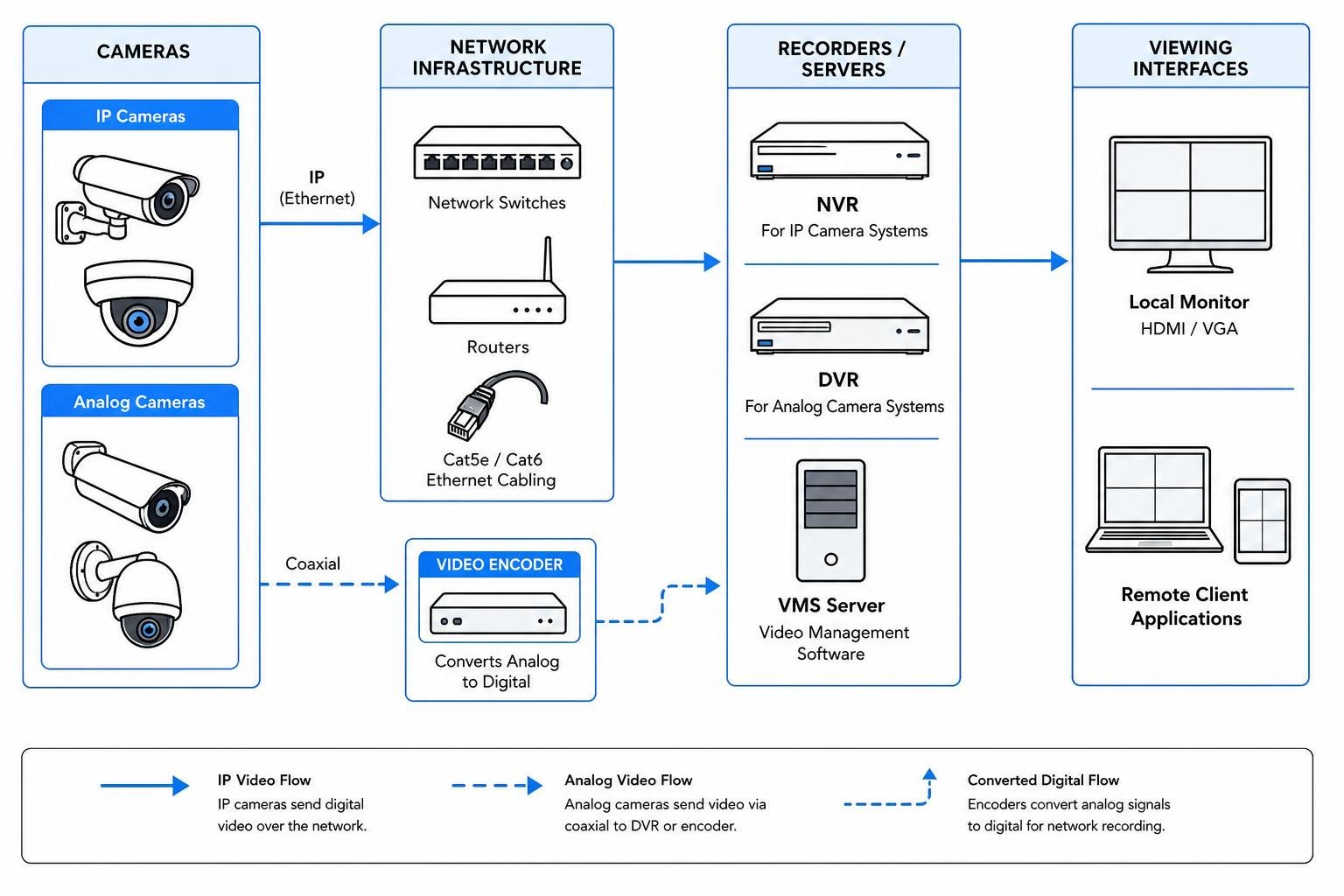
- Recorders and Servers: Captured video feeds flow to a central recording appliance. Analog setups rely on Digital Video Recorders (DVRs), while digital IP cameras stream to Network Video Recorders (NVRs) or dedicated Video Management Software (VMS) servers.
- Network Infrastructure: High-speed network switches, Cat5e or Cat6 ethernet cabling, and specialized routers form the backbone. For legacy systems, video encoders convert traditional analog signals into digital streams so properties can modernize without running entirely new cabling.
- Viewing Interfaces: High-resolution display monitors connected directly via HDMI/VGA or remote client applications allow operators to monitor live camera grids.
Finding the right hardware balance depends heavily on your property’s footprint. For commercial spaces, exploring The Ultimate Guide to Cameras for Business Security can help identify the ideal mix of fixed and motorized form factors for wide entryways and inventory aisles.
Evaluating the Pros and Cons of Active Monitoring
Deploying an active monitoring system brings clear operational benefits, but it also introduces technical overhead that property owners must manage.
| Advantage / Pro | Operational Impact | Potential Drawback / Con | Operational Impact |
|---|---|---|---|
| Visible Deterrence | Prevents opportunistic crime and trespassing | Network Congestion | High-bitrate streams can saturate home or office bandwidth |
| Evidentiary Records | Provides clear footage for insurance and law enforcement | Ongoing Maintenance | Requires regular lens cleaning, updates, and disk health checks |
| Operational Insights | Identifies process bottlenecks and safety violations | Privacy Obligations | Strict legal compliance needed for audio recording and public views |
| Proactive Alerting | Real-time notifications for boundary crossings | Initial Capital Cost | Commercial-grade hardware and cabling require upfront investment |
A well-designed setup provides continuous visibility while minimizing daily maintenance friction through reliable networking and smart automation.
Comparing Security Camera Types and Storage Infrastructure
Choosing how your cameras communicate and store data dictates how reliably the system will perform under tough real-world conditions.
Analog vs IP and Wired PoE vs Wireless Wi-Fi
The choice of transmission media is one of the most critical structural decisions in security planning.
- Analog Systems: Traditional analog setups use coaxial cabling to carry raw analog signals back to a DVR. While cost-effective for retrofitting older buildings with existing wiring, they offer limited resolution and lack advanced edge intelligence.
- Power over Ethernet (PoE) IP Systems: Digital IP cameras connect via standard Ethernet cables. Using standards like IEEE 802.3af/at, a single Cat6 line delivers both direct current electrical power and high-speed data transmission over runs up to 300 feet. This eliminates local electrical outlets at every camera location. For a deeper breakdown of wiring strategies, check out CCTV Systems Installation: Wired and Wireless Setup Made Easy.
- Wireless Wi-Fi Cameras: Wi-Fi units eliminate network cables, making them tempting for quick residential projects. However, running eight or more 4K wireless cameras can quickly congest a home Wi-Fi network. Furthermore, thick construction materials like brick or wire-mesh plaster walls act as natural signal blockers, leading to dropped frames or disconnects. Those planning a residential project can reference DIY Home Security Camera Setup: Help Me Pick the Best System for practical guidance on managing wireless limitations.
Local Storage Recorders vs Cloud VSaaS Platforms
Where and how video is stored affects both long-term subscription costs and footage accessibility during emergencies:
- Local NVR & DVR Appliances: Local systems write streams directly to internal, surveillance-grade 3.5-inch hard drives. These systems operate with zero recurring monthly subscription fees and keep capturing video locally even if the internet goes down. Pre-installed systems typically start with 2TB of storage and easily expand to 6TB or 16TB across multiple SATA and eSATA bays.
- Cloud Video Surveillance as a Service (VSaaS): Pure cloud platforms push video clips over the internet to remote offsite data centers. This ensures footage remains protected even if on-site hardware is damaged or stolen. However, cloud plans usually carry recurring subscription fees (typically $30 to $36 per camera annually) and demand substantial upstream bandwidth to handle continuous multi-stream uploads.
- Hybrid Architecture: The most resilient enterprise models leverage hybrid storage. Critical continuous recordings are saved locally to an NVR, while high-priority AI event clips and thumbnail snapshots are pushed to the cloud for secure off-site access.
Advanced Capabilities and System Integrations
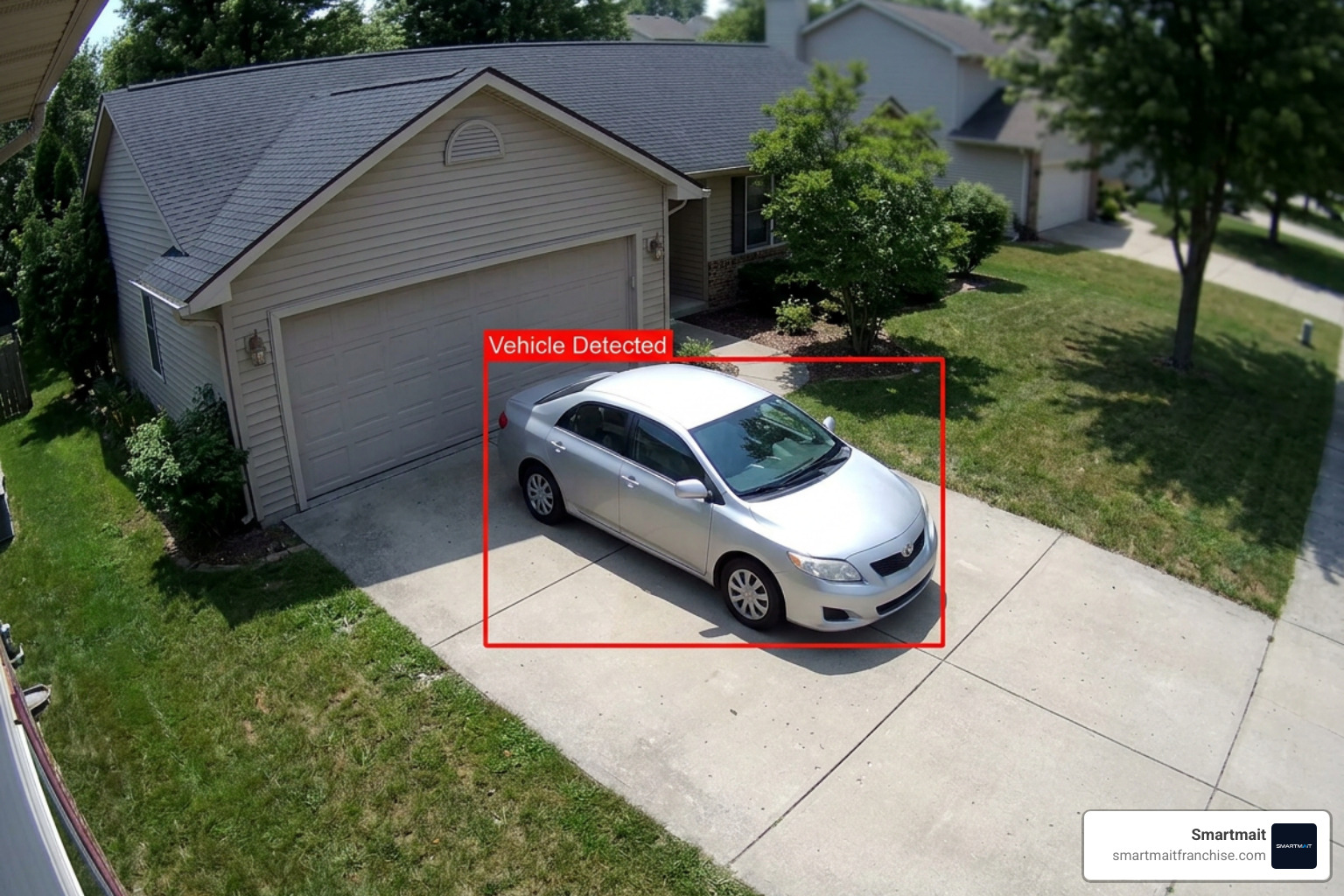
Modern surveillance has evolved far beyond passive video recording. Today’s hardware integrates high-definition optics, on-device intelligence, and automated physical deterrents to proactively handle security events.
Key Features of Modern Video Surveillance
When evaluating hardware, look for features that ensure reliable image clarity in adverse conditions:
- 4K Ultra HD Resolution: Sensors capturing 8MP (3840×2160 pixels) retain clear detail during digital zoom, making it easy to read vehicle plates or identify individuals at a distance.
- Advanced Optical Clarity at Night: Image quality in low light depends on hardware design. Quality systems utilize high-performance infrared arrays (often 18 IR LEDs providing 100 to 150 feet of coverage) or wide f/1.6 apertures for color night recording down to 0.003 Lux. Learn more about night configurations in The Ultimate Guide to Best Night Vision CCTV Cameras.
- Active Deterrence: Modern cameras do not just document intruders; they actively warn them off. Built-in motion-activated LED spotlights, red-and-blue strobe warnings, and localized siren alerts turn passive cameras into proactive tools.
- High-Efficiency Video Coding (H.265 / HEVC): Advanced compression algorithms like H.265 and H.265+ cut file sizes and bandwidth consumption by up to 50% compared to legacy H.264 codecs without sacrificing 4K image sharpness.
Artificial Intelligence and Edge Analytics
Surveillance intelligence has shifted from remote cloud servers directly to edge hardware:
- Dedicated On-Device NPUs: Advanced NVRs and cameras feature onboard neural processing units (such as 6-TOPS 8-core engines). These local processors run deep-learning object classification directly on the device, identifying humans, vehicles, and pets instantly with zero cloud subscription fees or network latency.
- Target Auto-Framing and Tracking: Motorized bullet-PTZ hybrids combine a wide-angle overview lens (such as a 122° fixed field of view) with an independent pan-tilt-zoom module. These units automatically lock onto moving subjects and track them smoothly from distances up to 164 feet away.
- Cross-Camera Tracking: In multi-camera networks, smart tracking handoffs let neighboring cameras coordinate in real time. As an individual moves out of one camera’s view, adjacent cameras automatically pick up the target to maintain an unbroken visual trail.
- Natural Language Video Search: Instead of scrubbing through hours of continuous video, users can run plain-text searches (e.g., “blue delivery truck” or “person in red jacket”) to pinpoint specific security events in seconds.
Unifying Access Control and Intrusion Alarms
Cameras provide maximum value when connected to other physical security systems:
- Visual Alarm Verification: Linking camera feeds to perimeter alarms lets operators visually confirm what triggered a sensor before dispatching emergency services. This eliminates costly false alarm penalties, which are discussed in No More False Alarms: A Beginner’s Guide to Alarm System Set Up.
- Access Control Integration: Pairing video with electronic badge readers, smart locks, or gate access creates an auditable visual log for every credential scan, stopping tailgating and unauthorized access.
- Centralized Security Dashboards: Physical Security Information Management (PSIM) software consolidates surveillance feeds, fire alarms, queue management, and automated gate controls into a unified operational dashboard.
Practical Implementation, Maintenance, and Security Standards
Installing and maintaining a dependable surveillance network requires strict attention to legal frameworks, cybersecurity, and hardware upkeep.
Privacy and Legal Regulations for Video Surveillance
Surveillance installations must balance property security with personal privacy rights:
- Expectation of Privacy: Cameras must never be pointed into areas where people have a reasonable expectation of privacy, such as neighboring backyards, bedroom windows, restrooms, or locker facilities.
- Audio Recording Regulations: While video capture is generally permitted on private property, recording audio is strictly regulated. Many jurisdictions enforce two-party consent laws, making unannounced audio recording illegal. In these areas, audio capture features should be turned off or clearly marked.
- Signage and Compliance: Commercial installations in public spaces should display clear signage informing visitors that video surveillance is active. Enterprise systems must also follow data protection standards (such as GDPR) regarding footage retention, secure handling, and user privacy rights.
- NDAA Compliance: Commercial and enterprise deployments that handle government contracts often require NDAA-compliant hardware, ensuring camera chipsets meet strict national supply-chain security guidelines.
Cybersecurity Best Practices and Network Hardening
Because IP security cameras are networked computing devices, they must be hardened against unauthorized digital access:
- Network Segmentation via VLANs: Isolate security cameras and NVRs on a dedicated Virtual Local Area Network (VLAN). This prevents anyone who accesses an outdoor camera cable from reaching the primary corporate or home data network.
- End-to-End Encryption: Encrypt video data across every leg of its journey—from edge camera capture (RTSP over TLS) to local storage arrays and client viewing streams (HTTPS/AES-256).
- Patch Management: Maintain regular firmware update routines to patch hardware vulnerabilities. Enterprise environments benefit from managed systems that support automated, encrypted over-the-air updates.
To ensure every physical and digital security standard is met during setup, consult the Ultimate Checklist for Security Camera Installation.
Long-Term Maintenance and Total Ownership Costs
A surveillance system requires regular maintenance to stay fully operational throughout its multi-year lifespan:
- Physical and Environmental Protection: Outdoor cameras should carry minimum IP65 or IP67 ratings to withstand harsh weather, dust, and direct water jets across temperatures from -22°F to 140°F. Periodically clean optical glass with microfiber tools and inspect weatherproofing seals.
- Power Redundancy: Always install primary NVRs and central PoE network switches on an Uninterruptible Power Supply (UPS). This prevents data corruption during unexpected brownouts and maintains security coverage during local power outages.
- Managed Services Model: Instead of treating security as a one-time purchase, consider a professional managed service approach. Combining professional installation with ongoing health monitoring, proactive hardware checks, and regular maintenance ensures optimal performance, reliable uptime, and steady total ownership costs.
Frequently Asked Questions About Security Systems
Can a wired surveillance system function during an internet outage?
Yes. A wired PoE NVR or analog DVR system continues to record high-resolution video directly to its local internal hard drives even if the internet connection goes down completely.
While remote phone notifications and offsite live viewing require active internet access, local live monitoring via HDMI/VGA display screens and 24/7 continuous on-site recording will continue without interruption.
How much video storage is required for continuous 4K recording?
Storage requirements depend on frame rate, camera count, and compression codecs. Using modern H.265 compression, a single 4K (8MP) camera recording continuously at 20 frames per second typically consumes between 25GB and 40GB of storage per day.
For an 8-camera 4K system with continuous 24/7 recording, a 2TB hard drive provides roughly 6 to 8 days of retention, while a 16TB expanded drive array can retain over 45 days of continuous footage. If cameras are set to record only AI-detected events, that same storage can last for many months.
What is the primary difference between DVR and NVR recorders?
The fundamental difference lies in how and where video signals are processed.
A DVR (Digital Video Recorder) is used with analog cameras; raw analog video signals travel across coaxial cables to the DVR, where the recorder’s internal components process, encode, and digitize the footage.
An NVR (Network Video Recorder) works with digital IP cameras; the camera itself digitizes, processes, and encodes the video at the lens, transmitting a complete digital stream over an Ethernet cable to the NVR, which simply stores the data and manages network traffic.
Conclusion
Choosing the right surveillance infrastructure requires balancing physical design, storage models, on-device intelligence, and ongoing system maintenance.
Whether you need a streamlined residential setup or a multi-camera commercial network, prioritizing stable Power over Ethernet connections, expandable local NVR storage, smart edge AI analytics, and disciplined cybersecurity practices will ensure your property stays protected around the clock.
If you are ready to implement a reliable surveillance solution tailored to your property, explore Stop Thief: A Complete Guide to Video Surveillance System Installation to take the next confident step in securing your facility.