
Choose Home Security That Covers the Risks That Matter
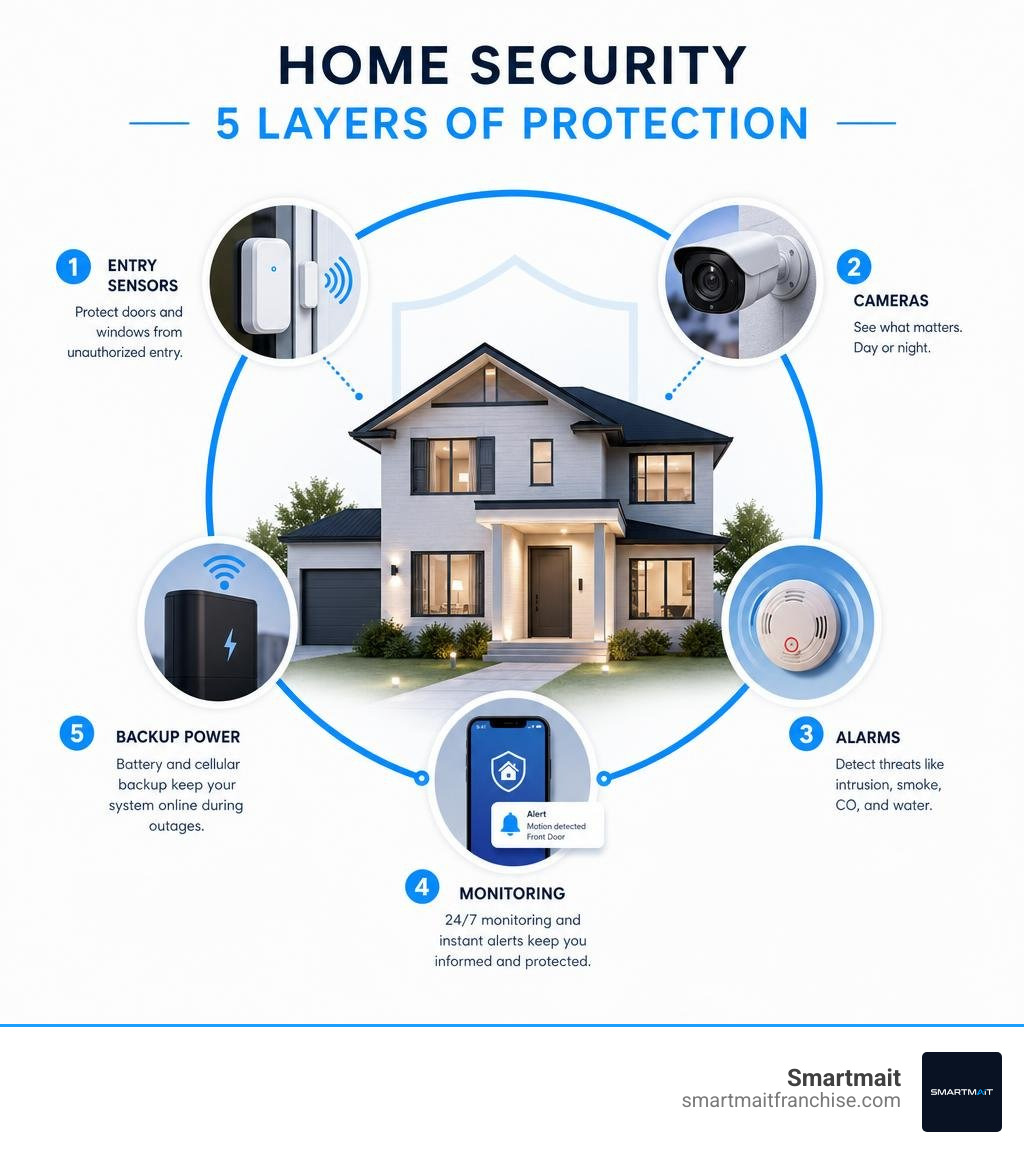
The best home security combines layered protection, reliable alerts, and a plan for outages. Start by securing exterior doors and accessible windows with entry sensors or strong locks. Then add indoor motion detection, cameras at key approaches, smoke and carbon monoxide alarms, and water or freeze sensors where a small problem could become expensive damage.
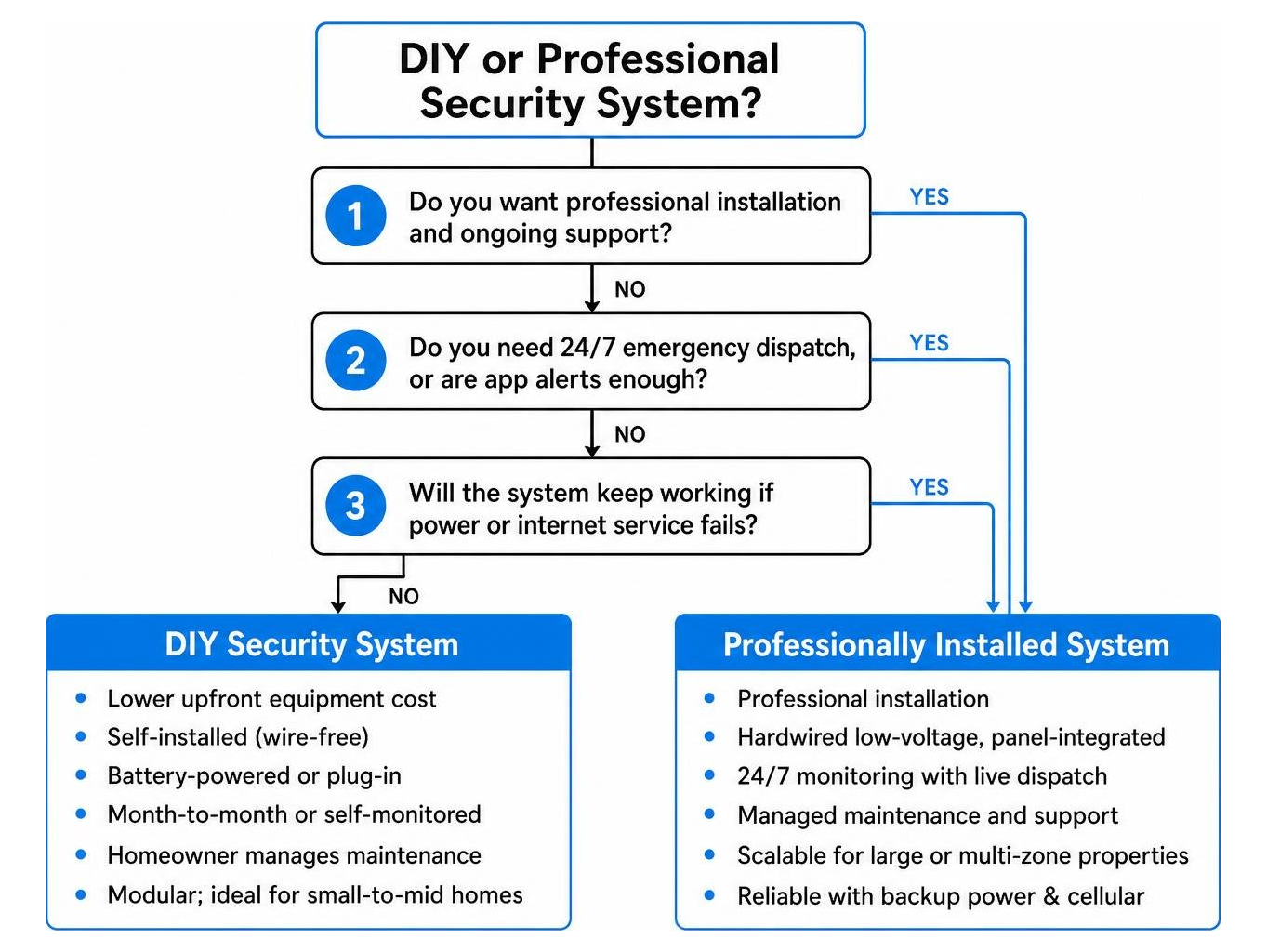
For most homes and small businesses, the right choice comes down to three questions:
- Do you want to install and manage the system yourself, or have a professional do it?
- Do you need 24/7 emergency dispatch, or are app alerts enough for your schedule?
- Will the system keep working if power or internet service fails?
A complete system should not rely on one device or one connection. Cameras can help verify activity, smart locks and lighting can make entry points safer, and cellular plus battery backup can keep critical alerts moving during an outage. Homes without a security system are estimated to be three times more likely to be burglarized, but the goal is not simply to add gadgets. It is to close real weak points without creating a system that is hard to use or maintain.
I am Dominic Hesano, a home and business automation professional focused on security, low-voltage systems, connected devices, and dependable ongoing service. In this guide, I will help you compare home security options and identify the features that fit your property, budget, and day-to-day needs.
Essential home security resources:
DIY vs. Professionally Installed Security Systems
Choosing how to build your property defense comes down to evaluating DIY packages against professionally integrated setups. Both approaches have evolved significantly by August 2026, offering options for renters, expanding households, and large commercial facilities. Understanding how hardware installation, startup costs, and system upkeep differ will help you choose the best setup for your home.
| Feature / Consideration | DIY Security Systems | Professionally Installed Systems |
|---|---|---|
| Upfront Equipment Cost | Lower ($150 – $500 baseline) | Moderate to High ($300 – $1,200+) |
| Installation Labor | Self-installed (peel-and-stick, wire-free) | Professional technicians ($124.99+ baseline fee) |
| Power Infrastructure | Battery-powered, solar, plug-in adapters | Hardwired low-voltage, panel-integrated |
| Contract Requirements | Month-to-month or self-monitored | Flexible, though some require multi-year agreements |
| Ongoing Maintenance | Homeowner manages sensor batteries and firmware | Managed support, scheduled device checks, tuning |
| Scalability & Coverage | Modular; ideal for apartments and small-to-mid homes | Extensive; handles large estates and multi-zone buildings |
When reviewing your property layout, check our guide on how to install a security system to see which deployment method matches your technical comfort level.
Wireless Setup and Equipment Configurations
DIY hardware has reshaped residential protection by eliminating the need to drill holes or run cables through finished drywall. Most DIY starter kits feature lightweight, adhesive-backed entry sensors, standalone wireless keypads, and plug-and-play base hubs that link directly to your home Wi-Fi network.
If you are renting or plan to move soon, these modular components can be removed and relocated in minutes without damaging surfaces. Setting up your cameras and sensors follows a straightforward, step-by-step workflow:
- Mount the central hub in a central location within range of your home router.
- Pair contact sensors and stick them on main exterior doors and ground-level windows.
- Position wide-angle interior motion detectors in primary hallways.
- Set up wire-free cameras using a DIY home security camera setup for high-traffic entry points.
Modern DIY hardware bundles highlight this approach, offering accessible cameras, biometric locks, and solar-powered sensors. Similarly, modular starter kits let homeowners unbox, pair, and activate an entire wireless safety perimeter in under an hour.
Hardwired Reliability and Professional Integration
While wire-free kits offer quick setup, hardwired architectures provide long-term stability for larger residences and complex layouts. Hardwired panels route low-voltage lines behind finished walls directly into dedicated power supplies, eliminating the need to monitor sensor batteries or worry about thick walls interfering with wireless signals.
Choosing a wired and wireless setup gives you the best of both worlds: rock-solid hardwired infrastructure for high-bandwidth exterior surveillance and perimeter doors, paired with wireless sensors for detached garages or interior expansion zones. At Smartmait, we specialize in building these hybrid setups so your property stays consistently protected without regular sensor dropouts.
Key Features to Evaluate in Modern Home Security
Modern security protects against more than just unauthorized entry—it guards your home against unseen environmental hazards like water leaks and freezing temperatures.

Essential Hardware for Comprehensive Home Security
A balanced security network blends exterior perimeter defense with interior detection:
- Magnetic Entry Sensors: Installed on doors and first-floor windows to alert you the instant an opening breaks contact.
- Passive Infrared (PIR) Motion Detectors: High-performance motion sensors provide a 90-degree field of view with up to 35 feet of range. Installing a single motion sensor in the corner of a room with three or more windows often delivers more reliable coverage than putting individual contact sensors on every pane.
- Calibrated Glassbreak Detectors: Tuned to recognize the acoustic frequency of shattering glass, these sensors trigger an alarm before an intruder steps inside.
- Environmental Moisture Sensors: Placed near water heaters, sump pumps, washing machines, and under-sink plumbing to catch leaks before they cause thousands of dollars in water damage.
- Low-Temperature Freeze Sensors: Programmed to trigger alerts if indoor temperatures fall below 41°F (5°C), protecting against frozen and burst pipes in cold snaps or vacant vacation properties.
- High-Decibel Auxiliary Sirens: While a base station often produces a 95dB alarm, adding an extra 105dB auxiliary siren ensures alerts are heard across the property and helps frighten off intruders.
Comprehensive hardware packages integrate these intrusion sensors and hazard detectors into a single managed dashboard, giving you coordinated control over both physical and environmental protection.
Smart Home Integrations and Video Surveillance
Cameras and smart automation turn passive alarm systems into proactive visual deterrents. Adding a video surveillance system installation lets you visually confirm alarms, speak to delivery drivers, and review recorded events right from your smartphone.
Key hardware integrations include:
- Video Doorbells: Keep an eye on package deliveries and visitors with two-way audio and wide-angle lenses.
- Exterior Floodlight Cameras: Equip your property perimeter with color night vision cameras that light up driveways and blind spots the moment movement is detected.
- Smart Door Locks: Replace physical keys with illuminated keypads or biometric palm and fingerprint scanners rated up to BHMA Grade 2 for commercial-grade physical security.
- Coordinated Smart Lighting: Integrate your system with automated home security systems to automatically turn on interior and exterior lights when an alarm triggers, creating the appearance of an occupied home.
Comparing Security Monitoring: 24/7 Dispatch vs. Self-Monitoring
Deciding between professional emergency monitoring and app-based self-monitoring determines how your system handles alerts when an alarm goes off.

Professional Dispatch and Emergency Redundancy
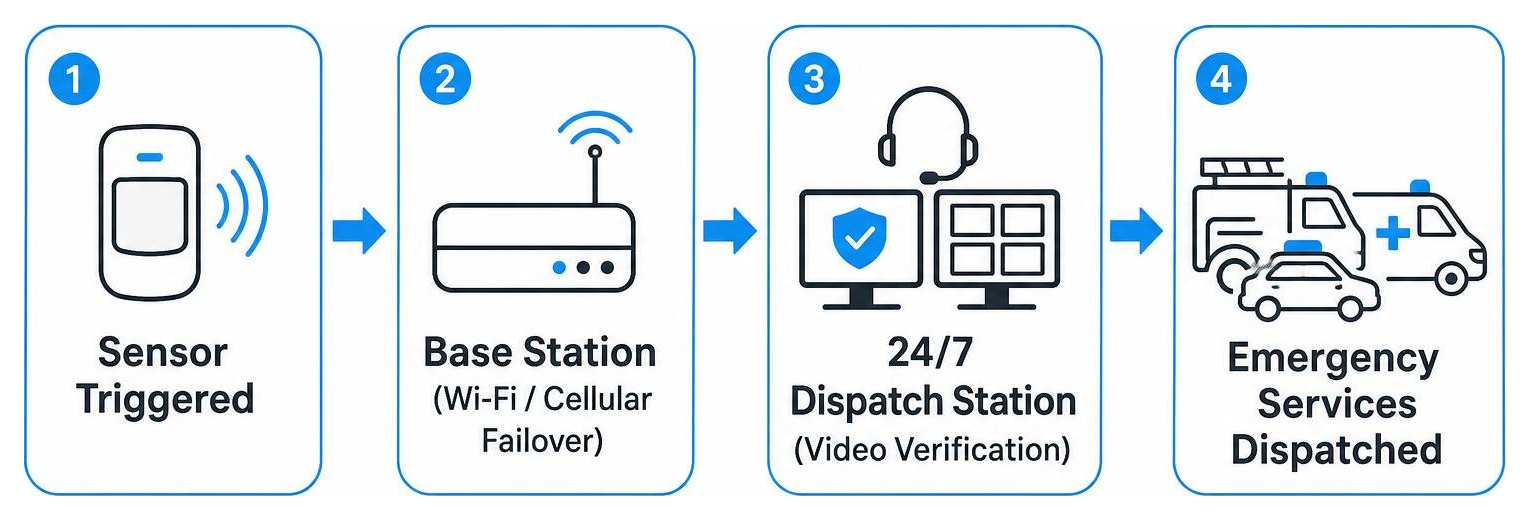
With professional monitoring, your system connects directly to a certified 24/7 central monitoring station. When a sensor triggers, trained dispatchers review incoming signals, check live camera feeds to confirm the emergency, and contact local police, fire, or EMS teams even if you are unreachable.
These monitored ecosystems feature built-in hardware backups to maintain protection during emergencies:
- Cellular Network Failover: If an intruder cuts exterior internet lines or your home broadband goes down, an internal cellular modem immediately routes alarm signals over secure wireless networks.
- 24-Hour Battery Backup: Built-in rechargeable batteries power the base station and internal sirens through extended electrical blackouts.
- Smash-Proof Hub Protection: Systems separate the entry keypad from the primary base hub. If an intruder breaks the wall keypad upon entering, the decentralized base station continues counting down and sends the distress signal to dispatch centers.
To see how monitoring tiers compare across major platforms, read our in-depth look at security system monitoring.
Self-Monitoring and App-Based Alert Management
Self-monitoring puts you in direct control through mobile app alerts, push notifications, and live camera feeds. This option removes recurring monthly monitoring fees, making it popular for budget-conscious homeowners and tech-savvy users.
However, self-monitoring means you are entirely responsible for tracking alerts. If your phone is muted, out of cellular range, or set to “Do Not Disturb” overnight, critical alarm events might go unnoticed. Modern self-monitored cameras help manage this by supporting local MicroSD card recording and motion-tagged cloud clips, giving you clear video documentation without locking you into expensive long-term contracts.
Preventing False Alarms and Addressing Vulnerabilities
False alarms waste local emergency resources and can lead to costly municipal fines. Modern security hardware uses smarter sensor designs and secure communication protocols to stop false triggers while eliminating system vulnerabilities.
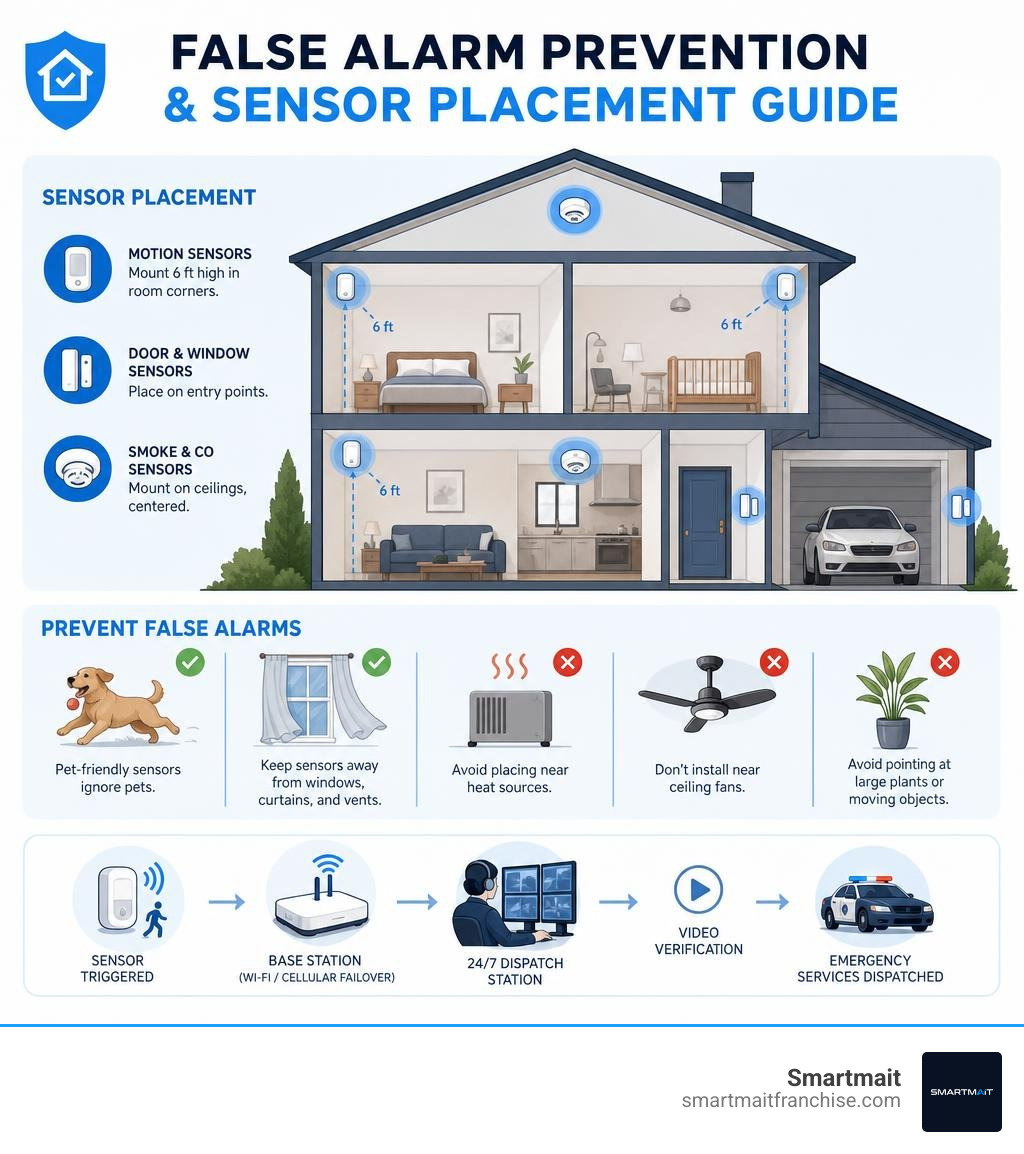
Pet-Friendly Sensors and Motion Calibration
Early motion sensors were notorious for triggering alarms whenever a dog or cat walked across the living room. Modern passive infrared (PIR) detectors prevent these false alarms using intelligent heat signature calibration and targeted physical placement:
- Mounting Height: Mount motion sensors exactly 6 feet above floor level in room corners.
- Field of View: Corner placement maximizes the sensor’s 90-degree viewing angle and 35-foot range while keeping floor-level pet activity below the primary detection beam.
- Thermal Distinction: Built-in algorithms identify the body mass and heat signature of humans while ignoring animals weighing under 40 to 50 pounds.
For more helpful installation practices, check our guide on no more false alarms guide.
Minimizing Vulnerabilities in Home Security Systems
Burglars often look for weak points like exposed wiring, unencrypted Wi-Fi cameras, and accessible keypads. Today’s systems use multiple layers of protection to secure both the physical hardware and the wireless data stream:
- Signal Encryption: End-to-end signal encryption prevents bad actors from intercepting sensor communications or jamming wireless frequencies.
- Acoustic Alarm Listeners: Instead of replacing hardwired smoke and carbon monoxide detectors, acoustic alarm listeners sit near existing units. When an interconnected smoke alarm sounds, the listener recognizes the specific frequency and relays the fire alert through your central security network.
- Decoupled Keypads: Keeping the primary base station hidden away from the front entryway ensures it cannot be smashed or disabled during the initial entry countdown delay.
Frequently Asked Questions about Home Security
Where is the best location to mount indoor motion sensors?
Mount motion detectors in room corners at an elevation of 6 feet above the floor. This corner vantage point provides an unobstructed 90-degree field of view and up to 35 feet of detection coverage. Placing sensors in high-traffic transition zones—such as central hallways, stairwells, and living rooms with multiple windows—allows a single sensor to protect several access points effectively.
How do security systems stay online during power and internet outages?
Leading security systems use a combination of rechargeable backup batteries and dual-path communication hardware. If your home’s main power fails, an internal backup battery keeps the central base station, internal sensors, and sirens running for up to 24 hours. If your home internet or Wi-Fi drops, the system automatically switches to a built-in cellular backup channel to deliver distress signals to emergency monitoring centers.
What is the typical cost range for a full home security setup?
Starter DIY equipment packages generally range from $150 to $350, while comprehensive whole-home bundles with multi-zone environmental sensors and exterior cameras range between $400 and $700. If you choose professional installation, labor typically starts around $124.99. Ongoing 24/7 professional monitoring runs between $15 and $30 per month on flexible, month-to-month plans, while self-monitored camera systems often carry no required monthly fees.
Conclusion
A truly reliable security system does far more than sound an alarm when a door opens—it provides clear, connected protection across your entire property. By combining entry sensors, pet-friendly motion detection, smart cameras, and hazard monitors with battery and cellular backups, you build a resilient safety network that keeps working through severe storms, power blackouts, and network disruptions.
Whether you install modular wireless hardware yourself or hire a professional to wire and integrate a custom setup, the key is keeping your system maintained, updated, and simple for the whole family to use.
If you are passionate about connected technology and want to bring reliable installation and ongoing maintenance services to property owners in your community, explore our Smartmait smart home franchise opportunities to learn how we build smarter, safer spaces nationwide.