
Build a Smart Home Connectivity Solution That Stays Reliable
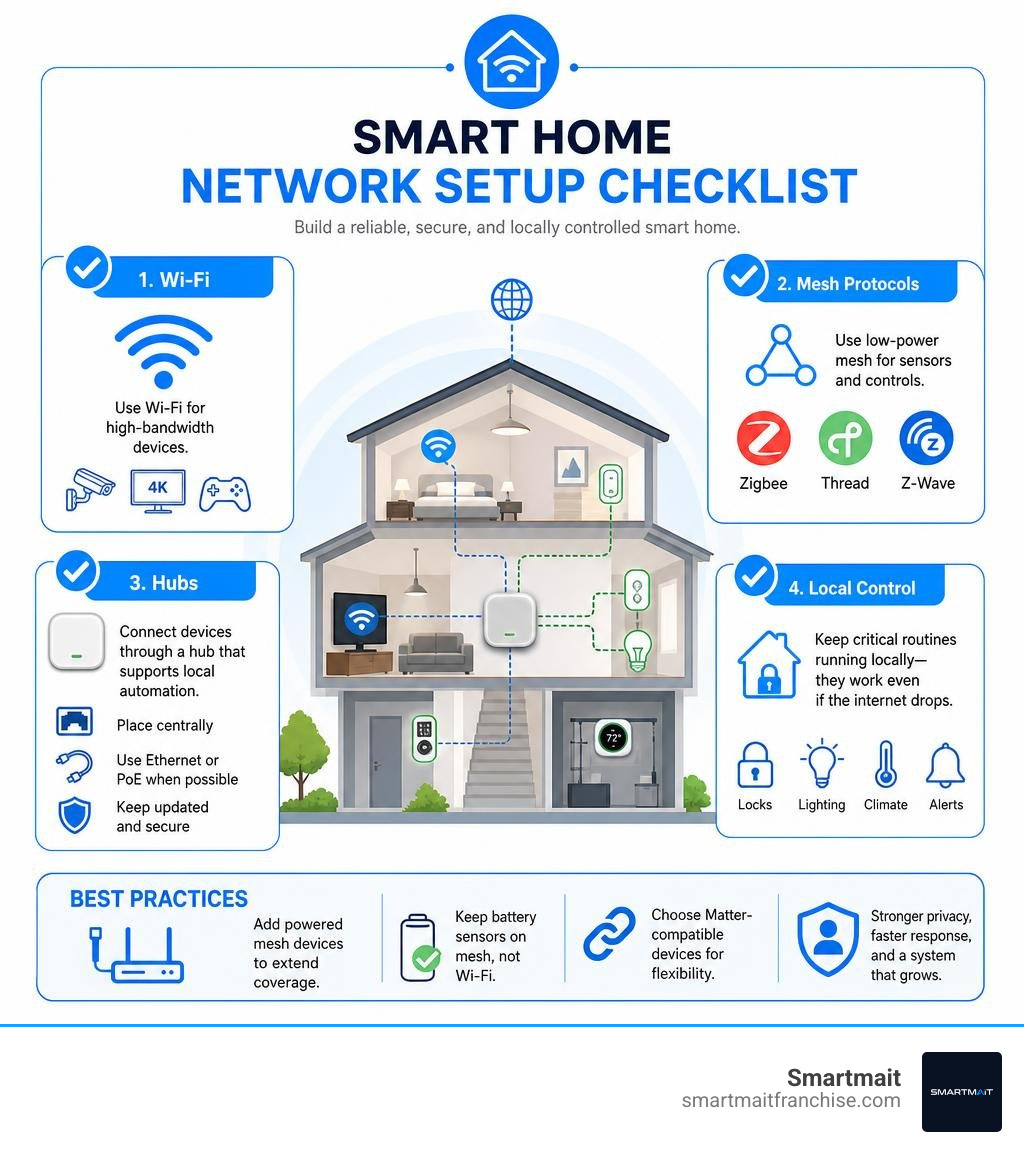
A reliable smart home connectivity solution starts with the right network foundation, not more apps or gadgets. Use Wi-Fi for high-bandwidth devices such as cameras, use low-power mesh networks like Zigbee, Thread, or Z-Wave for sensors and controls, and connect them through a hub that supports local automation.
To improve a wireless smart home network:
- Place the hub centrally and use Ethernet or Power over Ethernet when possible.
- Keep battery sensors on Zigbee, Thread, or Z-Wave instead of crowded Wi-Fi.
- Add powered mesh devices, such as smart plugs or wired switches, to extend coverage.
- Choose Matter-compatible devices when you want flexibility across Apple Home, Google Home, Alexa, and SmartThings.
- Keep critical routines, such as locks, lighting, climate, and alerts, running locally so they still work if the internet drops.
The goal is simple: fewer disconnected devices, faster responses, stronger privacy, and a system that can grow without becoming expensive to maintain. This guide explains the protocols, hubs, security choices, and setup practices that make that possible.
I am Dominic Hesano, a franchise development professional and business operator building SmartMait around professionally designed, installed, and supported smart technology. My experience with connected home and business systems, including networking, security, lighting, access control, and automation, informs this practical approach to choosing a smart home connectivity solution.
Quick look at smart home connectivity solution:
Core Wireless Protocols and Wireless Mesh Architecture
Every connected device relies on a medium to transmit its data. In modern properties, throwing fifty smart devices straight onto a generic home router brings sluggish responses, dropped signals, and frequent battery drains. We look at smart networks as a balanced architecture where distinct protocols handle specific roles.
Understanding the fundamentals of home automation basics helps us segment high-bandwidth media devices from low-power operational sensors. While video streams require high data throughput, contact sensors and smart radiator valves only transmit tiny packets intermittently.
| Protocol | Primary Frequency | Network Topology | Typical Range | Power Consumption | Best Use Case |
|---|---|---|---|---|---|
| Zigbee 3.0 | 2.4 GHz | Self-healing Mesh | 30–100 ft (indoor) | Ultra-Low (2+ yr battery) | Low-cost sensors, switches, bulbs |
| Thread | 2.4 GHz (IPv6) | Self-healing Mesh | 30–100 ft (indoor) | Ultra-Low (2+ yr battery) | Matter-native sensors, locks, shades |
| Z-Wave 800 | 908/916 MHz (Sub-GHz) | Mesh | Up to 1.5 miles (Long Range) | Ultra-Low | Security sensors, perimeter locks |
| Wi-Fi 6 (802.11ax) | 2.4 GHz / 5 GHz | Star (Mesh AP backhaul) | 150+ ft | Medium to High | Video doorbells, indoor/outdoor cameras |
| Bluetooth LE 5.4 | 2.4 GHz | Point-to-Point / Mesh | 30–50 ft | Low | Initial device pairing, BLE tracking proxies |
Thread and Zigbee 3.0 Mesh Performance
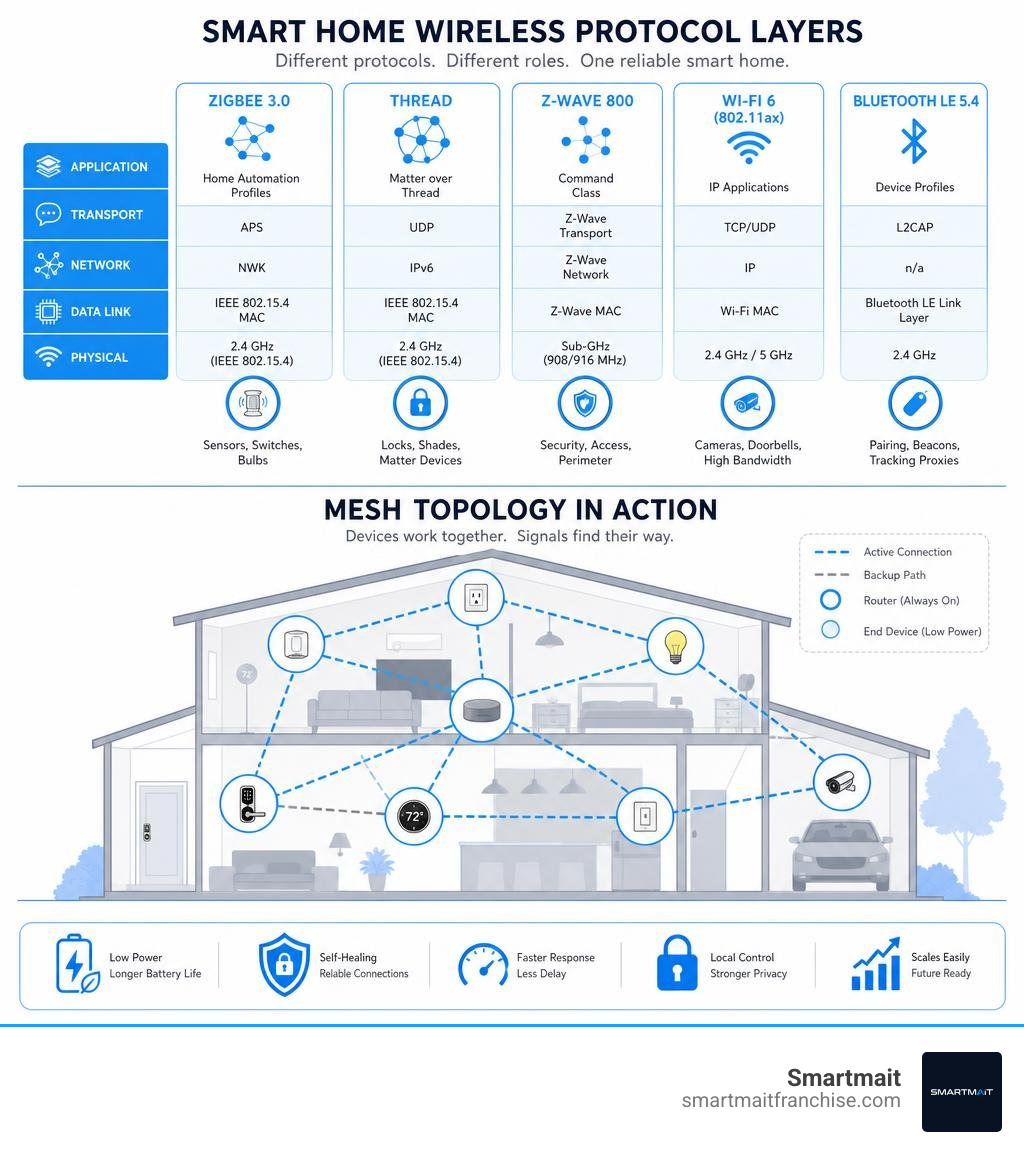
Both Thread and Zigbee 3.0 operate over the IEEE 802.15.4 physical radio layer at 2.4 GHz, yet their internal communication models differ significantly. Zigbee forms a coordinator-centric tree and mesh structure. In a Zigbee cluster, line-powered devices (like hardwired in-wall relays or smart outlets) function as routers, repeating packets across the house back to the central coordinator.
Thread evolves this concept by running Internet Protocol version 6 (IPv6) straight to every end node. Because Thread devices speak IP natively, they eliminate proprietary application translation layers. If a Thread router drops offline, the mesh re-routes packets instantly without stalling the network. Modern microcontrollers like the Silicon Labs EFR32MG26 SoC pack up to 3 MB of Flash memory and 512 kB of RAM, providing the processing power and memory headroom necessary to run responsive, secure Thread and Zigbee stacks while keeping battery draw negligible.
Z-Wave, Wi-Fi 6, and Bluetooth LE 5.4 in Modern Networks
Operating outside the crowded 2.4 GHz band, Z-Wave uses sub-GHz frequencies (typically 908.42 MHz or 916 MHz in North America). This gives Z-Wave superior penetration through dense building materials like brick, masonry, and concrete. Silicon Labs EFR32ZG28 SoCs introduce Z-Wave Long Range (LR), achieving direct line-of-sight wireless transmission spans up to 1.5 miles. This makes it a preferred option for remote entry gates, detached workshops, and large estate perimeters.
Meanwhile, Wi-Fi remains essential for throughput-heavy hardware. Modern Wi-Fi 6 (802.11ax) introduces Target Wake Time (TWT), which lets battery-operated cameras and high-bandwidth components negotiate sleep cycles to cut power draw. To prevent bandwidth congestion from streaming devices and high-definition video feeds, implementing a proper smart home WiFi setup ensures traffic flows efficiently across dedicated frequency bands.
Finally, Bluetooth Low Energy (BLE) 5.4 serves as the primary commissioning protocol. When adding new Matter devices, your mobile phone pairs via BLE to share credentials, after which the hardware switches its ongoing data traffic over to Thread or Wi-Fi.
The Role of Matter and Unified Multi-Protocol Hubs
Historically, building a smart home meant dealing with closed vendor ecosystems and proprietary bridges. You needed one bridge for your smart bulbs, another for your automated blinds, and a third for security sensors. Unified hubs and cross-brand standards change that dynamic entirely, consolidating separate wireless radios into coordinated network controllers.
For deeper architectural guidance, exploring our comprehensive smart home integration guide provides an end-to-end perspective on building interoperable setups.
How Matter Bridges Cross-Platform Silos
Matter is an open-source, IP-based connectivity specification supported by Apple, Google, Amazon, and Samsung SmartThings. Instead of locking accessories to an individual vendor cloud, Matter standardizes the application layer across Wi-Fi, Ethernet, and Thread networks.
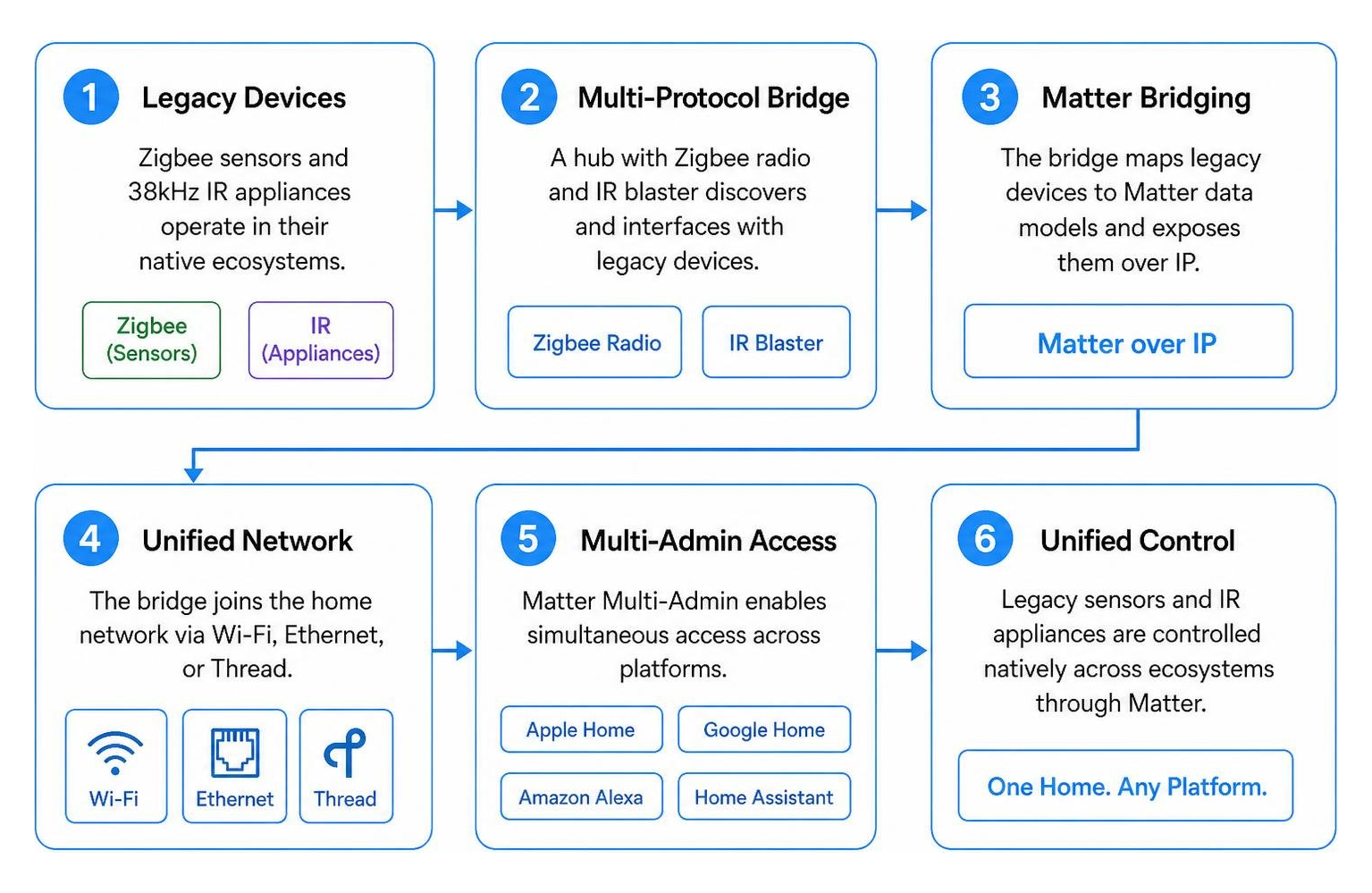
Matter also introduces bridging capabilities. Modern multi-protocol bridges, such as the Aqara Hub M200, map legacy Zigbee child devices and 38kHz infrared appliances directly into standardized Matter data profiles. Through this bridging mechanism, a legacy Zigbee contact sensor or an IR-controlled air conditioner exposes native controls to Apple Home, Google Home, Amazon Alexa, and Home Assistant simultaneously via Matter’s Multi-Admin feature.
Evaluating Multi-Protocol Hubs for Your Smart Home Connectivity Solution
Selecting the right hub involves assessing radio support, computing resources, power reliability, and edge processing capabilities.
- Thread Border Routers & Edge Controllers: The Matter-enabled controllers like the Aqara Hub M3 manage up to 127 Thread and Zigbee child nodes. Equipped with 8 GB of encrypted eMMC local storage and Power over Ethernet (PoE) input, these hubs run edge automations locally without sending control loops to third-party cloud servers.
- Dedicated Open Home Coordinators: For open-source platforms, hardware like the Home Assistant Connect ZBT-2 adapter upgrades coordinator throughput with a 460800 baud rate (a 4x increase over older 115200 hardware). Powered by the Silicon Labs MG24 SoC and an ESP32-S3 bridge, it offers dedicated antenna reception for dense Zigbee or Thread mesh installations.
- Enterprise Multi-Radio Gateways: Advanced installations benefit from quad-radio platforms like the multi-radio gateways like the SLZB-Ultima. These appliances feature dual independent SoCs (Texas Instruments CC26XX and Silicon Labs EFR32MG), PoE connectivity, onboard WireGuard VPN, and optional 4G/LTE failover for installations that require uninterrupted local autonomy.
Overcoming RF Interference and Setup Challenges
Deploying dozens of wireless devices in a compact footprint can lead to radio frequency (RF) overlap. Because Zigbee, Thread, Bluetooth, and standard 2.4 GHz Wi-Fi share the same 2.4 GHz ISM frequency band, poorly planned channel layouts lead to delayed automations and dropped sensor messages.
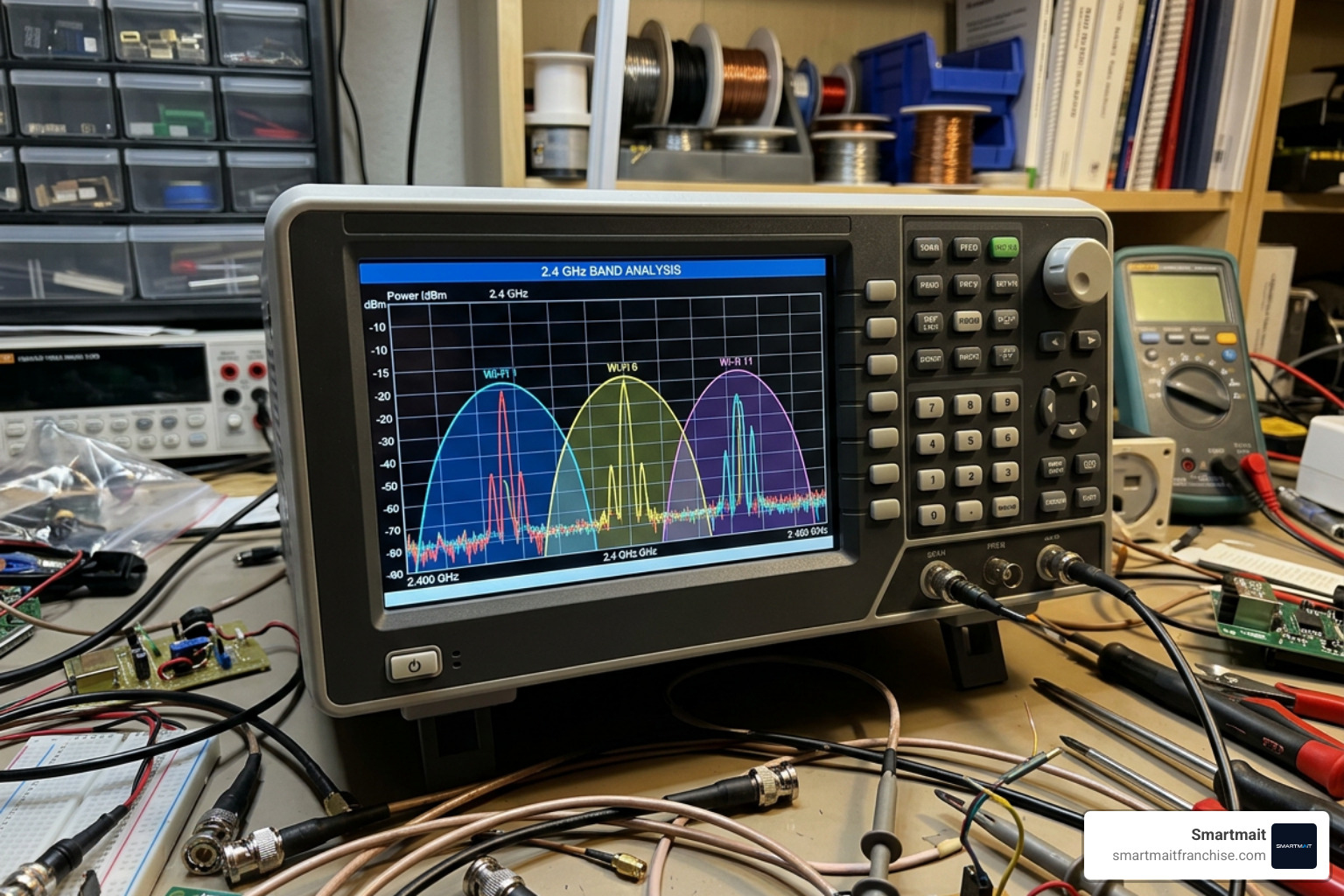
When devices become unresponsive, learning how to troubleshoot smart home issues systematically helps pinpoint whether problems stem from radio interference or network routing failures.
Managing 2.4 GHz Congestion and Bandwidth Limits
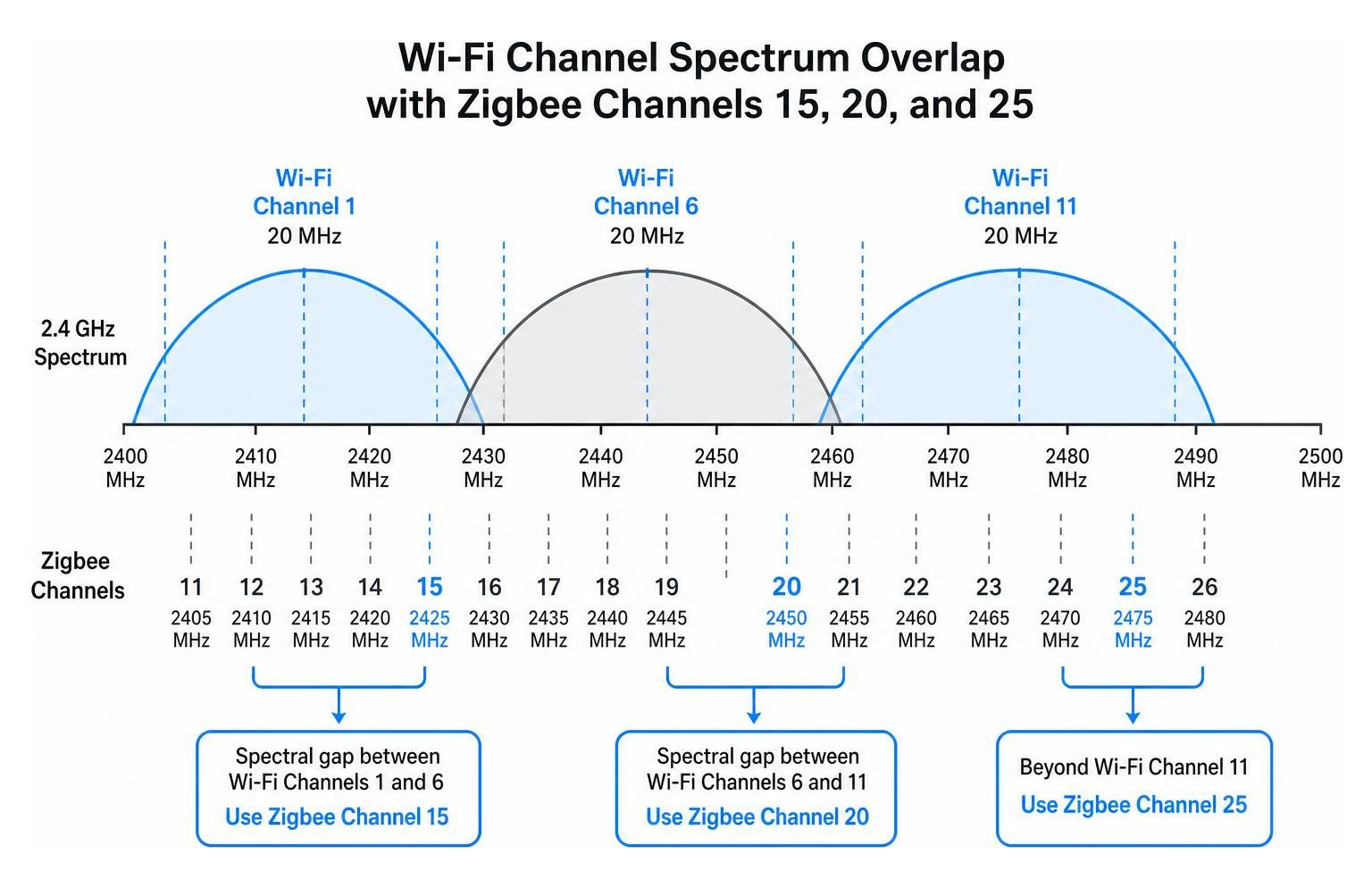
Wi-Fi channels 1, 6, and 11 each consume roughly 20 to 22 MHz of bandwidth within the 2.4 GHz spectrum. Conversely, Zigbee and Thread channels are narrower, spaced 5 MHz apart (channels 11 through 26).
To maintain clean signals:
- Set your 2.4 GHz Wi-Fi router to fixed non-overlapping channels (1, 6, or 11) with a 20 MHz channel width.
- Align your Zigbee or Thread mesh to channels that fall in the spectral gaps. For example, if your Wi-Fi uses channels 1 and 6, deploy your Zigbee coordinator on channel 25, which avoids the sideband splatter of lower Wi-Fi frequencies.
- Keep primary hub coordinators at least three feet away from your main Wi-Fi access points to prevent local receiver desensitization.
Migrating Legacy Coordinators and Minimizing Latency
When scaling up an existing network, running simultaneous multiprotocol firmware (MultiPAN)—where a single radio switches between Zigbee and Thread on the same chip—frequently introduces packet loss and dropped pairing states under load. Separating tasks across dedicated radios produces noticeably better stability.
For reliable migration and minimal latency:
- Dedicated Radios: Use separate physical coordinators for Zigbee 3.0 and Thread rather than a shared MultiPAN chip.
- Repeaters First: In any mesh network, install mains-powered repeaters (smart outlets, in-wall light switches) before pairing distant battery-powered sensors. This ensures low-power end devices discover strong routing paths during initial configuration.
- Wired Backhauls: Connect central hubs via RJ-45 Ethernet or PoE rather than Wi-Fi backhauls, eliminating wireless latency between your hubs and automation servers.
Designing an Enterprise-Grade Smart Home Connectivity Solution for Modern Spaces
Enterprise-level smart installations—such as high-density residential buildings, boutique hotels, and modern offices—demand higher privacy, local data storage, and resilient failover safeguards.
If tech starts malfunctioning unexpectedly, knowing where to turn for finding reliable smart home help keeps commercial and residential hardware operational over years of continuous use.
Selecting an Open-Source vs Proprietary Smart Home Connectivity Solution
The core architecture of your system determines how much control, privacy, and flexibility you maintain over time:
- Open-Source Local Platforms (e.g., Home Assistant): Over 2 million households trust Home Assistant, which was the top open-source project by contributors in 2025. Supporting more than 1,000 brands and 1,500 integrations, it processes all sensor data, media storage, and automation logic entirely within the local area network. This guarantees privacy and zero subscription fees, though it requires intentional hardware configuration.
- Proprietary Managed Platforms: Commercial turn-key systems offer pre-packaged hardware with built-in cellular backup. However, they rely on recurring cloud subscriptions, vendor-locked peripherals, and limited third-party device integrations.
Silicon-level security also plays a crucial role in preventing unauthorized access. Modern hardware integrating Secure Vault technology and Physically Unclonable Functions (PUF) meets PSA Certified Level 3 standards. This ensures device cryptographic keys remain shielded from physical tampering and remote network intrusion.
Scaling Mesh Networks for Multi-Dwelling Units and Commercial Sites
Large installations require structured network distribution. For example, enterprise deployments have scaled across 500+ luxury apartments in Saudi Arabia managing over 10,000 connected devices, and 110 health-care residential units in Japan utilizing 1,400+ sensors for occupant wellness tracking. Commercial venues, like the East Lancashire Cricket & Sports Club, successfully integrated 300+ connected devices to consolidate facility lighting, security, and climate management under unified local controls.
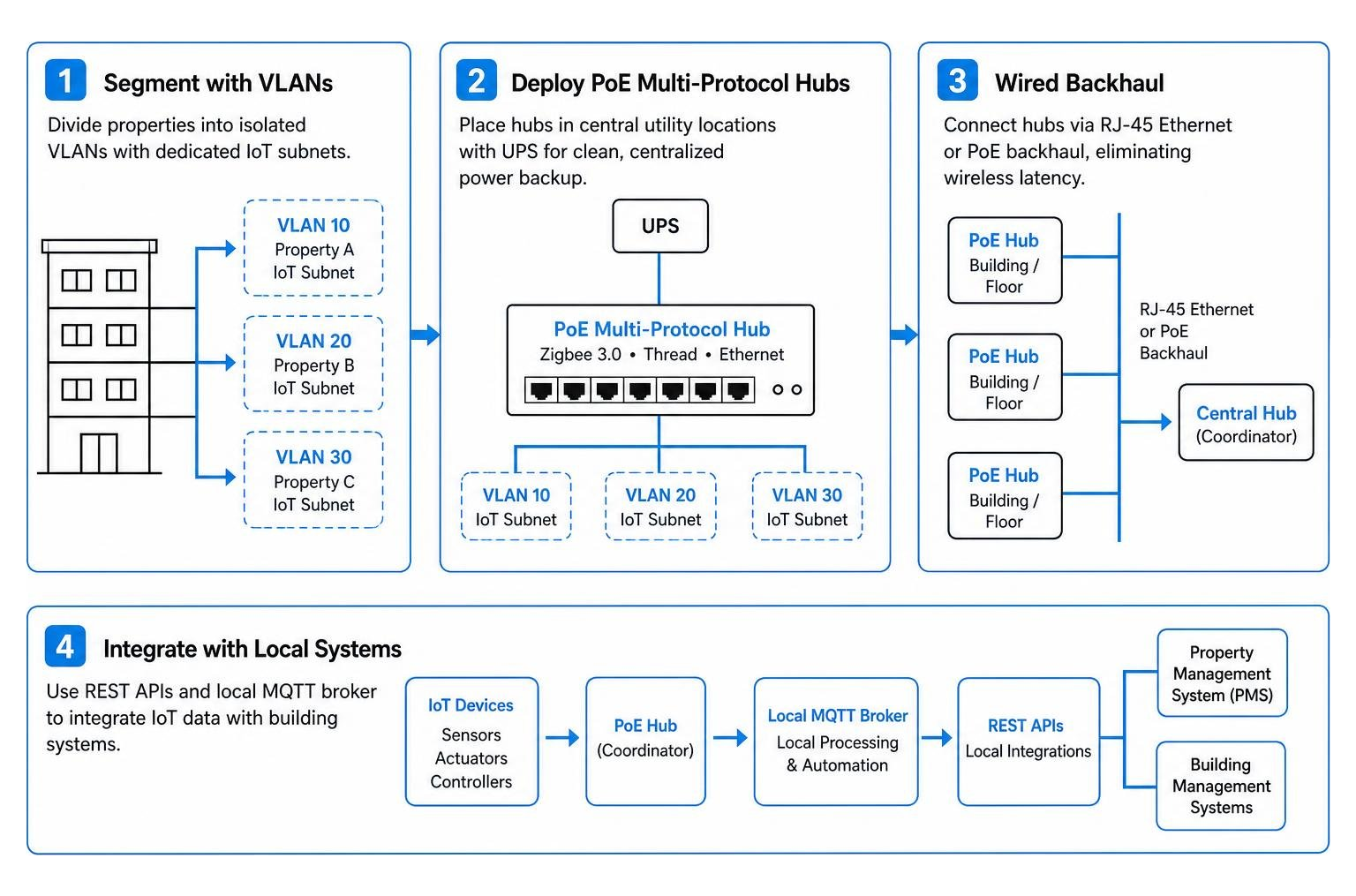
When scaling across multi-room buildings:
- Divide properties into isolated Virtual Local Area Networks (VLANs) with dedicated IoT subnets.
- Deploy Power over Ethernet (PoE) multi-protocol hubs in central utility locations for clean, centralized power backup via uninterruptible power supplies (UPS).
- Utilize REST APIs and local MQTT brokers to integrate smart building environmental sensors directly into property management systems (PMS) and building management frameworks.
Frequently Asked Questions About Smart Home Networks
What is the most reliable wireless protocol for smart home devices?
For low-power sensors, smart locks, and lighting, Thread and Zigbee 3.0 provide the highest operational reliability. Because they form self-healing mesh networks, every line-powered device acts as a signal repeater. If one node fails, data automatically routes through neighboring devices without disrupting the network. For outdoor perimeters and long distances, Z-Wave Long Range offers dependable sub-GHz performance without 2.4 GHz Wi-Fi interference.
Can smart home automations run locally without active internet access?
Yes. When your network uses edge controllers or local automation platforms, all condition-checking (WHEN-IF-THEN routines) executes directly on the local hub processor. Devices continue to trigger lighting, climate routines, and local alarm sirens even if your external internet connection drops completely. Only remote notifications and cloud voice assistant integrations require active outside internet service.
How does a Thread Border Router differ from a standard smart hub?
A traditional hub translates proprietary protocols into application data through a translation bridge. In contrast, a Thread Border Router acts as a network-level bridge, passing standard IPv6 data packets back and forth between low-power 802.15.4 Thread mesh devices and your home’s main Wi-Fi or Ethernet network. This allows your smartphone or smart display to communicate directly with Thread end devices without needing brand-specific cloud intermediaries.
Conclusion
Building a responsive, reliable smart home is not about chasing the newest gadgets. It comes down to designing a clean wireless foundation: offloading sensors to self-healing mesh protocols like Thread and Zigbee, using Wi-Fi 6 where throughput matters, bridging systems locally via Matter, and shielding your setup from 2.4 GHz radio congestion.
Smart systems should make life effortless rather than adding technical headaches. At Smartmait, we specialize in delivering professional, turnkey smart-home and smart-building infrastructure. We combine precision hardware setup with proactive ongoing support so your network stays secure, updated, and dependable year after year.
Explore how Smartmait professional smart home installation and ongoing maintenance services can elevate your residential or commercial property with a rock-solid, future-proof automation foundation.