

Home Automation Is Changing How We Live — Here’s What You Need to Know
Home automation lets you control your lights, locks, thermostat, cameras, and appliances automatically — from your phone, your voice, or preset schedules.
Quick answer:
| What it is | A system that connects your home devices so they work together automatically |
|---|---|
| How it works | Sensors detect conditions, a hub processes them, and devices respond |
| Who it’s for | Homeowners and businesses who want convenience, security, and energy savings |
| Where to start | Choose an ecosystem (like Google Home or Home Assistant), then add devices one by one |
| Biggest benefit | Control everything from one app — or have it all happen without touching anything |
The numbers tell the story. As of 2026, around 576 million households worldwide are using smart home technologies. In the US alone, that number sits at 84.9 million households. And the market is still growing fast — from $64 billion in 2022 to a projected $163 billion by 2028.
But here’s the thing: more people are buying smart devices than ever before, yet many end up frustrated. Systems don’t talk to each other. Apps multiply. And when something breaks, there’s no one to call.
This guide cuts through the confusion. Whether you’re just getting started or trying to fix a system that isn’t working the way it should, you’ll find clear, practical answers here.
I’m Dominic Hesano, a franchise development professional building SmartMait — a home and business home automation service franchise designed to bring professional installation, reliable support, and long-term system management to customers who are done dealing with unreliable tech and inconsistent installers. My background in franchising, operations, and local service businesses gives me a ground-level view of what actually works when automating homes and commercial spaces at scale.
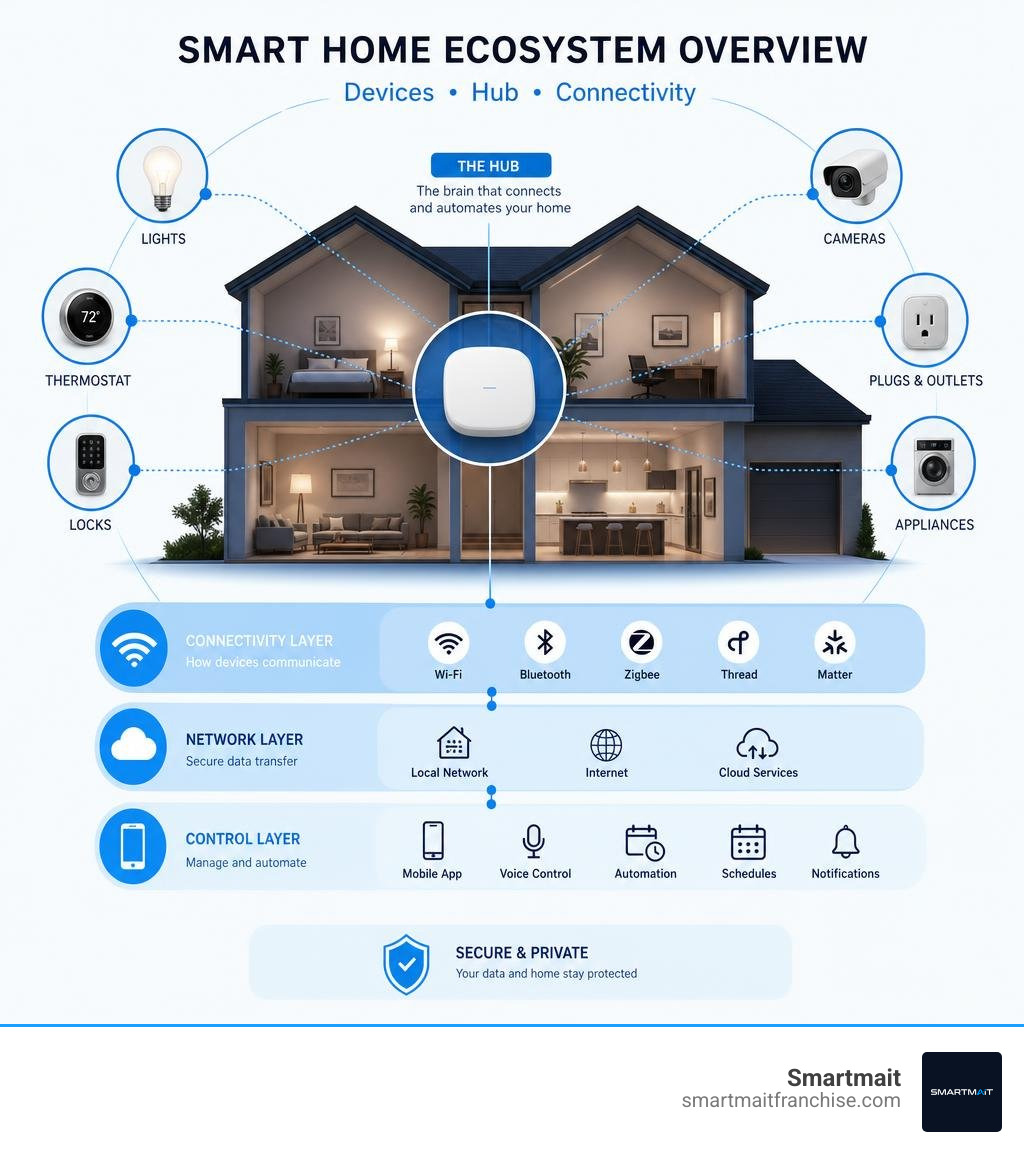
Home automation word guide:
What is Home Automation and How Does It Work?
At its core, home automation (often referred to historically as “domotics,” combining the Latin word for home, domus, with robotics) is the practice of automating household tasks through electronic and wireless means.
While the concept feels incredibly modern, the foundations of home automation were laid decades ago. The very first general-purpose home automation network technology, known as X10, was developed way back in 1975. X10 allowed compatible devices to talk to each other over existing home electrical wiring. Today, we have moved far beyond those early power-line signals to advanced Internet of Things (IoT) devices that communicate wirelessly through radio frequencies, Wi-Fi, and mesh networks.

To understand how home automation works, we have to look at how devices communicate using three main elements:
- Schedules: Actions triggered strictly by time. For example, your outdoor porch lights turning on at exactly 5:30 p.m. every weekday evening.
- Rules (or Triggers): Conditional “if-this-then-that” scenarios. For example, if a motion sensor detects movement in the hallway between midnight and 5:00 a.m., then turn on the bathroom light at 10% brightness.
- Scenes: Grouped device settings that activate simultaneously to create an atmosphere. A “Movie Night” scene might dim the living room lights to 5%, turn off the kitchen lights, and turn on your media center with a single tap or voice command.
With over 84.9 million US households actively managing connected devices in 2026, understanding this underlying framework is the key to moving past basic remote control and into true automation. If you are a DIY enthusiast looking to build custom controllers from scratch to bypass proprietary apps, check out our guide on DIY NodeMCU Home Automation: Stop Clapping, Start Coding to see how microcontrollers can be programmed directly.
Smart Home vs. Home Automation
While people often use the terms “smart home” and “home automation” interchangeably, we like to make a clear distinction between the two.
A smart home generally refers to a house equipped with devices that require internet access and cloud connectivity to function. In a typical smart home, when you tap a button on your phone to turn on a light, that signal travels from your phone, up to an internet cloud server, and back down to your light bulb.
Home automation, on the other hand, is a broader and more robust concept. It includes any system of wirelessly controlled devices that can monitor device states, communicate locally, and execute complex logic without needing a constant connection to the internet.
The industry has evolved rapidly to bridge these two worlds. According to ABI Research, by 2012, only 1.5 million home automation systems were installed in the United States. However, as internet-enabled smart tech exploded, research firm Statista noted that more than 45 million smart home devices were installed in U.S. homes by the end of 2018. From 2018 to 2023, the number of U.S. homes equipped with smart devices grew at a staggering 10.2% per year, reaching 63.43 million by 2023, and eventually scaling to the massive numbers we see today in 2026.
The Core Components: Sensors, Controllers, and Actuators
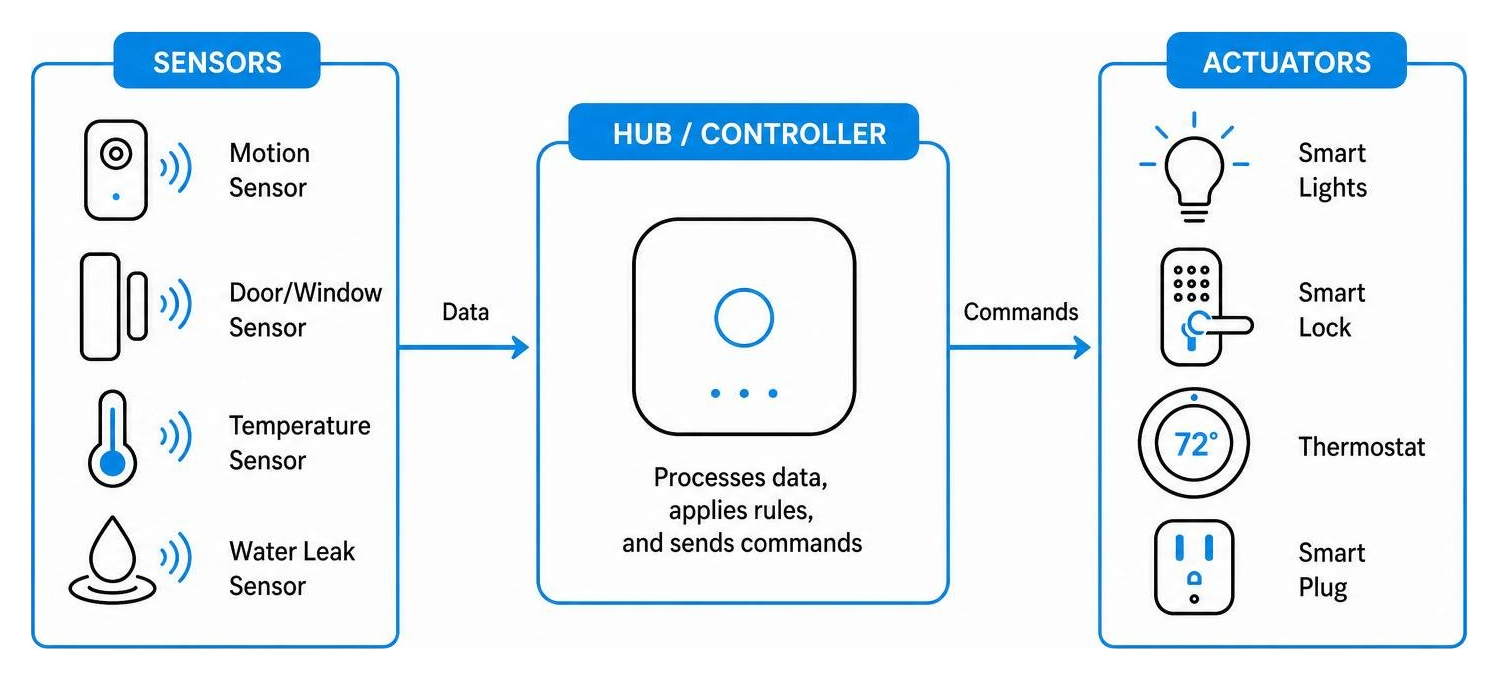
To make magic happen in an automated home, three components must work in perfect harmony:
- Sensors (The Eyes and Ears): These are the transmitters. They monitor environmental conditions like temperature, humidity, light levels, motion, or whether a door is open or closed.
- Controllers (The Brain): This is your central hub, smart speaker, or software platform. It receives data from the sensors, processes it against your pre-programmed rules, and decides what action to take.
- Actuators (The Hands): These are the receivers that execute the physical action. Smart plugs, smart switches, motorized valves, and light bulbs are all actuators.
When you use voice control to say, “Turn off the kitchen light,” your smart speaker (the controller) translates your voice, sends a wireless command, and the smart switch (the actuator) cuts power to the bulb.
Choosing Your Smart Home Ecosystem and Hub
One of the biggest roadblocks to a seamless smart home is platform fragmentation—where devices from different manufacturers refuse to talk to one another. Choosing the right ecosystem is the most critical first step.
| Ecosystem / Platform | Primary Connection Types | Internet Required? | Best For |
|---|---|---|---|
| Apple Home / HomeKit | Wi-Fi, Bluetooth, Thread | No (Local-first) | Apple device users seeking tight privacy |
| Google Home | Wi-Fi, Matter | Yes (Cloud-reliant) | Users heavily integrated with Google Assistant |
| Home Assistant | Zigbee, Z-Wave, Thread, Wi-Fi | No (100% Local) | DIYers wanting maximum privacy and customizability |
| Smartmait Managed | Multi-protocol (Managed Hub) | No (Local fallback) | Homeowners wanting zero-hassle, professional support |
Before buying a single bulb, we highly recommend reading The Smart Way to Plan Your Next Smart Home System Upgrade to map out your long-term infrastructure and avoid costly compatibility mistakes.
Popular Ecosystems and the Matter Protocol
For many years, intercompatibility between device manufacturers was a nightmare. That is changing rapidly thanks to Matter, a universal smart home standard designed to enable devices from different brands to communicate seamlessly.
Matter-ready devices use low-power wireless mesh networking protocols like Thread alongside traditional Wi-Fi to talk directly to one another without relying on proprietary cloud bridges. By using Matter, a smart sensor from one brand can directly trigger a light switch from another brand, bypassing the cloud entirely.
For local-first enthusiasts, platforms like Home Assistant have become incredibly popular. As a community-driven, open-source project supported by a non-profit foundation, it integrates with over 1,000 brands and supports more than 1,500 integrations. It acts as a universal local translator, allowing you to bridge older protocols like Zigbee, Z-Wave, and Bluetooth with modern Matter devices.
Local Control vs. Cloud-Based Systems
When setting up your home network, you must decide whether your system will rely on cloud-based processing or local control.
- Cloud-Based Systems: These are incredibly easy to set up but raise significant privacy and data security concerns. If your internet connection goes down, your automations stop working. Furthermore, all your usage data, camera feeds, and daily habits are stored on third-party servers.
- Local-First Systems: These process all data on hardware physically located inside your home. This means your automations work instantly, even if your internet is completely offline.
If you want a dedicated, local-first hardware setup without the complexity of building your own server, the plug-and-play Home Assistant Green is an excellent starting point. It keeps your data strictly private and operates entirely within your local network.
Key Applications: Energy Efficiency, Security, and Convenience
Why do people automate their homes in the first place? According to a landmark survey by iControl, the primary drivers of demand for smart and connected devices are, first, personal and family security, and second, excitement about energy savings.

To explore how these applications integrate into your daily routine, you can also check out our roundup of The Best Apps for Homeowners Who Hate Chores to simplify your home maintenance schedules.
Smart Lighting and Climate Control
Lighting and climate control are the low-hanging fruit of home automation. By upgrading to smart bulbs, smart switches, and smart thermostats, you gain granular control over your home’s resource consumption.
- Occupancy-Aware Systems: By pairing motion and CO2 sensors with your HVAC system, your home can automatically lower the heating or cooling in unoccupied rooms, saving massive amounts on utility bills.
- Solar Optimization: Advanced systems can monitor your solar panel output and automatically run energy-intensive appliances, like washing machines or EV chargers, only during peak solar production hours.
Advanced Security and Entry Control
Security is about peace of mind. Modern automated security systems go far beyond traditional burglar alarms by integrating motion detectors, smart cameras, and smart locks into cohesive safety routines.
- Geofencing: Your home can detect when your smartphone leaves a 100-foot radius, automatically locking the front doors, arming the security cameras, and shutting off the garage door.
- Landlord-Tenant Solutions: Smart locks allow property owners to issue temporary, time-sensitive passcodes to guests or maintenance workers, eliminating the security risks associated with physical keys. However, we always advise landlords to communicate clearly with tenants about passcode security and wireless reliability to prevent privacy disputes.
Planning Your Setup: DIY vs. Professional Installation
Once you have decided on your devices, you face a major crossroads: should you install everything yourself, or hire a professional?
If you are building or remodeling, we strongly recommend reviewing Smart Home New Construction: Must-Have Features for Your Dream Build to ensure your wiring infrastructure is ready for the future.
The Challenges of DIY Home Automation
The DIY route is highly appealing to tinkerers, but it comes with hidden costs. While a basic starter kit might only cost $200 to $500, the time investment can quickly spiral to 1 to 4 hours per device when troubleshooting connectivity issues.
Common DIY hurdles include:
- Network Overcrowding: Adding dozens of Wi-Fi smart plugs can easily overwhelm standard ISP-provided routers.
- Firmware and Security Maintenance: DIYers must manually manage firmware updates and configure router security (such as setting up separate 2.4GHz virtual local networks and using WPA3 encryption) to keep hackers out.
- Platform Fragmentation: Getting devices from different brands to talk to each other without lag often requires complex workarounds.
When to Hire a Professional for Home Automation
For complex integrations—such as whole-home audio, dedicated home theaters, advanced security networks, or automated water shut-off valves—professional installation is highly recommended.
A professional integrator handles the heavy lifting: network design, clean in-wall wiring, device provisioning, and building custom, unified interfaces. If you are working with builders, read The Blueprint for Smart Home Construction: What to Ask Your Contractor to ensure your contractor and smart home integrator are on the same page from day one.
Frequently Asked Questions About Smart Homes
How much does a basic smart home setup cost?
A basic DIY starter setup consisting of a smart speaker, a few smart bulbs, and a smart plug typically costs between $200 and $500. However, whole-home professional systems can range from $2,000 to over $10,000 depending on the complexity of your lighting, audio, and security integrations.
How do I secure my smart home devices from hackers?
To protect your automated home:
- Secure your router: Avoid using your ISP’s default router. Change the default admin credentials immediately.
- Create a guest network: Put all your IoT devices on a separate Wi-Fi network so a compromised smart light bulb cannot be used to access your personal computer or bank details.
- Enable MFA: Always use multi-factor authentication on your smart home accounts.
- Keep firmware updated: Set your devices to update their software automatically.
What is the Matter protocol and why does it matter?
Matter is a universal connection standard backed by the tech industry’s biggest players. It allows smart devices from completely different brands to communicate directly with one another locally, ensuring your smart home setup remains future-proof, highly reliable, and easy to configure.
Conclusion
Home automation is no longer a futuristic luxury reserved for tech enthusiasts. In 2026, it is a practical, highly accessible way to make our living spaces safer, more comfortable, and significantly more energy-efficient.
However, as systems grow more advanced, keeping them running smoothly requires ongoing care. That is where we come in. At Smartmait, we provide professional smart-home and smart-building installation, optimization, and proactive maintenance services. By combining expert physical installations with ongoing system health checks, we ensure your technology remains secure, updated, and completely stress-free.
Ready to experience a home that truly works for you? Contact us today to take the first step toward your hassle-free automated home.