
Major Smart Home Voice Assistants: Cloud vs. Local Processing
When building out your voice ecosystem, the first major decision is choosing between cloud-based voice processing and local processing. Both paths offer distinct benefits depending on whether you prioritize cutting-edge AI capabilities or absolute privacy and uptime reliability.
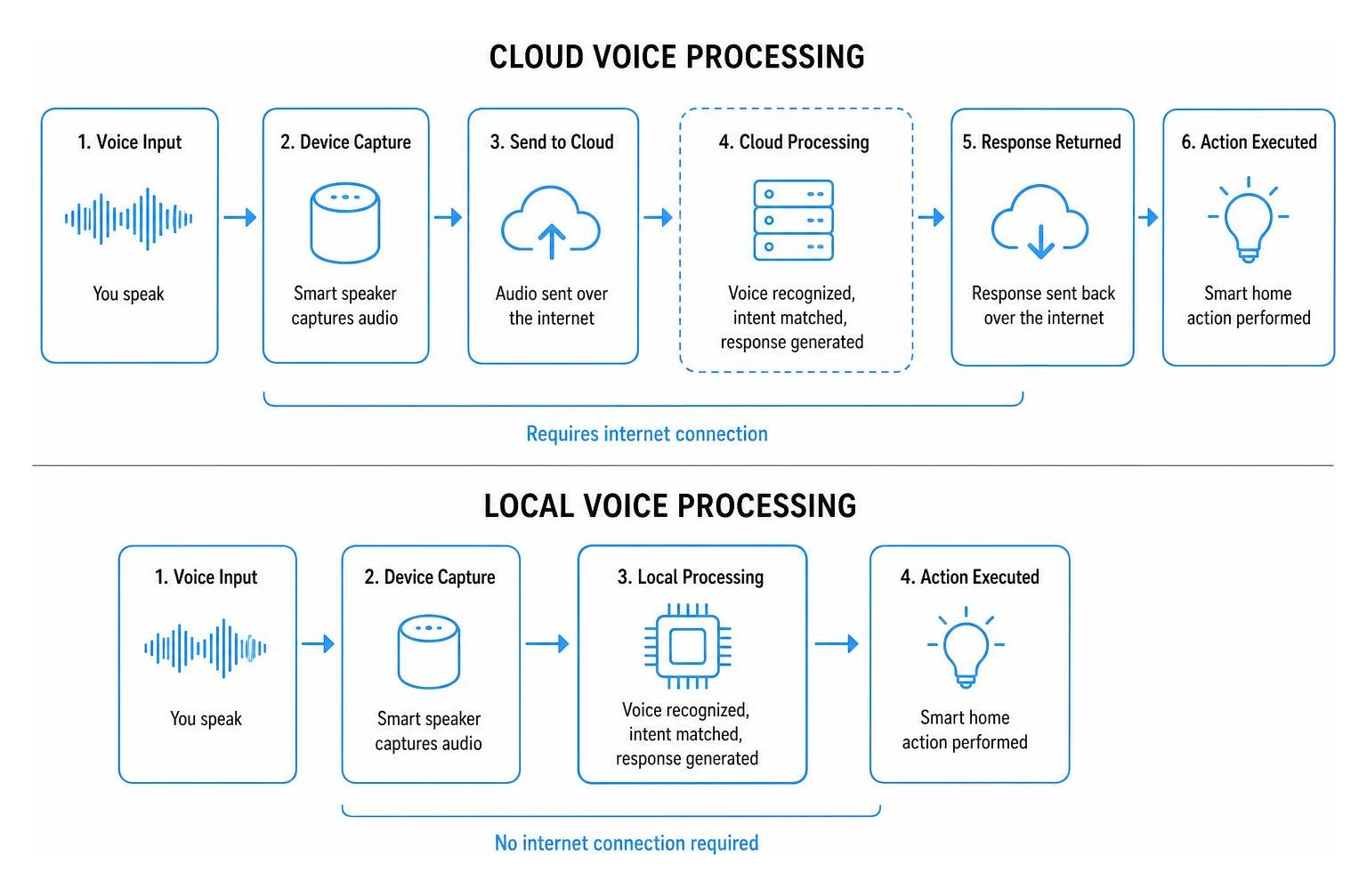
To understand the core differences between these architectures, take a look at how voice data travels in each system:
Generative AI and Cloud Voice Assistants
Cloud voice assistants rely on remote data centers to parse spoken phrases, match intent, and execute commands. Mainstream ecosystems like Amazon Alexa and Google Assistant have historically dominated this space due to their low barrier to entry and expansive integration support.
With recent developments like Google Gemini voice assistant features, cloud-based voice control is shifting from rigid keyword syntax to fluid, generative AI conversations. Generative AI allows you to speak naturally without memorizing exact phrase structures. Instead of issuing separate instructions, you can combine multiple requests into a single prompt: “Hey Google, dim the living room lights to 30%, set the temperature to 70 degrees, but don’t touch the porch lights.”
Cloud processing excels at handling multi-turn prompts, complex web queries, and contextual requests (such as “Play that upbeat summer song from 1998”). However, it requires an active, stable internet connection and involves transmitting voice data to external cloud servers.
Local Processing with Home Assistant Assist
For homeowners and business operators who prioritize privacy, low latency, and offline functionality, local processing provides a powerful alternative. Introduced in Home Assistant version 2023.2, Home Assistant Assist processes spoken phrases entirely on hardware located inside your home.
Key advantages of local processing include:
- Absolute Data Privacy: Voice audio never leaves your local network or gets stored on external servers.
- Offline Reliability: Core smart home commands (like toggling switches or running local automations) continue working even if your internet connection goes down.
- Multilingual and Broad Support: Assist supports over 50 languages across local and cloud modes.
- Budget-Friendly Extension: You can expand local voice capture to every room in your building using low-cost hardware. Microcontrollers like the ESP32 combined with ESPHome allow you to build custom voice satellites for approximately $13 per room. You can learn more about configuring native local systems in this guide to Home Assistant voice control capabilities.
To decide which architecture suits your property, review our breakdown in this In-Depth Guide to Home Automation Basics.
Essential Smart Home Voice Commands for Every Device

Mastering smart home voice commands starts with understanding standard syntax patterns. While modern assistants are better at understanding natural phrasing, using clear structure ensures high accuracy across all your smart endpoints.
For standard Google Home and Nest systems, you can review official phrase references on how to Control your home devices by voice.
Lighting, Climate, and Appliance Control
Environmental controls represent the most frequent daily voice interactions. You can target specific devices, entire rooms, or building-wide states:
- Smart Lighting: “Turn on the kitchen lights,” “Dim the dining room overheads to 40%,” or “Set the office light strip to warm white.”
- Climate Control: “Set the thermostat to 68 degrees,” “Switch HVAC to cooling mode,” or “Lower the temperature by 2 degrees.”
- Smart Plugs and Switches: “Turn off the coffee maker plug,” or “Power on the workshop air filter.”
- Motorized Shades and Doors: “Close the patio blinds,” or “Open the garage door.”
If you run wired, professional building infrastructure like Gira KNX systems, central servers (such as the Gira X1 or HomeServer) bridge high-end automation protocols directly to Alexa or Google Assistant. This lets you issue voice directives for complex tasks like operating door intercoms or adjusting dynamic window coverings across multi-story layouts.
Entertainment and Media Directives
Media controls let you direct audio and video streams hands-free across independent speakers or unified multi-room groups:
- Targeted Streaming: “Play jazz in the living room,” or “Play podcasts on the master bedroom display.”
- Multi-Room Audio: By grouping smart speakers in your management app, you can say “Play morning news on the All-House speaker group” to sync playback.
- Playback & Volume Adjustment: Volume can be set precisely on a 0% to 100% scale (e.g., “Set living room volume to 35%”) or incrementally (e.g., “Volume up”).
- Camera Feeds: Stating “Show the front porch camera on the kitchen TV” instantly casts live security video to smart displays.
Managing Productivity: Timers, Alarms, and Lists
Voice assistants act as effective hands-free productivity tools, especially in environments like kitchens, home offices, or workshops.
| Feature Type | Sample Voice Command | Key Function / Operational Rule |
|---|---|---|
| Named Cooking Timer | “Set a 12-minute pasta timer” | Tracks multiple concurrent countdowns with custom labels. |
| Relative Timer Adjustment | “Add 5 minutes to the pasta timer” | Dynamically modifies active running timers on the fly. |
| Delayed Device Action | “Turn off the living room lights in 10 minutes” | Schedules a future action. (Note: Cannot be canceled once queued in some systems). |
| Recurring Alarm | “Set an alarm for 7:00 AM every weekday” | Establishes automated, repeating wake-up schedules. |
| Direct Alarm Silence | “Stop” | Immediately silences active ringing alarms without needing a wake phrase (English users). |
| Dynamic To-Do Lists | “Add furnace filter to my hardware shopping list” | Appends items directly to specific linked task or grocery lists. |
Setting and Modifying Voice Timers
Setting a timer hands-free while cooking or working prevents messy screens and burnt food. Modern assistants support multiple concurrent, named countdowns:
- Creating Named Timers: Stating “Set a 15-minute pizza timer” and “Set a 45-minute roast timer” allows the assistant to track both simultaneously.
- Querying Remaining Time: You can ask “How much time is left on the pizza timer?” to receive precise countdown updates.
- Modifying Active Countdown: In systems like Home Assistant Assist, you can adjust running timers by saying “Add 3 minutes to the pizza timer” or “Remove 2 minutes from the roast timer.”
- Silencing Alerts: When an alarm or timer rings, English-language users on platforms like Google Home or Assist can simply say “Stop” without uttering the wake word first.
Creating Lists and Scheduling Delayed Actions
You can maintain organization across your household or business by managing digital lists and scheduling delayed hardware triggers:
- List Management: Saying “Add motor oil to my garage supplies list” updates native or linked task applications instantly.
- Delayed Commands: You can combine device commands with built-in sentence timers to create deferred execution routines. Phrases like “Turn off the backyard lights in 20 minutes” or “Pause office audio in 30 minutes” queue actions for later. You can browse standard syntax structures directly in the Home Assistant built-in sentence commands documentation.
Advanced Setup, Customization, and Area-Aware Control

A voice assistant is only as smart as the underlying network and device architecture supporting it. Customizing entity attributes and enforcing room-level context transforms an average setup into an intuitive automation system.
Customizing Smart Home Voice Commands and Routines
Out of the box, smart home hubs discover connected hardware using default device names like light.living_room_ceiling_fixture_1. Asking a voice assistant to control complex technical names usually leads to frustration.
To fix this, implement the following best practices:
- Assign Entity Aliases: Set short, natural aliases for all hardware entities. A switch labeled
light_switch_3should have aliases like “Desk Light,” “Reading Lamp,” and “Office Light.” - Selective Exposure: Avoid exposing every backend entity to your voice processing engine. Expose only the specific switches, scenes, and scripts you intend to control by voice to prevent command confusion.
- Custom Sentence Creation: Open platforms allow you to create custom sentence templates. You can link a natural phrase like “Activate movie time” directly to a script that dims lights, closes blinds, and powers on your media center.
Room-Aware Control and Hardware Integration
Without room-aware control, you are forced to state complete location names for every command: “Hey Google, turn off the master bedroom light.”
Area-aware processing eliminates this friction:
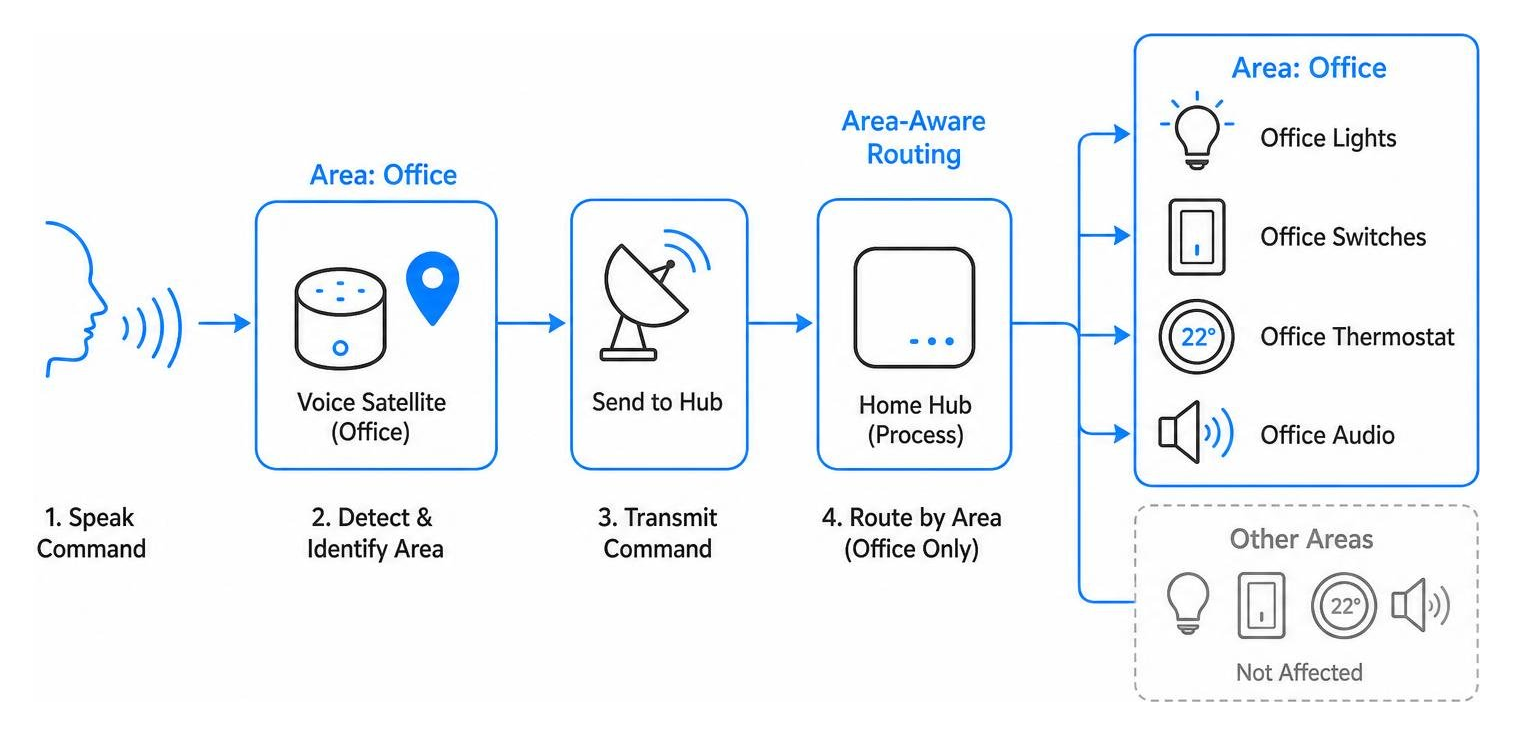
When you assign a smart voice satellite (like an ESP32 micro-satellite or smart speaker) to the exact same “Area” or “Room” as the surrounding light switches and thermostats:
- You step into the office and say “Turn off the lights.”
- The voice satellite recognizes its physical presence in the Office.
- The system automatically restricts execution to the office lights, leaving the rest of the building untouched.
If you are expanding a larger property, integrating robust network backbone setups ensures low latency when routing these location-based commands. Learn how to optimize your network foundation in our guide to Smart Home WiFi Setup 101 – Stop Your Devices from Fighting for Bandwidth.
Maintaining and Optimizing Voice Command Infrastructure
Even well-configured voice networks encounter occasional misfires. Maintaining reliable voice control requires proactive network management and routine configuration checks.
Troubleshooting Smart Home Voice Commands and Setup
When smart home voice commands stop responding, systematically work through these diagnostic steps:
- Verify Wake Word Sensitivity and Mute Switches: Check that hardware mute buttons haven’t been engaged physically on smart microphones or satellites.
- Resolve Network Bottlenecks: Voice satellites require steady, low-latency network connections. If a remote room satellite frequently drops off, check for Wi-Fi interference or offline mesh nodes.
- Audit Entity Exposure: If an assistant replies “I couldn’t find a device named Desk Lamp,” verify that the target light switch is still explicitly exposed to the voice assistant integration.
- Inspect Sentence Syntax: When custom commands fail, test the phrasing against open-source sentence definition test files or simplified command structures.
- Handle Accidental Wake Triggers: If a satellite triggers accidentally during conversation, saying “Nevermind” causes assistants like Home Assistant Assist to immediately drop listening mode and cancel processing.
For a structured step-by-step diagnostic strategy, review our complete walk-through on How to Troubleshoot Smart Home Issues in 7 Days.
Frequently Asked Questions About Smart Home Voice Control
Can voice commands be processed locally without an internet connection?
Yes. Open-source local processing engines like Home Assistant Assist process speech recognition and sentence parsing entirely on local hardware in your building. While cloud assistants (like Alexa or legacy Google Assistant) require an active internet connection to convert speech to text on remote servers, local voice engines keep all command execution within your local area network (LAN).
Can you disarm home security systems using voice commands?
For critical safety and security reasons, smart home platforms intentionally restrict or disallow disarming security alarms via simple voice commands. Allowing disarm commands creates a risk where someone could shout through an open window or door to turn off your security system. While some platforms allow disarming if you speak an authorized numerical PIN code aloud, direct, unauthenticated voice disarming is blocked across major systems. To learn more about securing your property safely, check out The Ultimate No-Stress Guide to DIY Home Security Setup.
How do area-aware smart home voice commands work?
Area-aware commands work by linking a specific physical voice receiver (a smart speaker, display, or micro-satellite) to a designated logical room inside your smart home control software. When the satellite picks up a localized command such as “Turn on the fan,” the system injects the satellite’s assigned location into the prompt context, executing the request only for devices in that designated room.
Conclusion
Mastering smart home voice commands turns a collection of disconnected smart gadgets into an effortless home environment. Whether you choose the conversational intelligence of cloud-based AI or the privacy and local speed of self-hosted processing, the key to success lies in clean device naming, solid network coverage, and logical room-aware configurations.
Building and maintaining a reliable smart automation system takes time and technical care. At SmartMait, we provide professional installation, network optimization, and ongoing maintenance services to keep your connected building operating smoothly without the hassle. If you want to elevate your technology setup or need help fixing erratic smart devices, explore our services and Learn More About Professional Smart Home Support today.