Setting the Stage with Smart Home Scene Automation

Smart Home Scene Automation: A Scalable Service Opportunity

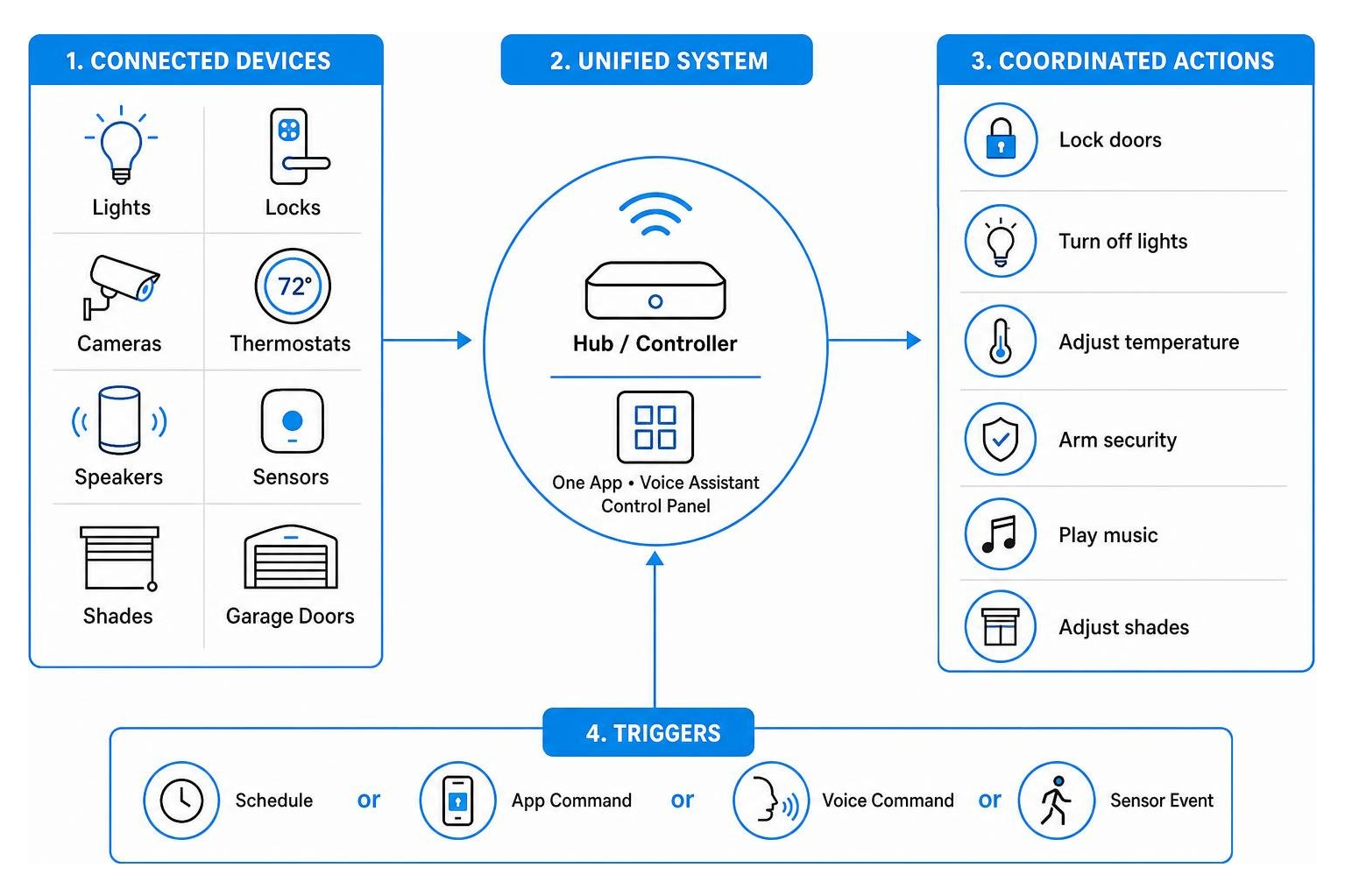
Smart home scene automation lets an integrator set several connected devices to known states with one command, such as dimming lights, closing shades, adjusting climate, and switching media inputs for Movie Night. In professional home automation, the business value for a franchise operator is not the one-time setup. It is the ability to turn scene design into a repeatable service package that includes system tuning, seasonal updates, and ongoing maintenance memberships.

For prospective franchise owners and established integration businesses considering conversion, scenes are more than a convenience feature. They create a standardized service offering that supports recurring client relationships and long-term business scalability beyond owner-dependence. A well-designed scene also supports client efficiency goals by coordinating lighting, plug loads, and environmental settings when spaces are unoccupied.

Smartmait offers franchise territories in the U.S. low-voltage and smart-building integration industry for operators who want to deliver these systems with consistent processes and structured customer support.

I am Dominic Hesano, a franchise development professional and business operator focused on Smartmait, smart-building technology, low-voltage systems, and recurring service models. My work in smart home scene automation centers on helping operators build dependable, supportable technology services rather than one-off installations.
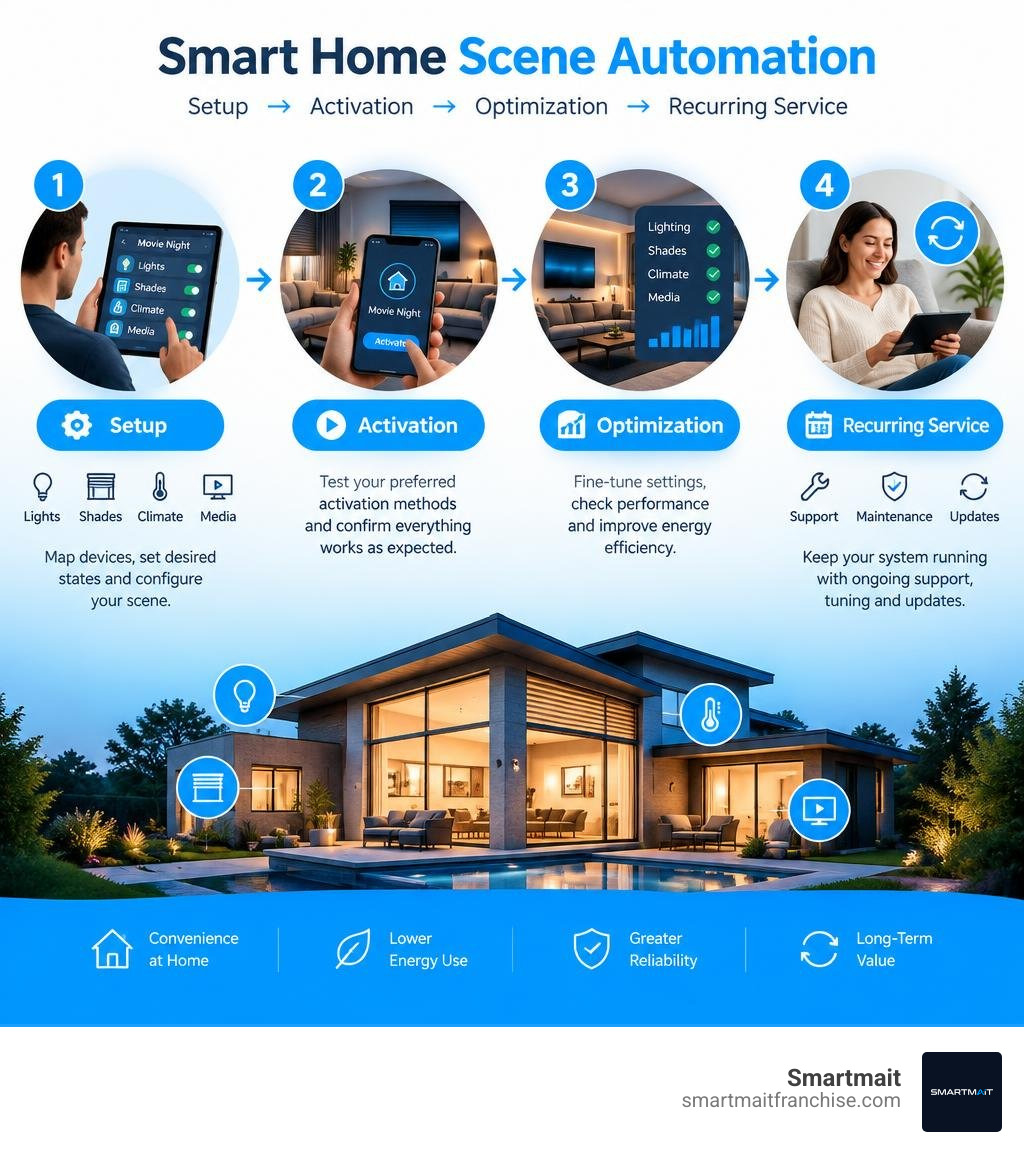
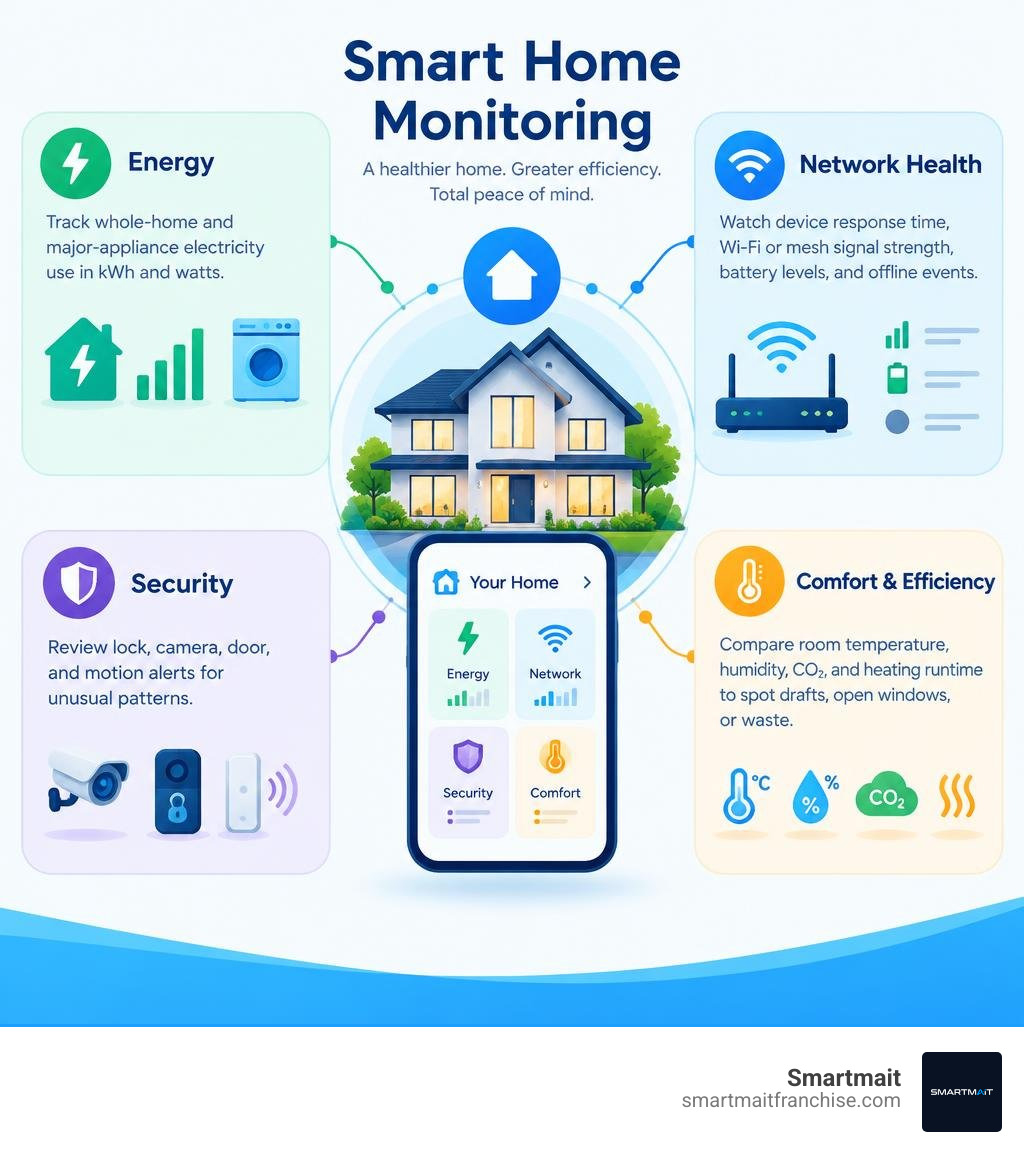
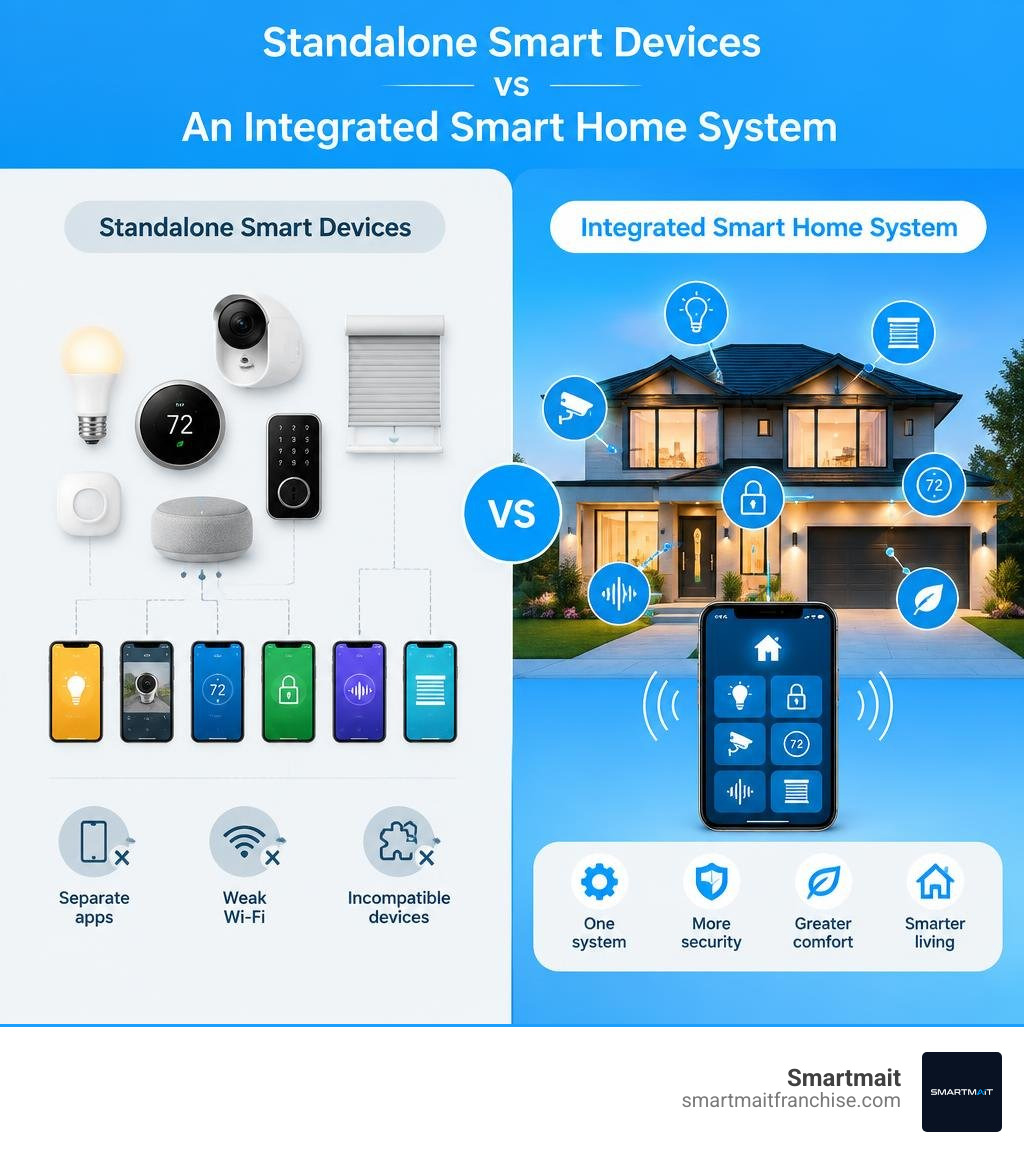
Smart home scene setup, activation, optimization, and recurring service workflow infographic

Simple smart home scene automation glossary:

Understanding Scenes vs. Automations and Scripts

When building a scalable integration business, establishing standard definitions across your field service team is essential. Misunderstandings between scenes, scripts, and automations lead to messy code, difficult troubleshooting, and unpredictable technician callouts. Understanding foundational home automation basics ensures your engineering team designs clean architectures that remain stable over years of operation.

Feature / Dimension Scene Script Automation
Primary Definition Static, stateless snapshot of target entity states Reusable sequence of executable actions and logic Event-driven rule combining triggers, conditions, and actions
Execution Timing Applied immediately across target entities Executes sequentially with optional pauses/delays Executes automatically upon trigger condition match
Logic & Conditions No internal logic or conditional branches Supports if/else conditions, loops, and delays Full conditional rule evaluation pipelines
State Tracking Stateless (records timestamp of last activation) Active state (idle or running) Enabled or disabled status
Franchise Use Case Preset room modes (Movie, Dinner, Goodnight) Staged AV power sequences, multi-step actions Hands-free scheduled, presence, or sensor triggers

Core Differences: Scenes vs. Automations

A scene represents a static destination: it defines what devices should look like, sound like, or feel like at an exact moment. It has no brain of its own to decide when to execute. In contrast, an automation is an event-driven engine composed of three parts: triggers (when something happens), conditions (only if certain rules are met), and actions (what the system does).

For low-voltage business owners evaluating standardized delivery, separating scenes from automations allows your team to build modular systems. Technicians can adjust the lighting levels in a “Goodnight” scene without breaking the complex scheduled automation that calls it at 11:00 PM. This modularity also supports franchise operating standards, because documented scene definitions can be reused across client projects and service agreements.

When to Use Scripts Alongside Scenes

While scenes snap multiple entities to explicit states instantly, certain hardware requirements demand sequential execution. For example, powering on an AV receiver, waiting four seconds for the HDMI handshake, switching inputs, and setting sub-zone volume requires a script. Scripts provide the necessary delays, conditional checks, and step-by-step logic that pure scenes lack.

Standardizing when field technicians deploy a script versus a scene prevents network flooding and ensures smooth commissioning across all customer installations. For franchise operators, that standardization also creates a training framework that can be taught consistently to new technicians.
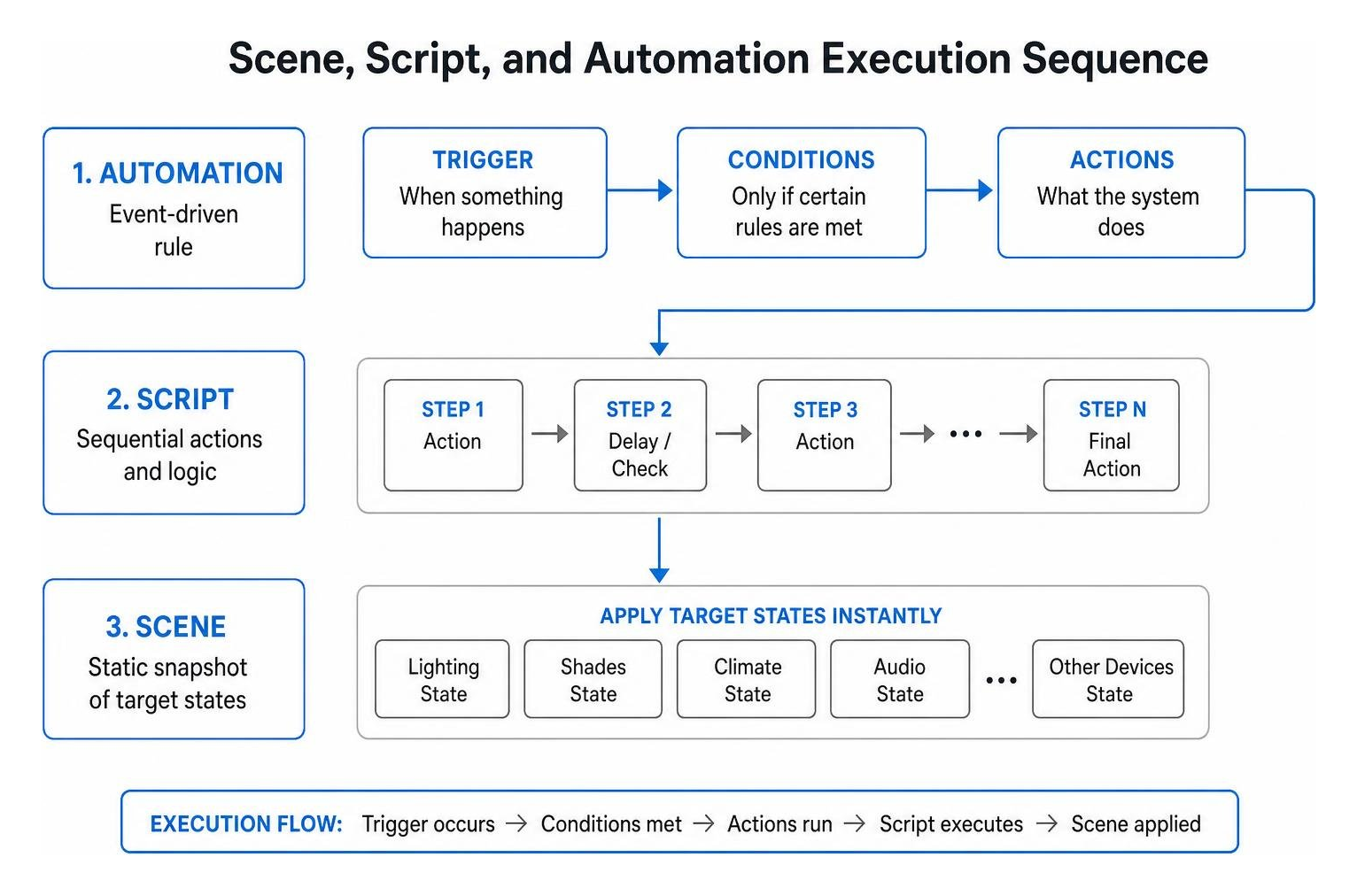
Scene, Script, and Automation Execution Sequence

How to Build and Configure Your First Scene

A core strength of a structured franchise model is moving away from ad-hoc field installations toward documented, repeatable configuration workflows. Whether your technicians commission systems using graphical user interfaces or underlying configuration templates, consistent execution protects your brand reputation and operational standards.
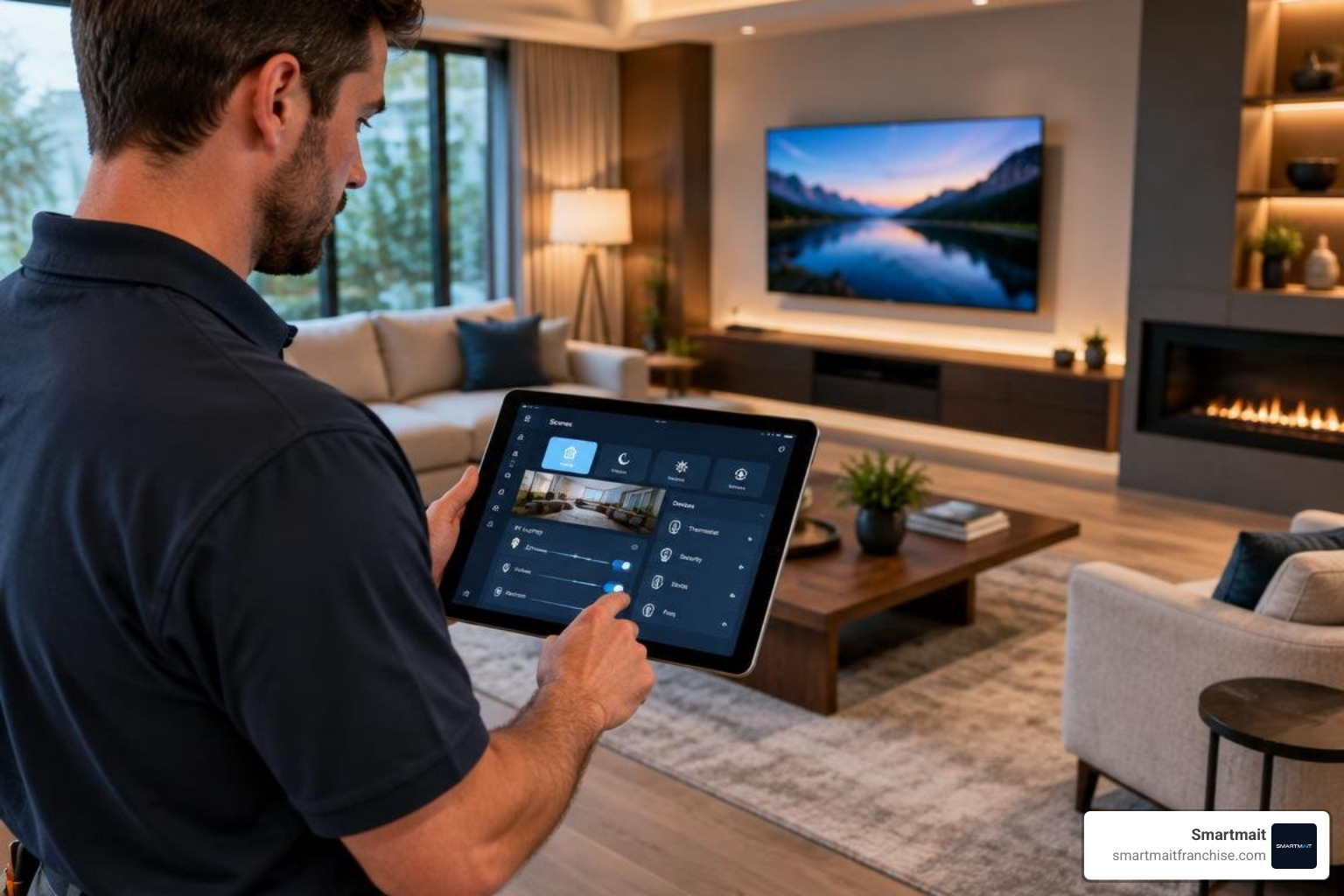
Professional scene configuration and commissioning interface

Standardized service staging establishes consistent profiles for smart home lighting control across target brightness ranges, calibrated color temperatures, and integrated sub-system states before signing off on client handover.

Visual UI Setup vs. YAML Configuration

In modern control platforms and smart-building ecosystems, integration businesses standardize their commissioning protocols through two core deployment pathways:

  1. Visual Interface Workflows: Enable field technicians to visually capture live room environments and assign them to standardized client profiles quickly.
  2. Standardized Configuration Templates: Allow central engineering teams to establish baseline templates with predetermined parameters for deployment across multiple project types.

Documenting these configuration standards allows new technicians to onboard rapidly without reinventing custom setups on every job site. For an established integration business evaluating conversion to a franchise network, standardized documentation forms an operational backbone that reduces technician training cycles and supports service consistency.

Multi-Protocol Scene Activation Methods

A robust installation provides clients with intuitive, multi-modal control pathways:

  • Dedicated Keypads & Controllers: Physical low-voltage keypads engraved with standardized labels like Welcome, Entertain, and Away.
  • Central Dashboard Displays: Dedicated touch interfaces mounted in central living or operational areas.
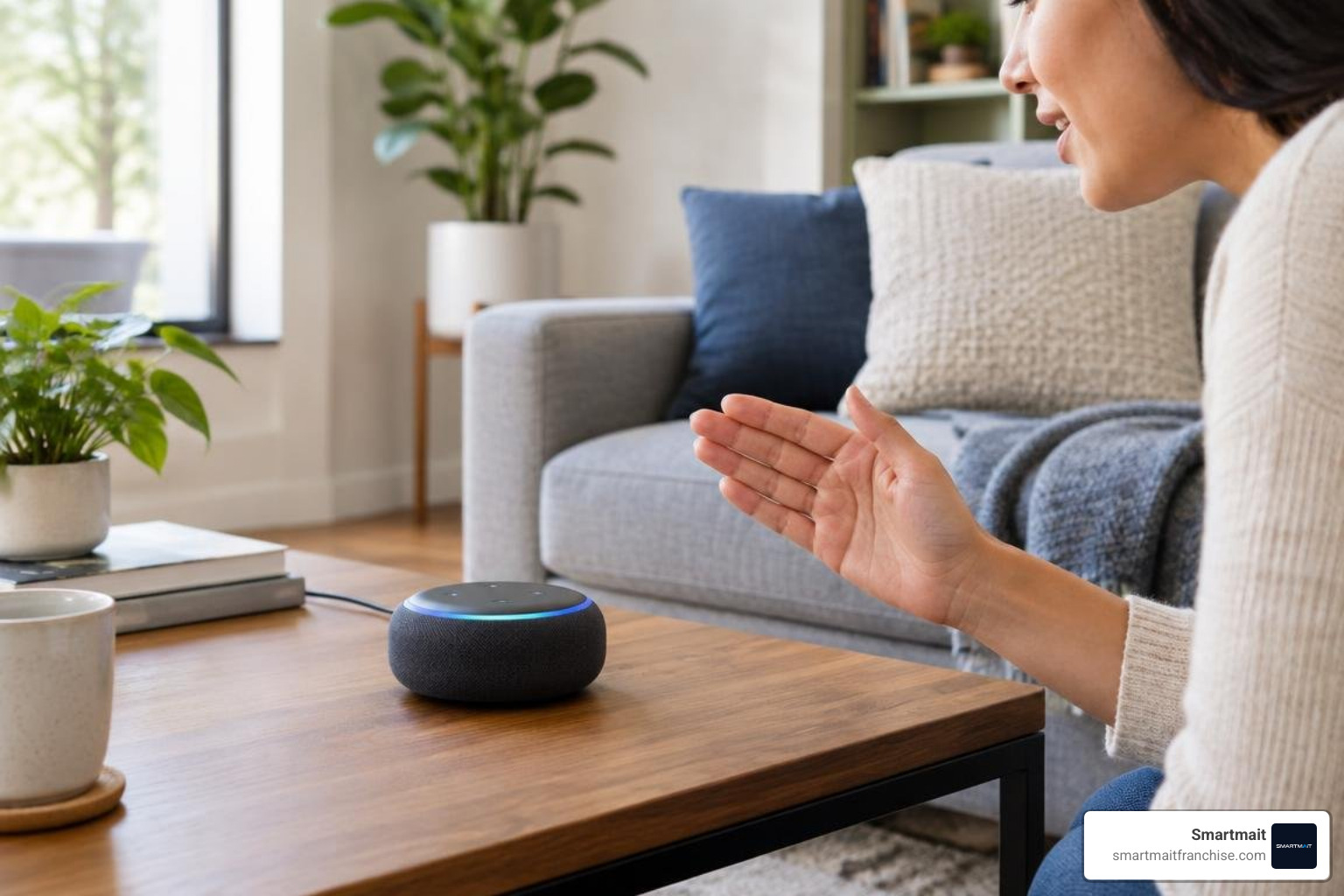
  • Voice Control Systems: Integrated configurations enabling voice command presets through smart home voice commands.
  • Automated Sensor Logic: Hands-free background triggers aligned with occupancy and environmental schedules.

Standardizing these activation pathways across a franchise territory ensures high client satisfaction and gives operators a clear framework for technician onboarding and ongoing customer support.

Advanced Smart Home Scene Automation Strategies

As homes incorporate dozens of multi-protocol smart devices, basic scenes can suffer from latency, dropped commands, and network collisions. Implementing advanced architectural standards ensures high reliability across all customer projects.
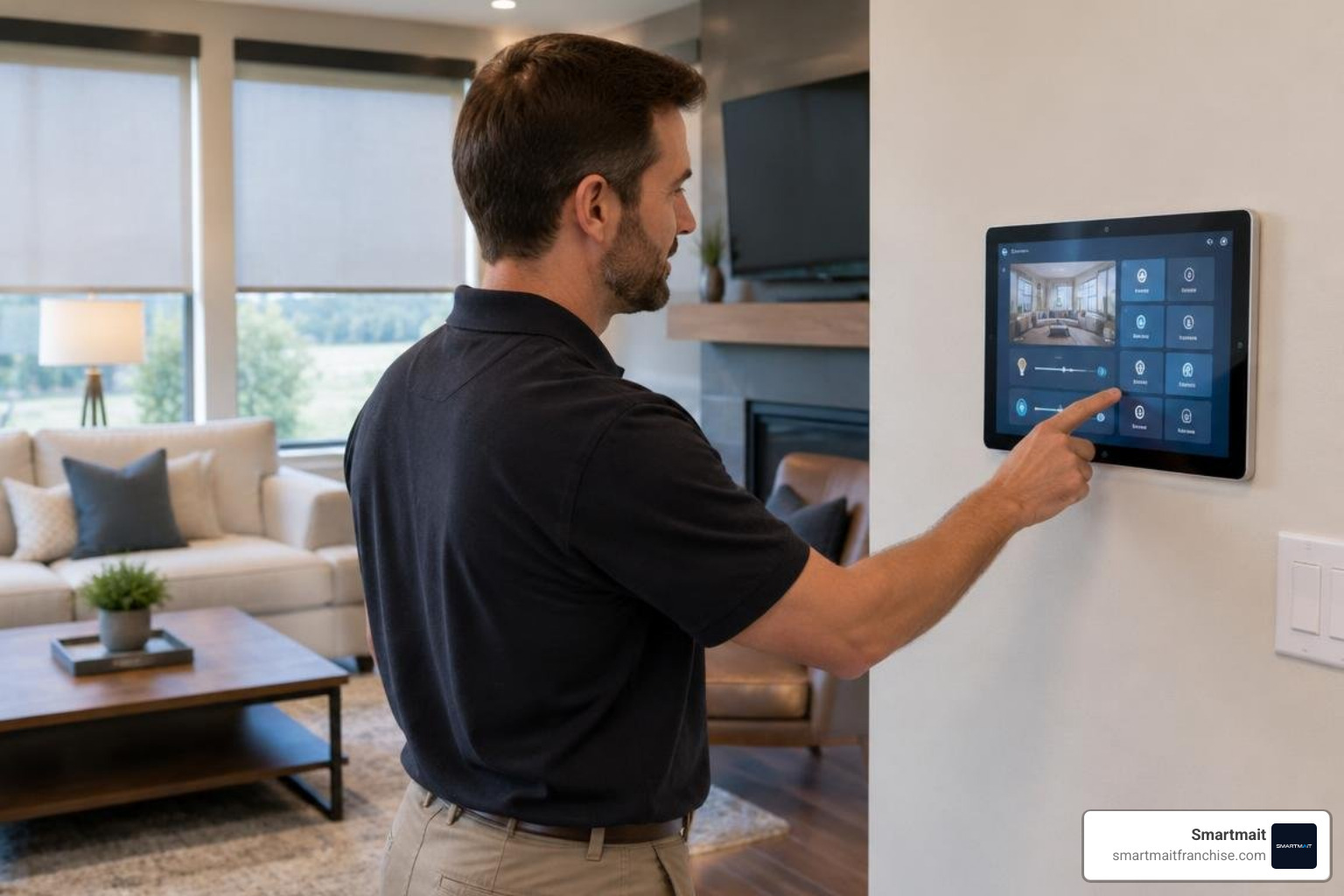
Smart hub automation dashboard used for technician training

Dynamic Smart Home Scene Automation with Adaptive Lighting

Modern smart homes demand dynamic environments that follow human circadian rhythms. Integrating adaptive lighting algorithms adjusts the color temperature of fixtures throughout the day—delivering cool, energizing white light at midday and warm, amber hues at sunset.

When designing scenes that interact with dynamic lighting integrations, integrators must establish manual control overrides. If a client triggers an explicit “Reading Scene,” the automation platform must temporarily suspend the automated circadian adjustments on those fixtures until the scene is dismissed or reset. Building these advanced capabilities into ongoing maintenance packages positions your integration business as an essential technology partner.

On-the-Fly Smart Home Scene Automation Using Snapshots

Advanced installations often require capturing temporary states rather than activating static presets. For instance, when a doorbell rings or an intercom call initiates, an integration system can use dynamic snapshot actions (such as scene.create with snapshot_entities) to save the live state of active lighting and media zones.

Once the visitor finishes or the call ends, the system automatically restores the cached snapshot. Developing standard procedures for dynamic snapshots gives your technicians an easy blueprint for delivering premium user experiences and supports the kind of documented service model that franchise operators can scale.

Practical Daily Scenes and Energy-Saving Impact

Integrating scene control with proactive energy management creates substantial value for clients while establishing ongoing optimization opportunities for your service business.

A comprehensive integration framework utilizes top smart home automation products to eliminate wasteful consumption across residential and light commercial properties:

  • Connected Thermostats: Regulate HVAC runtime to deliver measurable climate efficiency.
  • Managed Plug Loads: Eliminate phantom power drain across unused media and office appliances.
  • Coordinated Lighting Profiles: Combine dimming curves with occupancy sensing to optimize electrical utilization.
  • Comprehensive Building Systems: Synchronize shading and environmental controls to lower overall thermal transfer.

Essential Daily Scene Configurations

Standardizing a menu of core scenes simplifies project scoping, technician training, and customer onboarding:

  • Good Morning: Gradually raises window treatments, shifts climate controls to active daytime comfort, and brings accent lighting to crisp daylight levels.
  • Movie Night: Dims ambient lighting, engages accent backlighting, lowers motorized shades, and routes media distribution zones.
  • Away Mode: Sweeps non-essential lighting off, sets HVAC to eco efficiency profiles, secures motorized deadbolts, and arms exterior perimeter sensors.
  • Bedtime: Deactivates main living zones, maintains low-level pathway illumination, and confirms building perimeter security.

Maximizing Household Energy Efficiency

Educating clients on energy efficiency allows integrators to package seasonal tuning and recurring optimization reviews. Scheduling semi-annual checkups to adjust thermal setpoints, update shading schedules, and review load profiles transforms transactional client relationships into long-term service agreements.

Establishing Quality Assurance and Operational Standards

Independent integration businesses often struggle to maintain field efficiency when technicians spend unbilled time resolving inconsistent commissioning outcomes across projects. Developing standard operating procedures and quality assurance runbooks resolves these issues systematically across a growing team.

Standardizing Documentation and Quality Control

Inconsistent commissioning results typically stem from a lack of documented, repeatable processes across a growing technician workforce. Rather than leaving field staff to develop ad-hoc approaches independently, franchise operational standards establish clear guidelines:

  1. Centralized commissioning checklists that keep every technician working from the same playbook.
  2. Standardized documentation templates that record project configurations for future service visits.
  3. Structured quality-control sign-offs before a project is considered complete.

Maintaining Operational Consistency Across a Growing Team

As an integration business scales, unified naming conventions, shared documentation standards, and centralized training materials help new technicians onboard quickly and consistently. Franchise operating procedures that formalize these standards protect brand reputation and support long-term customer relationships across recurring maintenance visits, while giving business owners a clear framework for training and quality assurance as they grow beyond owner-dependence.

Frequently Asked Questions About Smart Scenes

What is the main difference between a scene and a routine?

A scene is a static snapshot that sets multiple devices to specific states at that exact moment. A routine (or automation) is an active program that monitors triggers—such as schedules, motion sensors, or geofencing boundaries—and executes actions (like activating a scene) when defined conditions are met.

Can I create and apply scenes without defining them in YAML?

Yes. Modern smart home platforms feature visual UI scene builders that let you adjust room devices manually and save their current states. Integrators can also generate runtime scenes on the fly using action commands that capture live entity states dynamically without editing configuration files.

Why does Adaptive Lighting override my custom scene settings?

Dynamic circadian integrations continuously monitor and update light brightness and color temperature based on sun position. If a scene manually forces a specific light color without setting a manual override flag, the adaptive integration will overwrite the scene values on its next update cycle.

Conclusion

Mastering scene design, protocol management, and energy optimization allows professional integrators to deliver seamless, dependable living environments. Moving away from haphazard, unstandardized installations toward documented, repeatable processes is the key to scaling an integration company beyond owner-dependence.

Smartmait provides franchise territories across the United States for forward-thinking entrepreneurs and independent low-voltage integrators seeking to scale their operations through proven operating models, centralized training, and recurring service agreements.

To explore available territories and evaluate our franchise partnership model, learn more about Smartmait smart home and low-voltage franchise opportunities and request franchise information today.
Why Smart Homes Without Cloud Dependency Offer Superior Privacy and Speed

Why Home Automation Without Cloud Creates a Stronger Service Advantage

For smart-home franchise buyers and established integration businesses, home automation without cloud dependency means designing systems that keep core commands, data, and automations on local hardware and the local network. To build this capability into a service business:

  1. Standardize on a local automation hub and devices with local control paths.
  2. Use protocols such as Zigbee, Z-Wave, and local-network Wi-Fi devices where appropriate.
  3. Separate IoT devices from the main network and limit unnecessary outbound internet access.
  4. Build recurring support around backups, updates, network health, and automation reviews.

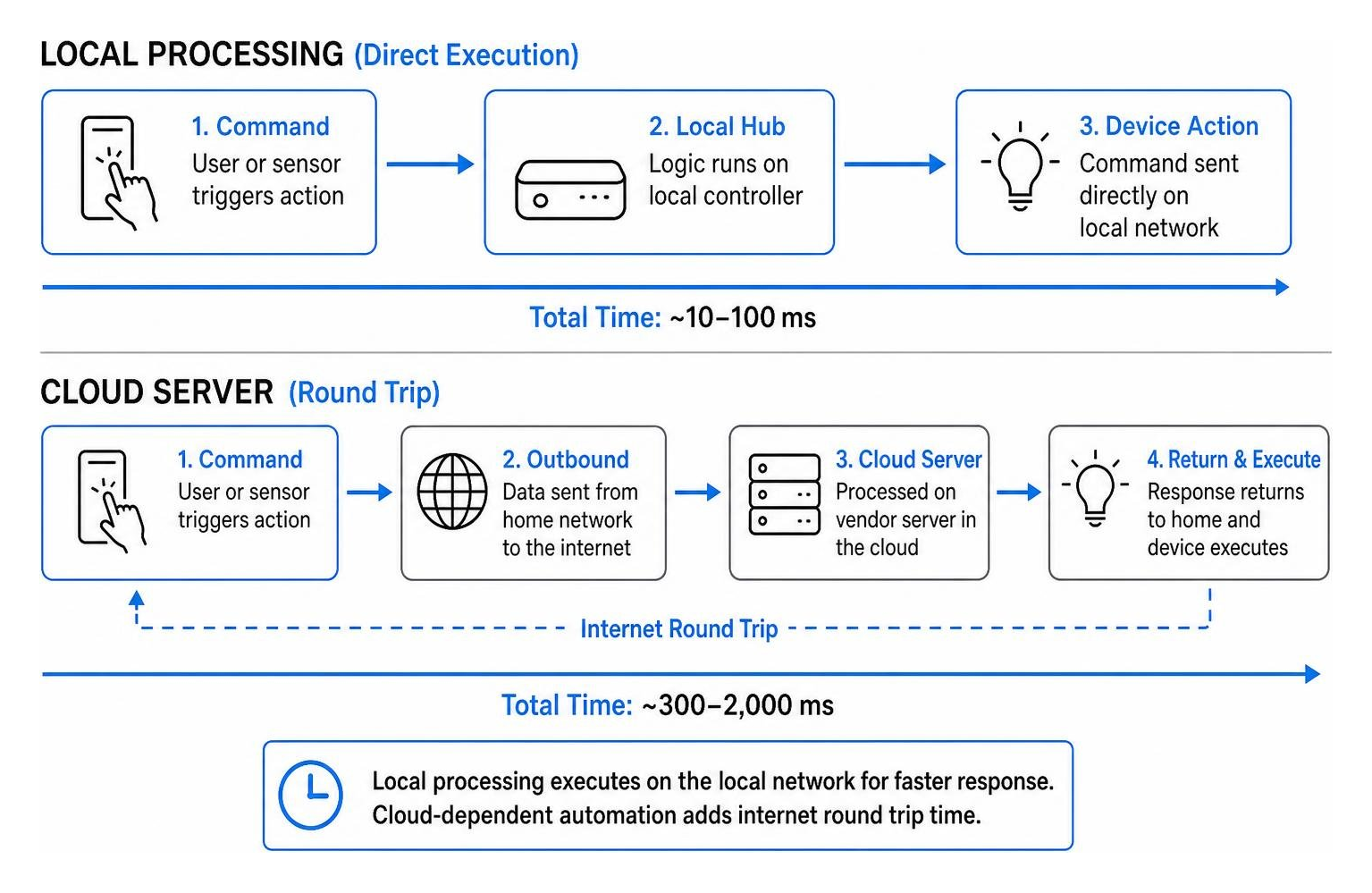
This approach gives customers faster responses, better privacy, and continued operation during many internet or vendor-service outages. Local commands can respond in roughly 10 to 100 milliseconds, while cloud-dependent commands may take 300 to 2,000 milliseconds due to the extra trip to remote servers.

For an operator, local-first design is more than a technical preference. It can reduce customer frustration with subscriptions and unreliable apps while creating clear long-term service needs: network management, secure remote support, configuration backups, device replacement, and system optimization.

I am Dominic Hesano, a franchise development professional and business operator building Smartmait around smart-home, low-voltage, networking, security, and automation services. My work in home automation without cloud dependency focuses on how reliable, privacy-aware systems can support durable customer relationships and scalable service operations.

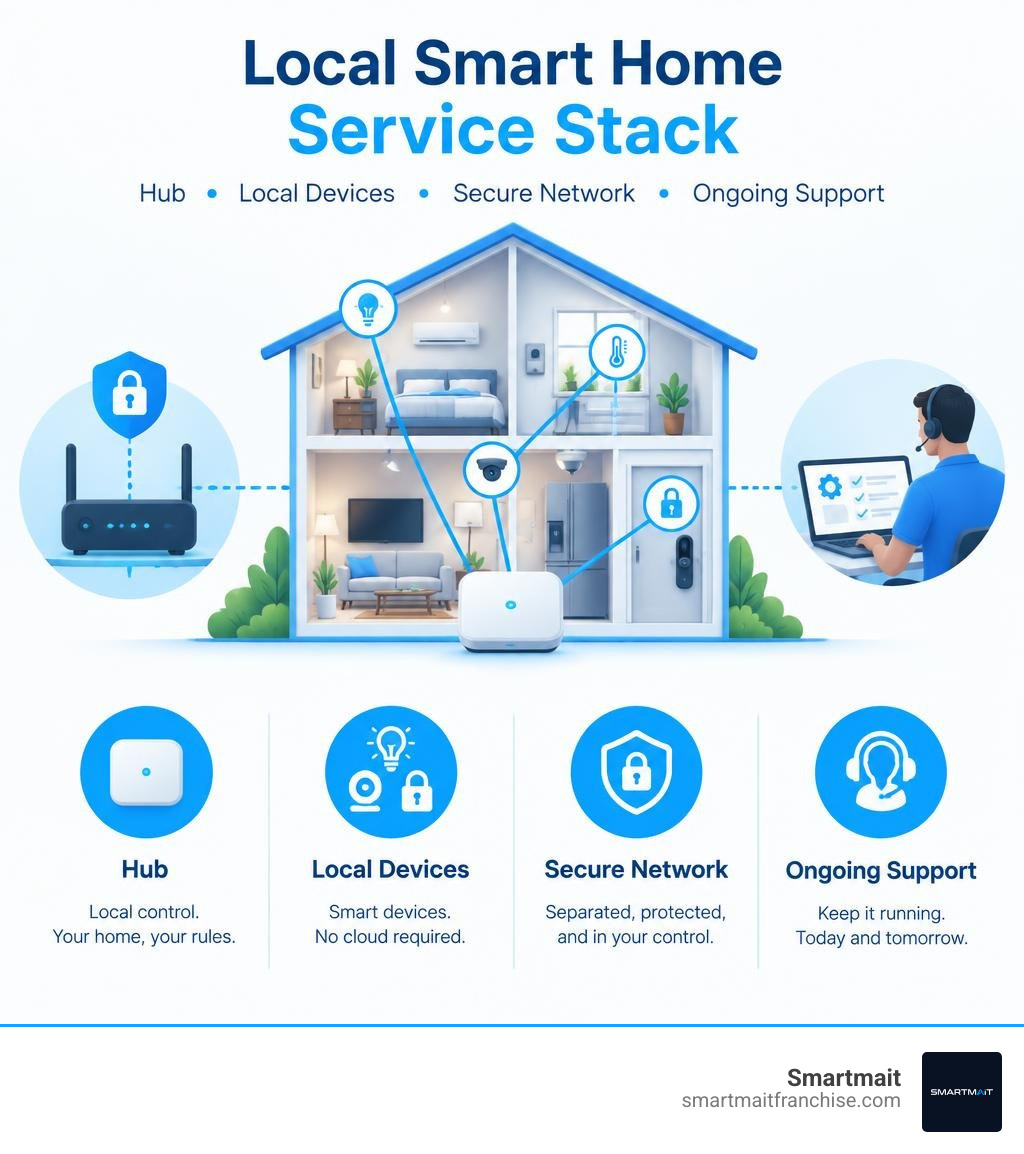
Local smart home service stack: hub, local devices, secure network, ongoing support infographic

Home automation without cloud word roundup:

Understanding Home Automation Without Cloud: Architecture and Core Differences

As we build and scale modern smart-building integration businesses across the United States, we see a massive shift in customer priorities. Property owners are exhausted by mandatory monthly subscriptions, unexpected cloud outages, and privacy intrusions. For prospective franchisees evaluating the smart-home service sector, adopting a local-first service delivery model transforms how we deliver value.

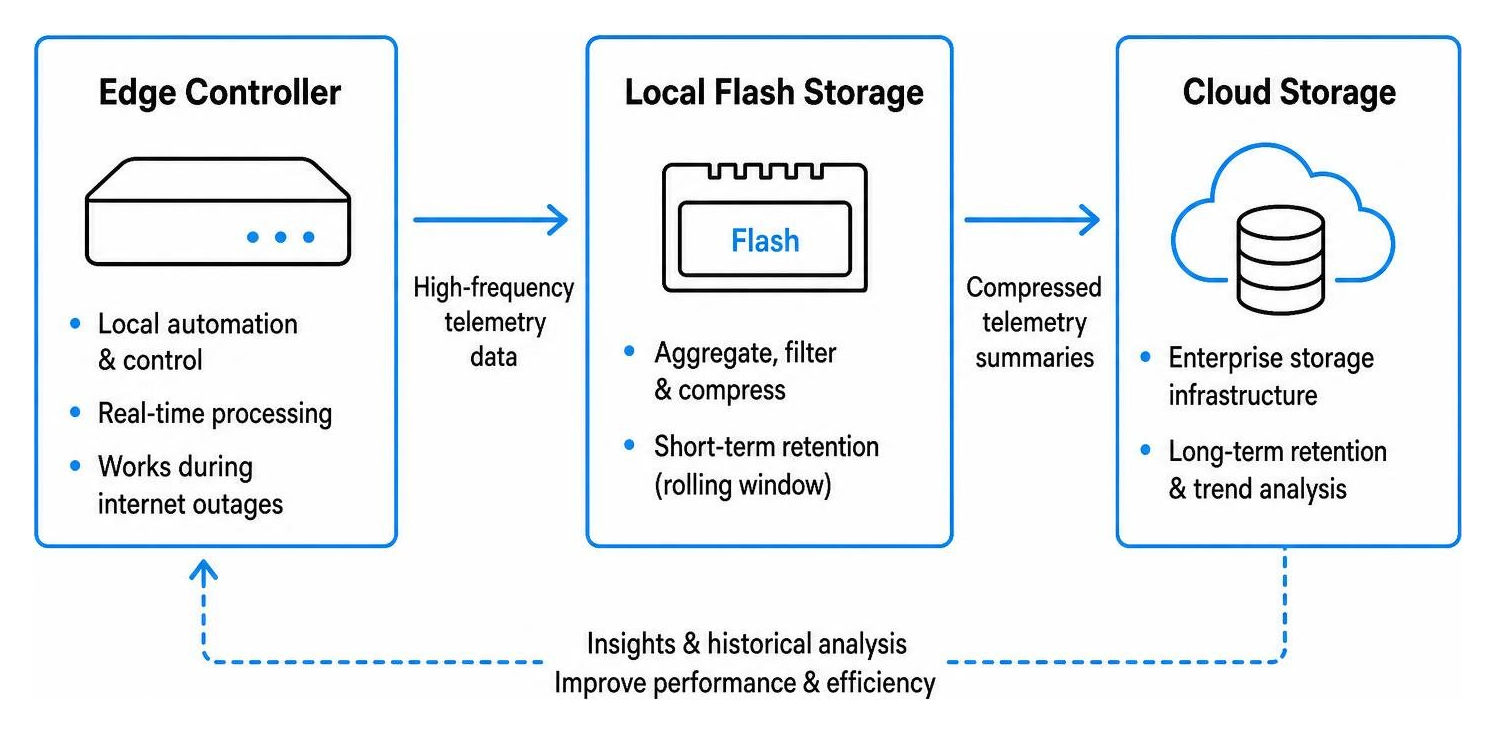
In a cloud-dependent model, every button press, sensor trigger, or automation request travels out through the customer’s modem, traverses multiple internet service provider (ISP) hops, processes inside a third-party data center, and travels back down to the target device. In contrast, local-first home automation without cloud executes the entire logic stack on a dedicated on-premises edge controller. The data never leaves the local area network (LAN) unless the customer explicitly requests off-site administrative visibility.

Local processing direct execution versus cloud server round trip

Understanding this architectural distinction is essential for operational teams. A comprehensive guide to reliable smart home integration emphasizes that local execution eliminates the common failure points associated with consumer-grade Wi-Fi gadgets. By reducing unnecessary external telemetry, integration businesses establish higher baseline reliability and insulate client homes from external disruptions.

Architecture Dimension Cloud-Dependent Integration Model Local-First / Cloud-Free Service Model
Execution Point Vendor server / Public cloud infrastructure Local edge controller / On-premises hub
ISP Outage Impact Total loss of automation and app controls 100% normal on-site automation and control
Response Time 300ms to 2,000ms (high latency) 10ms to 100ms (near-instantaneous)
Ongoing Operating Cost Recurring third-party cloud subscription fees Zero mandatory third-party software subscriptions
Security & Privacy Risk Outbound telemetry, vendor data aggregation Complete data sovereignty, strict LAN containment
Service Revenue Model Reactive troubleshooting when APIs change Proactive network optimization and maintenance tiers

Why Outages and Sunsetting Threaten Cloud-Dependent Systems

For independent integration business owners considering converting to a franchise model, customer churn caused by vendor decisions is a critical business risk. The consumer IoT landscape is filled with cautionary tales where cloud architectures rendered functional hardware useless:

  • Abrupt cloud server shutdowns have historically disabled thousands of proprietary smart-home hubs across the country.
  • Cloud service retirements by major tech vendors have repeatedly forced enterprise and residential users to scramble for alternative platforms.
  • End-of-life decisions for cloud-tethered devices have eliminated remote access and core features for entire hardware generations.

When an independent installer relies on closed, cloud-tethered products, the installer absorbs the customer’s frustration when those services get sunsetted. Franchise operators who standardize on open, local protocols protect their brand equity. By ensuring the physical hardware remains locally controllable regardless of any external manufacturer’s corporate longevity, operators build durable client relationships that yield steady service agreements rather than angry support calls.

Latency and Data Sovereignty: 10ms Response Times vs Server Hops

Speed and privacy represent the two most compelling sales arguments for our franchise operators. When a homeowner walks into a room, a motion sensor should illuminate the lights instantly. In a local-first system, that command path executes in 10 to 100 milliseconds—a timeframe perceived by the human brain as instantaneous. Cloud-dependent solutions introduce round-trip network hops that inflate latency to 300 to 2,000 milliseconds. That slight pause when entering a dark room creates a frustrating user experience.

Simultaneously, data privacy has evolved from a niche preference into a primary purchasing criterion for affluent homeowners and commercial clients. Closed smart-home systems continuously transmit telemetry, occupancy patterns, and audio metadata to off-site cloud platforms. By delivering local data sovereignty, our franchise locations can offer residential and commercial clients complete digital privacy: all data stays within the property walls, protected from corporate profiling, third-party data broker harvesting, and external server breaches.

Essential Capabilities and Protocols for a Cloud-Free Integration Business

Smart building local edge controller installation

Transitioning an integration business from simple retail plug-ins to commercial-grade, cloud-free automation requires a structured approach to hardware and protocol standards. Reviewing our connectivity solution guide helps operators understand how to configure robust physical architectures that minimize service truck rolls.

Evaluating Wireless Standards: Zigbee, Z-Wave, and Thread

To deliver dependable local automation, professional technicians must master the primary wireless protocols that operate independently of external cloud servers:

  • Zigbee (802.15.4): A mature, highly versatile mesh networking standard operating primarily on the 2.4 GHz spectrum. High-quality USB coordinators can manage hundreds of end-devices and routing nodes locally. Because it requires no vendor-cloud registration, Zigbee hardware installed ten years ago continues to run reliably today.
  • Z-Wave: Operating on the sub-GHz band (908.42 MHz in the US), Z-Wave avoids all 2.4 GHz Wi-Fi interference. With strict certification requirements, interoperability across diverse manufacturers is exceptionally high. It is ideal for critical low-voltage infrastructure like smart deadbolts, water shut-off valves, and commercial sensors.
  • Thread & Matter Local Fabrics: Thread brings low-power, self-healing IPv6 mesh networking to smart devices. When paired with Matter’s local connectivity layer, it provides direct, encrypted device-to-device communication without routing through cloud bridges.

Equipping technicians with comprehensive diagnostic training across these three wireless standards ensures our franchise locations can solve complex interference challenges and build resilient multi-vendor ecosystems.

Assessing Local-First Hardware Categories

A professional franchise operator evaluates equipment ecosystems based on long-term serviceability, ease of installation, and local API availability. Approved hardware categories include:

  1. Smart Relays & In-Wall Micro-Modules: Dry-contact relays and smart dimmers that communicate via Zigbee, Z-Wave, or local Wi-Fi APIs (such as local MQTT or REST). These preserve mechanical wall switch functionality even if the central processor is powered down.
  2. Local Network Video Recording (NVR) & Cameras: Power-over-Ethernet (PoE) security cameras streaming direct RTSP or ONVIF feeds into an on-premises NVR or edge AI processor. This eliminates monthly camera cloud storage fees while delivering real-time human and vehicle classification.
  3. Smart Thermostats & Environmental Monitors: Climate controls that accept direct local commands over Z-Wave or local network protocols, maintaining internal scheduling logic offline.
  4. Smart Locks and Access Control: Battery-efficient Z-Wave or Zigbee electronic deadbolts and commercial access relays that store user access credentials locally on the hardware.

Evaluating Local-First Delivery and Network-Service Capabilities

Delivering home automation without cloud dependency shifts an integrator’s core discipline from simple gadget installation to managed network infrastructure. Standardizing these processes allows franchise owners to recruit technicians with basic low-voltage backgrounds and train them into high-performing automation specialists. Following proven smart home WiFi setup strategies ensures that high-density wireless environments maintain peak throughput without dropped packets.

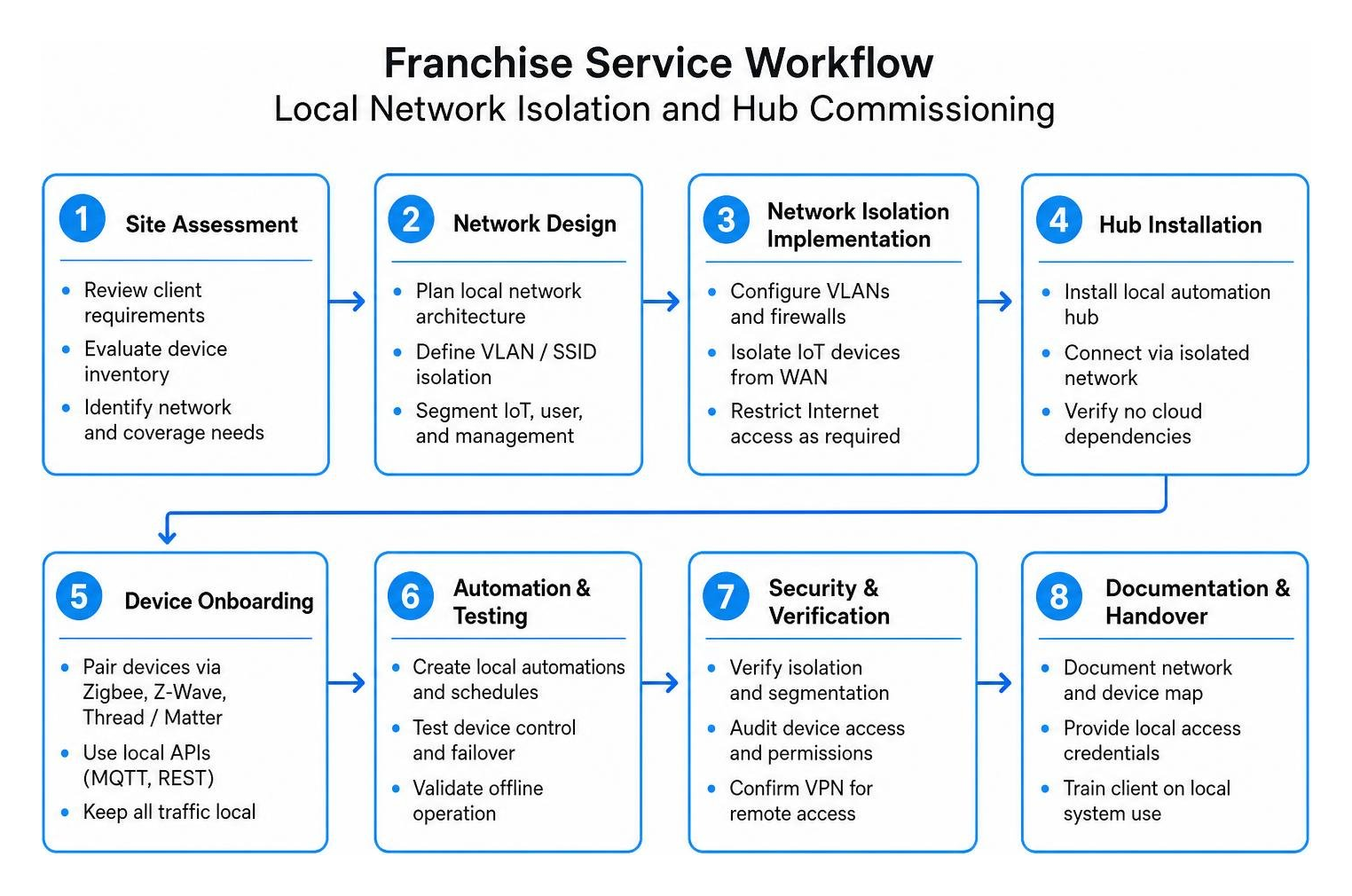
Franchise service workflow for local network isolation and hub commissioning

Assessing Local Automation Platforms and Support Requirements

The brain of the local smart home must be robust, vendor-agnostic, and completely functional without an active internet link. Standardizing on mature, locally hosted automation engines supporting thousands of protocol integrations demonstrates the operational strength of edge computing.

For a scaling franchise system, standardizing on a dedicated local automation engine enables repeatable operational processes:

  • Pre-Engineered Standard Operating Procedures: Blueprints and pre-configured deployment images allow field technicians to commission comprehensive lighting, climate, and security automations in minutes.
  • Automated Encrypted Backups: Nightly hub configuration backups stored on local Network Attached Storage (NAS) or an encrypted administrative partition guarantee rapid disaster recovery.
  • Standardized Network Commissioning: Consistent naming schemes and IP allocations make ongoing system audits seamless across all managed properties in a franchise territory.

Network Hardening: VLAN Isolation, Firewall Rules, and DNS Sinkholing

True data privacy requires network-level containment. Our franchise model incorporates enterprise-grade network hardening into standard residential and commercial integration packages:

  • Virtual Local Area Network (VLAN) Segmentation: We place all IoT devices on an isolated VLAN (e.g., VLAN 40), separating them entirely from the client’s personal computers, financial workstations, and mobile devices.
  • Strict Egress Firewall Rules: We configure firewall policies that drop all outbound WAN traffic originating from the IoT VLAN. The smart switches, sensors, and camera bridges can talk freely to the local hub, but cannot phone home to remote overseas servers.
  • DNS-Level Filtering: Deploying on-premises DNS sinkholes strips out tracking domains, diagnostic telemetry, and advertising beacons before they ever hit the gateway.

This level of cybersecurity hardening positions our franchise operators as sophisticated technology advisors, enabling them to capture premium commercial and executive residential service accounts.

Advanced Privacy Services: Local Voice Control and Secure Remote Access

Private on device local voice control interface

One of the historical hurdles of cloud-free automation was the reliance on proprietary commercial voice assistants. In 2026, breakthroughs in open edge computing have enabled entirely private, local voice processing pipelines that fit naturally into our service catalog. To explore how voice commands integrate into client spaces, read our smart home voice commands guide.

Evaluating Voice Assistance in Local Automation

Local voice processing uses lightweight, edge-based artificial intelligence to process speech without transmitting audio recordings to corporate servers:

  • Wake-Word Detection: Highly optimized micro-models run directly on satellite microphones to detect custom wake words instantly with near-zero power consumption.
  • On-Device Speech-to-Text: Compact neural speech engines convert audio waveforms to text strings inside the local home server in a fraction of a second.
  • Intent Processing: Local intent engines parse the transcribed text, match it to the exact entity (such as “turn off living room sconces”), and trigger the automation directly over the LAN.

For franchise owners, deploying private local voice control solves the constant customer annoyance of corporate voice assistants misinterpreting commands or injecting unsolicited promotional responses.

Encrypted Remote Access Without Vendor Servers

Clients naturally expect to check their security cameras or adjust their climate control while traveling. Traditional smart homes achieve this by opening continuous outbound connections to a vendor cloud broker.

In our local-first framework, franchise operators provide secure remote access without introducing third-party security vulnerabilities:

  1. WireGuard / Zero-Trust Mesh VPNs: We establish end-to-end encrypted private tunnels directly to the client’s local controller, allowing mobile devices to access the local dashboard as if they were sitting on the home Wi-Fi.
  2. Hardened Reverse Proxies with Mutual TLS: For clients requiring frictionless app access without running a continuous VPN profile, we deploy reverse proxies with strict SSL encryption and multi-factor authentication.
  3. Zero Inbound Port Forwarding: By avoiding traditional router port-forwarding rules, the property’s network remains completely invisible to automated public port scanners.

Managing Trade-Offs, Limitations, and Ongoing Maintenance

Operating a local-first automation business requires honest communication regarding technical trade-offs. While cloud-based consumer gadgets promise effortless plug-and-play setup, they offload control to third-party servers. Local-first systems require deliberate engineering, professional deployment, and disciplined ongoing care.

This trade-off is precisely where our franchise business model excels. By packaging technical complexity into structured service tiers, we convert operational maintenance into reliable, recurring service agreements. Implementing practical home automation solutions allows our operators to structure comprehensive quarterly and annual maintenance plans that cover:

  • Supervised Firmware Updates: Testing and validating device updates in controlled staging environments before rolling them out to client hardware, preventing broken automations.
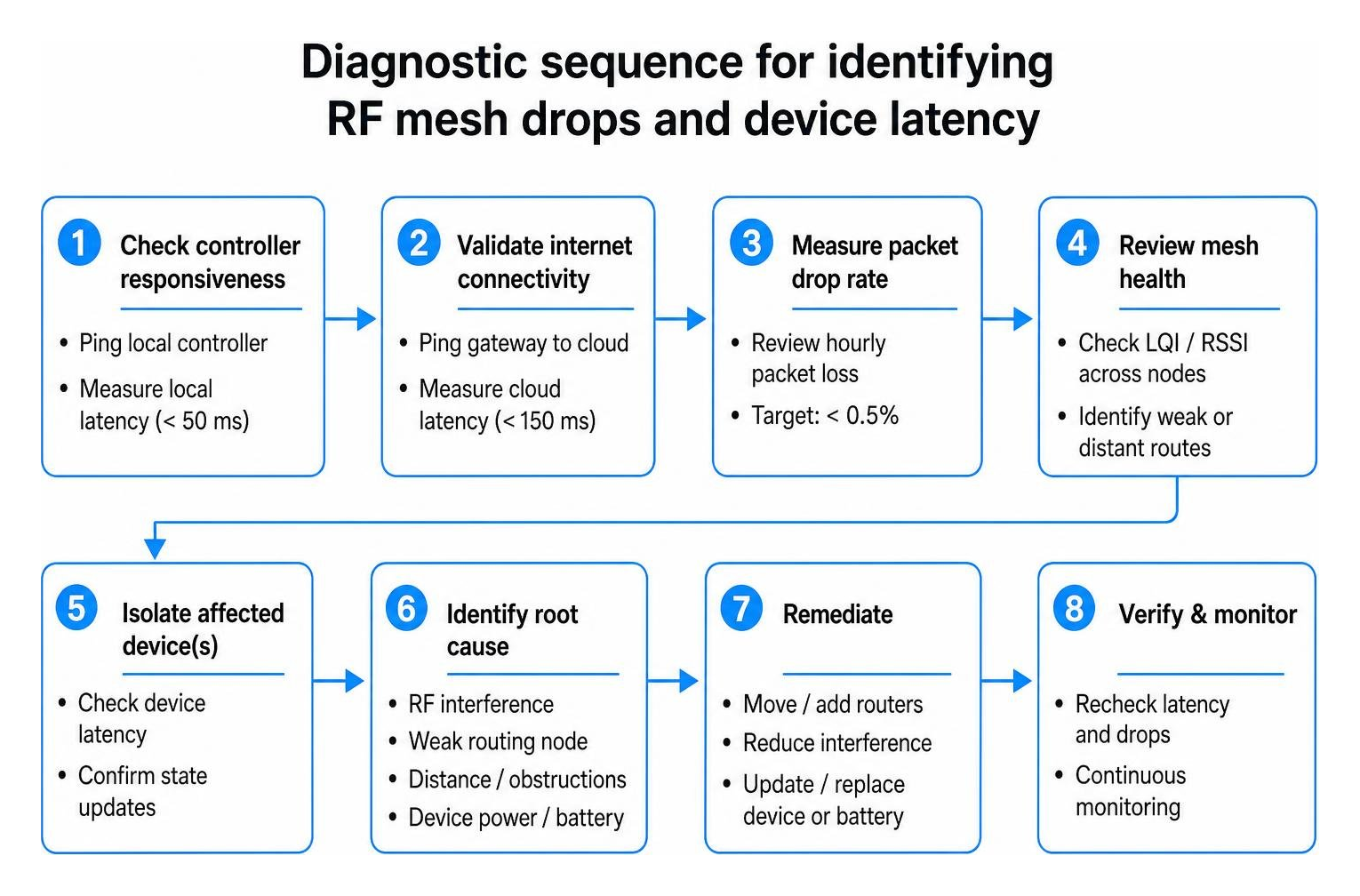
  • Network Health Audits: Monitoring Zigbee and Z-Wave mesh routing tables, verifying RF signal strength, and eliminating channel interference caused by neighboring Wi-Fi networks.
  • Local Backup Verification: Regularly auditing configuration backups and testing physical restoration workflows to ensure business continuity.
  • Proactive Battery Replacement Schedules: Tracking battery voltage across hundreds of distributed sensors and replacing them during scheduled visits before devices go offline.

By managing these maintenance requirements through structured service memberships, franchise operators escape the boom-and-bust cycle of one-time project installations, creating predictable revenue and lasting customer retention.

Frequently Asked Questions About Local-First Smart-Home Integration Businesses

Can a local-first smart-home system function without an internet connection?

Yes. A properly engineered local-first smart-home runs 100% of its logic, sensor tracking, schedule triggers, and switch actuations on the local area network. Even during extended ISP outages or severe weather events that take down regional internet infrastructure, on-site wall switches, motion automations, environmental controls, and local security systems continue to operate without interruption.

How can prospective franchise owners evaluate equipment that does not require cloud subscriptions?

When selecting equipment partners, operators evaluate products using four criteria: native protocol support (Zigbee, Z-Wave, Thread), local API availability (MQTT, local REST, or native Matter binding), documentation of “Local Push” communication, and the absence of mandatory user account registration. Hardware that meets these standards guarantees that the physical device can be commissioned, operated, and maintained without ongoing vendor cloud connectivity.

Is a local-first integration business more difficult to operate and maintain?

While local-first integration requires deeper networking and protocol knowledge than setting up retail Wi-Fi gadgets, it delivers higher long-term reliability and fewer emergency support calls. Within our franchise framework, comprehensive technician training programs, standardized operating blueprints, and structured recurring-maintenance workflows simplify deployment, allowing operators to run a scalable, highly profitable service enterprise.

Conclusion

The growing demand for data privacy, near-instant system responsiveness, and freedom from subscription fatigue has made local-first automation the definitive standard for premium residential and commercial spaces. For prospective franchise buyers and independent low-voltage integrators seeking a scalable path forward, mastering home automation without cloud dependency provides an insurmountable competitive moat against retail installers.

Smartmait equips franchise operators with the standardized technical frameworks, comprehensive technician training pathways, and recurring-revenue business models necessary to lead the smart-building and integration industry in their exclusive territories.

If you are an established low-voltage contractor ready to convert your business to a structured national brand, or an ambitious entrepreneur evaluating executive franchise ownership opportunities in the expanding smart-building market, request your Smartmait franchise information package today to speak with our franchise development team.

Safe, Secure, and Cheaper: How Connected Tech Lowers Policy Costs

Smart Home Insurance Discounts Can Create Recurring Service Demand

Smart home insurance discounts can help franchise operators sell more than one-time installations. Connected water-leak sensors, freeze alarms, monitored security systems, and smart smoke or carbon monoxide detectors can reduce the chance or cost of a claim. When customers ask about potential policy credits, a well-run integration business can provide the installation, documentation, testing, and ongoing support they need. According to the Insurance Information Institute, policyholders should review coverage details and risk-reduction options with their carrier.

For prospective Smartmait franchise owners, the opportunity is clear:

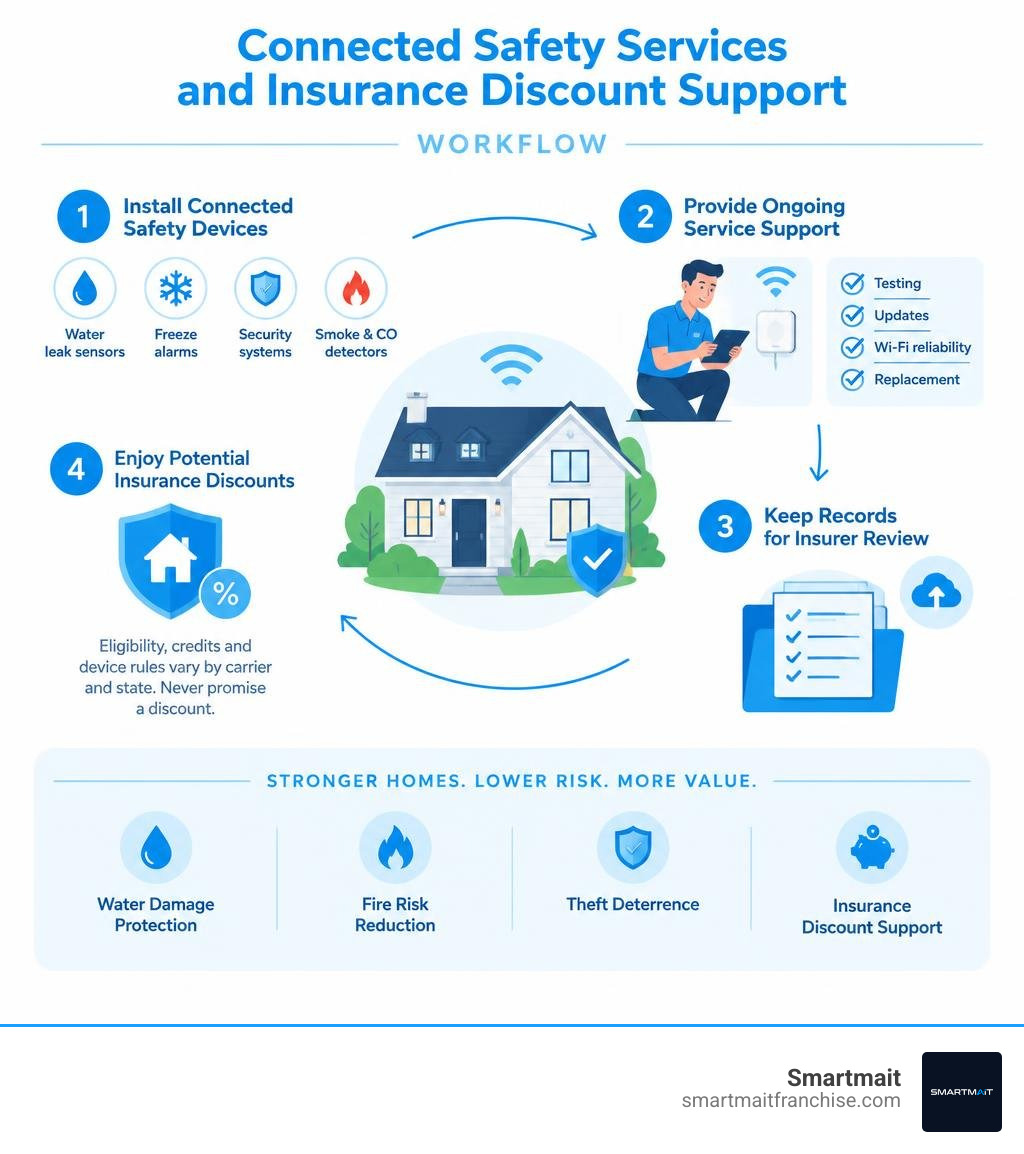
  1. Install connected safety devices that address costly water, fire, and theft risks.
  2. Build service plans for testing, firmware updates, Wi-Fi reliability, and device replacement.
  3. Help customers keep installation records and monitoring details for insurer review.
  4. Never promise a discount – eligibility, credits, and device rules vary by carrier and state.

Water prevention is especially valuable. About 1 in 60 homes has a water or freezing claim each year, with average water damage claims near $14,000. That makes leak detection and automatic shutoff systems a strong foundation for recurring customer relationships, not just a smart-home add-on.

I am Dominic Hesano, a franchise development professional and operator building Smartmait in the smart-home, low-voltage, security, networking, and automation space. My experience with connected-system installation, support, and service models informs how franchise operators can approach smart home insurance discounts as a customer-value and recurring-revenue opportunity.

Connected safety services and insurance discount support workflow infographic

Smart home insurance discounts vocab explained:

How Smart Home Insurance Discounts Create a Franchise-Service Opportunity

Connected technology installation and maintenance service model

For entrepreneurs evaluating a franchise territory and independent low-voltage integrators seeking an operational roadmap, the smart home landscape has fundamentally shifted. As of September 2026, connected devices are no longer viewed merely as luxury lifestyle conveniences. Instead, major property and casualty insurers treat connected sensors as essential risk-mitigation assets.

Nearly six out of ten property owners express a desire to invest in connected devices specifically capable of detecting issues, issuing real-time alerts, and stopping property damage before it escalates. When policyholders realize that risk-reducing hardware can lead to potential premium credits—often ranging from 1% to 3% for basic intrusion setups and up to 5% to 15% for comprehensive, professionally monitored multi-peril systems—demand for certified deployment surges.

This consumer incentive creates an ideal bridge for franchise operators to move beyond transactional, one-and-done hardware jobs. By building recurring service memberships centered on system health, sensor calibration, and network uptime, franchise businesses create lasting relationships. Operators who understand how to choose the best smart home monthly service for peace of mind can structure operational packages that solve long-term maintenance headaches for clients while establishing predictable operational flow.

Service Category Primary Perils Addressed Consumer Risk Profile Franchise Service & Maintenance Opportunity
Flow-Based Water Defense Non-weather leaks, plumbing bursts, supply line failures High frequency; ~$14,000 average claim severity Annual valve testing, flow sensor calibration, emergency shutoff bypass checks
Low-Temperature & Freeze Monitoring Sub-freezing pipe ruptures, HVAC failure during winter Seasonal spikes; ~$27,000 average claim severity Pre-winter sensor checks, threshold alert testing, battery replacements
Life Safety & Fire Detection Electrical fires, smoldering materials, carbon monoxide Catastrophic loss; life safety threat Smoke sensor cleaning, acoustic listener checks, central monitoring link audits
Perimeter & Monitored Intrusion Burglary, forced entry, package theft ($15B annual impact) High property loss; top 5 loss peril Camera firmware updates, sensor alignment, central dispatch connectivity testing
Connected Appliance Telemetry Internal component failures, overflow, thermal runaway Appliance wear and surge damage IoT gateway sync, diagnostic reporting, appliance integration checkups

Quantifying Potential Revenue by Device and Service Category

Understanding how insurers categorize property hazards helps franchise owners configure their service catalogs effectively. Water damage remains the second most frequent homeowners insurance claim behind wind and hail. Non-weather water claims and frozen pipe bursts represent massive losses—an average frozen-pipe claim costs approximately $27,000.

Because of this severity, insurers reward active protection. Devices such as automated water shutoff valves, acoustic pipe sensors, and sub-floor leak detectors carry significant weight in insurer discount matrices. Similarly, monitored life-safety sensors that detect smoke, rapid heat rise, and electrical arcing address catastrophic fire risks. When combined with whole-home security, these installations help clients pursue policy savings while creating four distinct service touchpoints for franchise operators:

  1. Initial Site Evaluation and System Architecture: Assessing plumbing risers, entry points, and high-risk electrical zones.
  2. Precision Low-Voltage and Sensor Deployment: Commissioning hardware according to carrier and manufacturer standards.
  3. Third-Party Central Station Integration: Establishing verified reporting links to licensed central monitoring stations.
  4. Scheduled Maintenance and Recertification: Providing routine battery changes, valve cycling, and documentation updates for policy renewal.

How Insurance Risk Reduction Shapes Service Demand

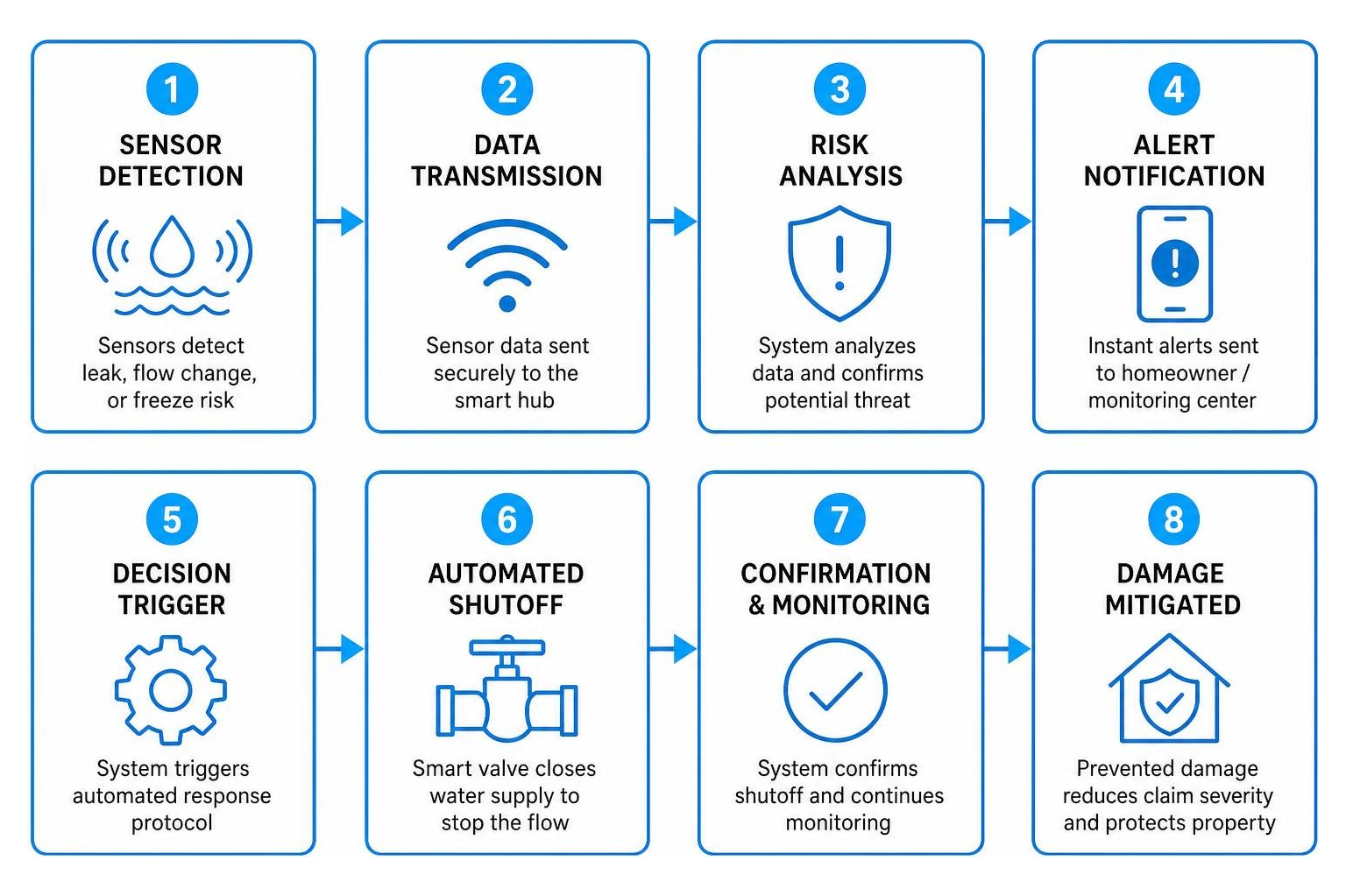
Insurance carriers build their underwriting on actuarial models that reward verified loss reduction. When a smart home platform detects a plumbing breach and actuates a physical ball valve in milliseconds, it transforms a potential five-figure claim into a minor mop-up.

Franchise operators serve as the trusted technical professionals who ensure these systems remain operational over time. Insurers increasingly seek verified installations, as unmaintained DIY sensors with dead batteries or disconnected Wi-Fi provide zero real-world protection.

When positioning these capabilities, franchise owners must train their field teams to speak clearly about risk reduction while maintaining strict compliance: never promise or guarantee specific discount percentages. Because underwriting guidelines, policy endorsements, and multi-policy bundling rules vary widely across carriers, our operational model focuses on delivering professional documentation, certified installation, and robust technical support.

High-Impact Service Categories for Smart-Home and Smart-Building Franchise Operators

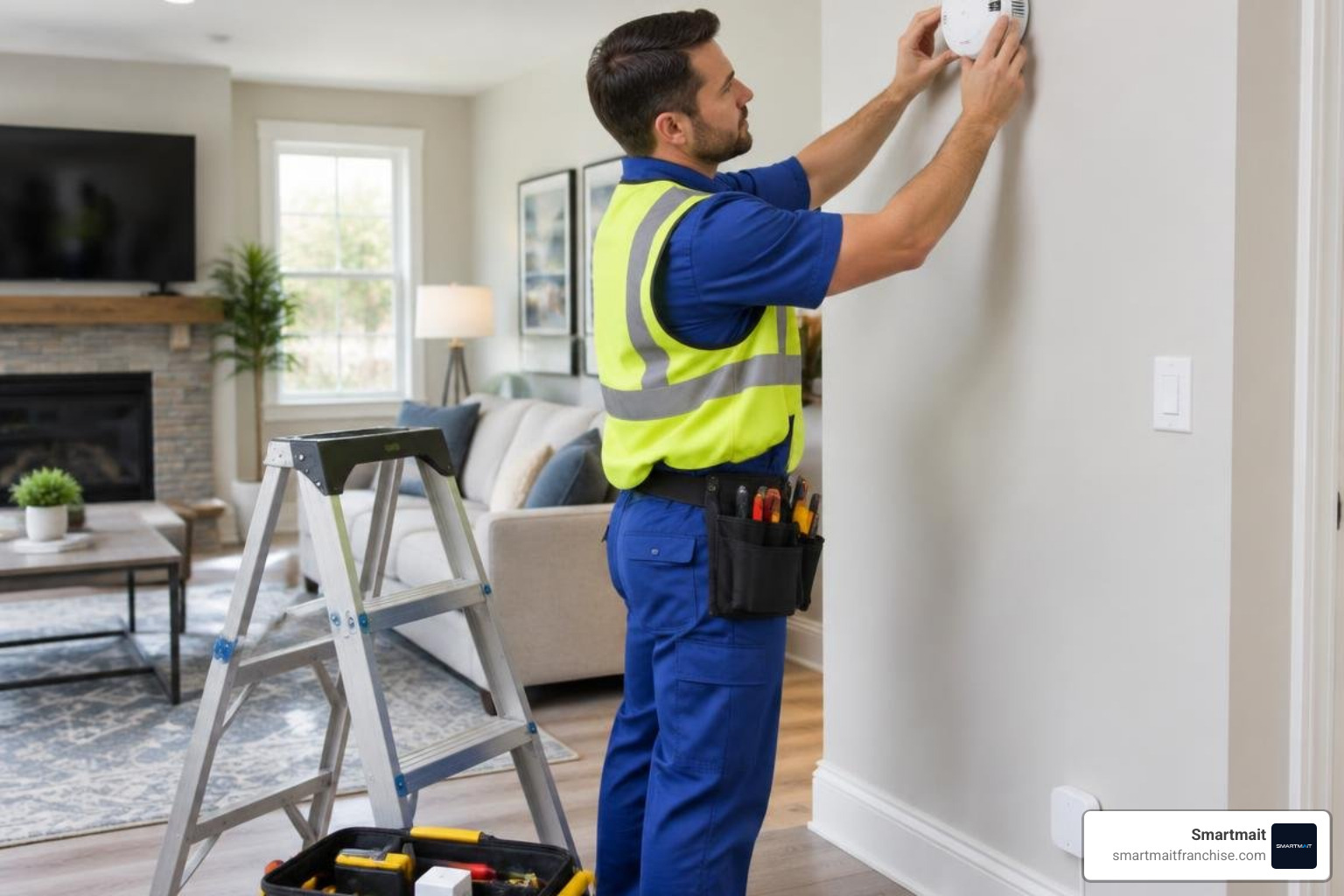
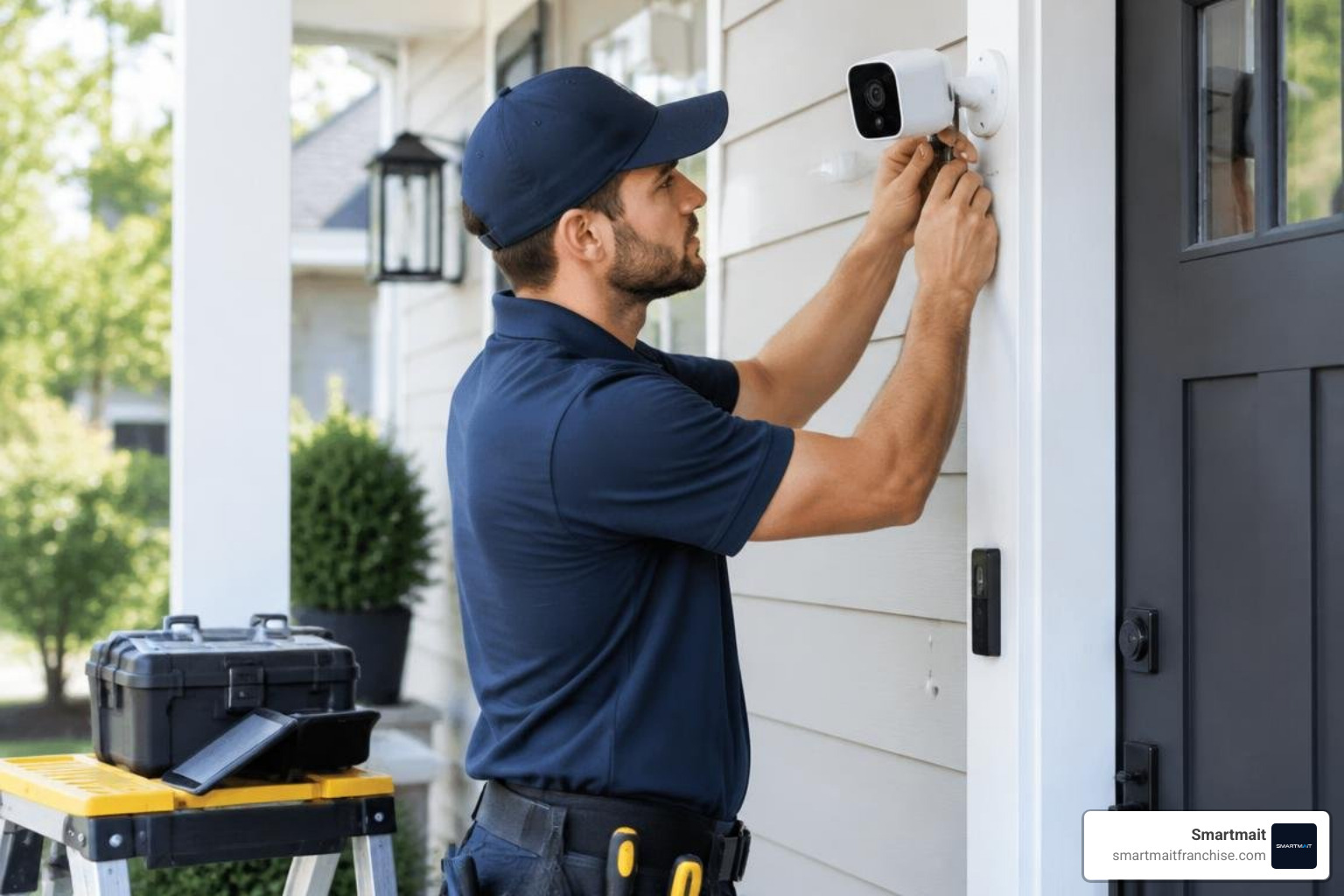
Technician installing smart safety and monitoring systems

Operating a territory successfully requires a deep understanding of which hardware ecosystems provide measurable risk mitigation. Systems that simply control ambient lighting or play music rarely move the needle for underwriting departments. In contrast, protective infrastructure directly protects properties against the primary drivers of insurance claims.

Risk mitigation flow from sensor detection to automated shutoff

Franchise owners benefit from organizing their service offerings around integrated systems that offer multi-layer protection, making it easier to scale their service footprints.

Water and Fire Prevention Services That Support Customer Retention

Water mitigation technology has evolved into two primary operational tiers: point-of-use wireless pucks placed near appliances, and whole-building, inline flow-monitoring valves. Whole-building systems monitor pressure dynamics, water flow rates, and ambient pipe temperatures to spot micro-leaks and freeze conditions.

Pairing flow monitors with electrical hazard sensors and certified life-safety detectors provides broad peril coverage:

  • Automated Shutoff Infrastructure: Motorized valves that cut main water supplies instantly upon moisture detection.
  • Freeze-Warning Nodes: Thermal probes that alert property owners before sub-freezing indoor temperatures cause structural pipe bursts.
  • Acoustic and Electrical Monitoring: Sensors that identify electrical micro-arcs and abnormal heat signatures inside breaker panels before structural ignition occurs.
  • Connected Life Safety: Hardwired or wireless smoke and carbon monoxide detectors linked to unified communication hubs for instantaneous remote alerting.

These systems require routine operational audits. Valves must be cycled to prevent mineral buildup, sensor batteries require scheduled testing, and IoT communication protocols need ongoing optimization. This requirement naturally aligns with a recurring service membership model.

Monitored Security and Smart Locks as Ongoing Service Offerings

Burglary and property crimes consistently rank among the top five property loss perils, while package theft alone accounts for an estimated $15 billion in annual consumer losses. Consequently, insurance carriers have long provided premium credits for properties equipped with monitored intrusion detection.

Modern connected security pairs physical barriers with real-time digital verification:

  • Central Station Monitored Alarms: Security panels connected via redundant cellular paths to professional dispatch centers.
  • Smart Deadbolts and Access Control: Keyless commercial-grade access systems providing encrypted access logs and remote locking capabilities.
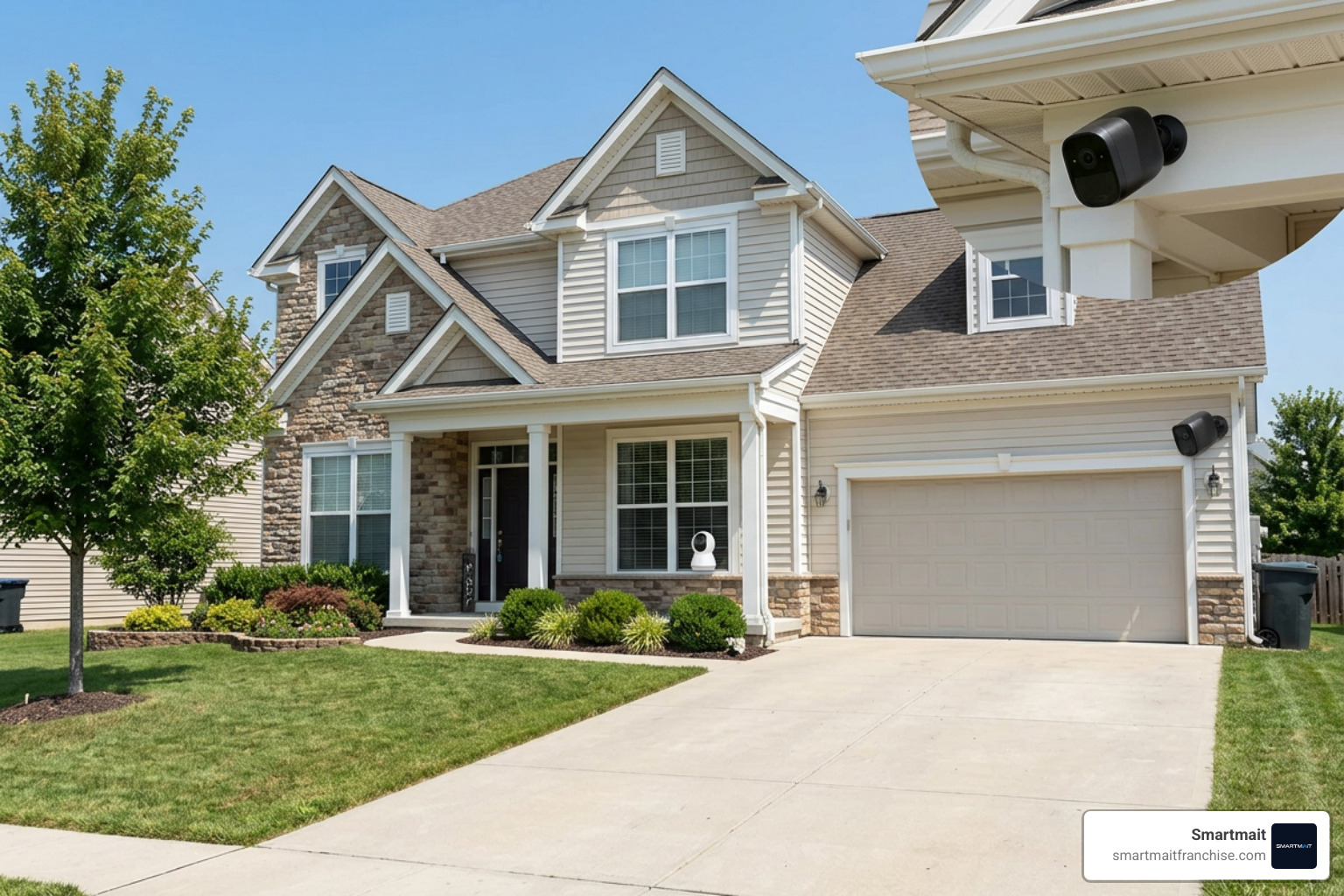
  • Perimeter Optical and Motion Sensors: High-resolution video doorbells and exterior cameras with intelligent motion filtering to deter unauthorized entry.

By helping property owners find the best home security options, franchise operators install reliable systems that deter intrusion while supporting the owner’s eligibility for protective device credits.

Smart Appliances and Connected IoT Platforms in a Franchise-Service Model

The Internet of Things (IoT) has expanded into major household appliances. Modern refrigerators, dishwashers, washing machines, and water heaters now feature integrated telemetry and internal moisture sensors. This connectivity opens new service avenues for low-voltage integration businesses.

Recent industry developments highlight this momentum. Initiatives such as the collaboration between Samsung Electronics and Hartford Steam Boiler (HSB) under the Home Connectivity Alliance (HCA) specifications illustrate how real-time appliance data can support insurance risk evaluation. When appliances communicate diagnostic health and early risk indicators directly through platforms like SmartThings, property owners can unlock policy benefits while staying ahead of equipment breakdowns.

Qualifying Connected Appliances and Integration Opportunities

For a franchise operator, connected appliances represent an expanding endpoint ecosystem that requires setup, network configuration, and ongoing management. Appliances manufactured from 2020 onward frequently include onboard intelligence capable of detecting internal flow abnormalities, pump failures, and power anomalies.

Franchise technicians can assist clients by establishing a unified gateway for all connected devices. By helping customers set up unified home management systems, operators ensure that diagnostic alerts reach the customer immediately. Technicians can also offer preventative service calls when appliance sensors register abnormal operational patterns, transforming raw telemetry into proactive maintenance visits.

Balancing Data Sharing, Cybersecurity, and Malfunction Risks

While connected technology brings significant protective advantages, it introduces digital vulnerabilities that require professional oversight. Unsecured IoT devices can expose networks to unauthorized access, and unstable local Wi-Fi networks can cause sensors to drop offline, leaving properties unprotected.

Franchise businesses can address these challenges by providing comprehensive network hardening services:

  • Network Segmentation: Isolating smart home devices and safety sensors on secure, dedicated virtual local area networks (VLANs).
  • Firmware Lifecycle Management: Routinely auditing and updating device firmware to patch emerging cybersecurity vulnerabilities.
  • Power Stability Infrastructure: Installing battery backups and surge suppression to keep security gateways and shutoff valves operational during power outages.
  • Data Privacy Consultation: Assisting property owners with opt-in protocols so they share only necessary operational data with insurance partners.

Establishing robust technical foundations helps franchise operators protect their clients’ digital privacy while maintaining the reliability of physical safety systems.

Building a Compliant, Recurring-Revenue Franchise Offering

Transitioning from an ad-hoc installation business to an organized, multi-territory franchise requires standardized operational processes. For independent business owners considering conversion, building a recurring-revenue model centered on maintenance and compliance offers operational stability.

Franchise organizations support operators with standard operating procedures for system verification, technician training, and customer service delivery. When an integration business provides documented proof of installation and regular system testing, it delivers tangible value that helps clients validate their protective equipment with insurance providers.

Required Documentation and Verification Steps

Insurance carriers maintain strict verification processes before applying protective credits to a policy. Franchise technicians must follow structured commissioning checklists to ensure clients receive complete documentation:

  • Certificate of Professional Installation: Formal documentation detailing the make, model, serial numbers, and physical locations of installed safety hardware.
  • Central Station Monitoring Agreements: Proof of an active monitoring contract with an accredited, licensed dispatch facility.
  • Activation Compliance Verification: Ensuring devices are fully commissioned, connected to carrier-approved applications, and functional within carrier-specified onboarding windows (such as 55-day activation timelines).
  • Annual System Health Logs: Maintained records of annual valve cycling, sensor testing, and battery replacements to support policy renewals.

Establishing consistent documentation workflows protects the credibility of the franchise while making policy updates straightforward for clients.

Evaluating Market Demand and Service Eligibility

Market demand for connected safety installations varies across geographic territories based on climate conditions, regional perils, and state insurance regulations. For example:

  • Western States: Carriers often emphasize brushfire defense, water mitigation, and perimeter intrusion protection, with distinct discount structures across perils.
  • Northern and Cold-Climate States: Freeze warnings, pipe-temperature sensors, and automated water shutoff systems see elevated demand due to seasonal freeze-thaw cycles.
  • All-Peril Markets: States like Washington often utilize standardized all-peril discount frameworks for participating connected homes.

Independent contractors exploring conversion to a franchise network can leverage territory research to align their service mix with regional demands. By understanding regional climate risks and carrier requirements, franchise owners can package the right balance of life-safety, water-defense, and security services for their local customer base.

Frequently Asked Questions About Smart Home Insurance Discounts for Franchise Owners

Do franchise operators need professional installation capabilities to support smart home insurance services?

Yes, professional installation capabilities are essential for operating a compliant smart-building franchise. While consumers can purchase basic DIY battery-powered sensors, insurance carriers frequently reserve their most significant protective device credits for hardwired, professionally commissioned, or central-station-monitored installations.

Franchise technicians receive structured training to install high-voltage and low-voltage interfaces, plumb automated shutoff valves safely, segment network traffic, and provide the formal documentation carriers require for policy endorsements.

How can smart appliances create recurring revenue for franchise operators?

Smart appliances generate recurring revenue through structured service memberships, regular diagnostic inspections, and proactive maintenance visits. Connected appliances report real-time operational status, such as filter clogs, pump strain, power surges, and moisture leaks.

Franchise operators can provide subscription-based system checkups, audit IoT connectivity, update device firmware, and inspect mechanical connections, resolving small issues before they escalate into major water damage or electrical hazards.

Do smart home insurance discounts vary by state and insurance provider?

Yes, smart home insurance incentives vary significantly by state jurisdiction and insurance carrier. State insurance commissioners regulate how carriers structure policy credits, resulting in varying discount caps and peril-specific rules across state lines.

Furthermore, carriers maintain proprietary risk algorithms—some offer free or subsidized loss-prevention hardware upon policy enrollment, while others apply premium reductions upon receiving proof of professional monitoring. Franchise owners are trained to navigate these regional variations to guide their clients effectively.

Conclusion

The expansion of connected safety technology has transformed how property owners manage risk and how low-voltage professionals structure their businesses. By moving beyond one-off hardware sales, integration companies can build sustainable operations powered by recurring service memberships, routine maintenance, and certified system support.

Smartmait positions franchise owners to lead this evolving market. As a seller of elite U.S. franchise territories in the low-voltage and smart-building integration industry, we equip operators with proven workflows, technician training, and comprehensive support systems. Whether you are an experienced entrepreneur evaluating a new business opportunity or an established independent integration contractor seeking to scale beyond owner-dependent operations, our franchise model provides the framework to build a modern, service-driven enterprise.

To learn more about territory opportunities, operational support, and our franchise evaluation process, scale your enterprise with a premier smart building and low-voltage franchise and request your comprehensive franchise information package today.
What an Elite Smart Energy Monitor Reveals About Household Power Drain

See the Household Power Drain Your Utility Bill Hides

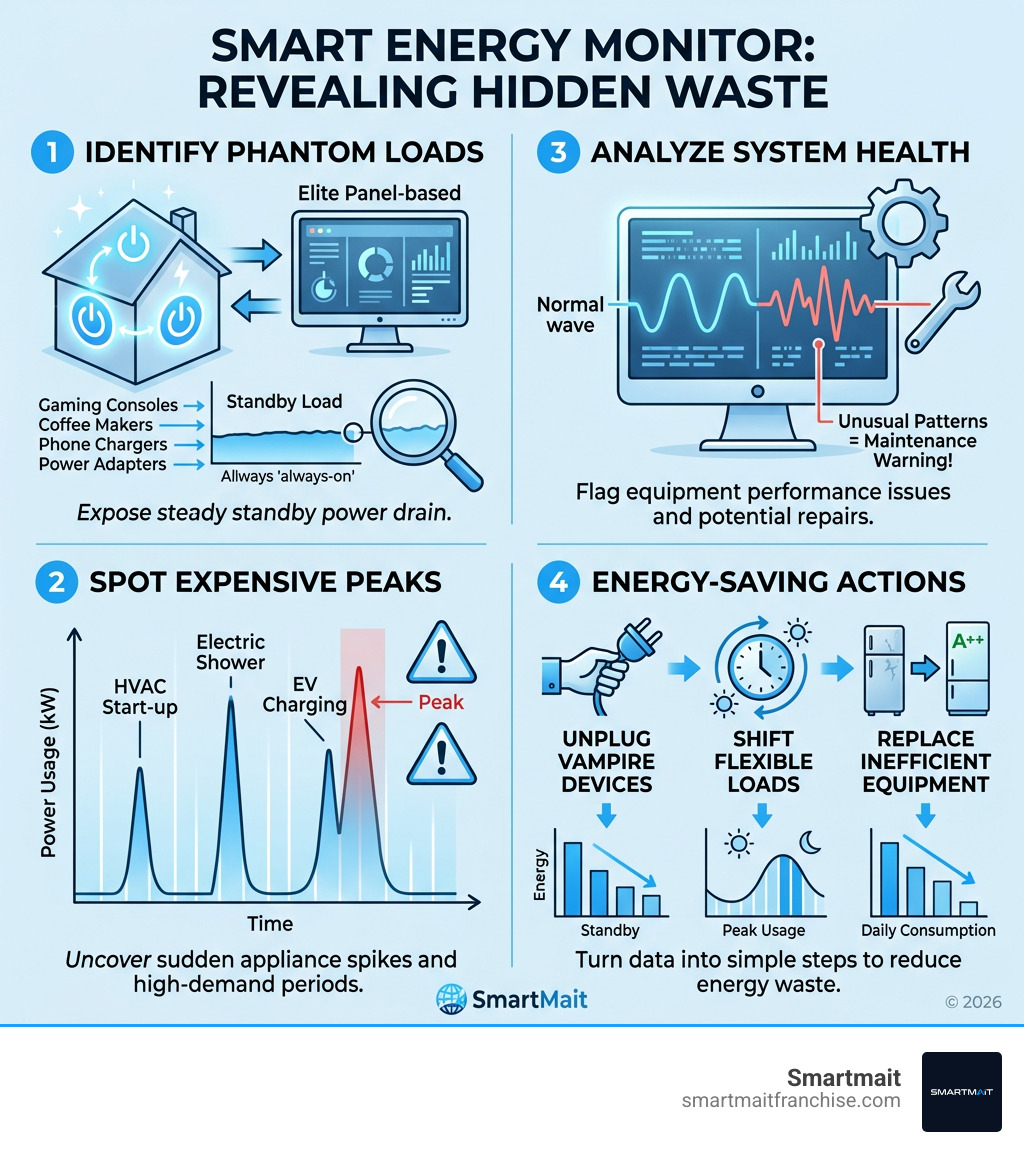
An elite smart energy monitor shows how and when your home or small business uses electricity in real time. It can expose steady standby loads, sudden appliance spikes, and peak-demand habits that a monthly utility bill cannot explain. The best model depends on the job: a Wi-Fi circuit monitor may suit a single appliance, while a panel-based meter with CT clamps, power-quality data, and open protocols is better for whole-building tracking.

Use the data to answer three practical questions:

  1. What is drawing power when everything seems off? This is where phantom or vampire loads often appear.
  2. Which loads cause expensive peaks? HVAC equipment, water heating, cooking, and EV charging are common suspects.
  3. Is the system operating normally? Unusual consumption patterns can flag equipment that needs attention before it becomes a larger repair.

Unlike a standard utility smart meter, higher-spec monitors can deliver faster readings, circuit-level visibility, historical logs, and integration with solar, batteries, EV chargers, or building controls. They do not reduce a bill by themselves. Their value is turning hidden consumption into clear actions: shift flexible loads, remove waste, and investigate abnormal demand.

I am Dominic Hesano, a SmartMait business operator with experience building practical home and business automation services, including connected systems that help customers understand and manage energy use. In this review, I will break down what an elite smart energy monitor can reveal, where each monitor type fits, and what to consider before installation.

Infographic showing monitor data revealing standby load peaks and energy-saving actions infographic

Elite smart energy monitor vocabulary:

Core Architecture of an Elite Smart Energy Monitor

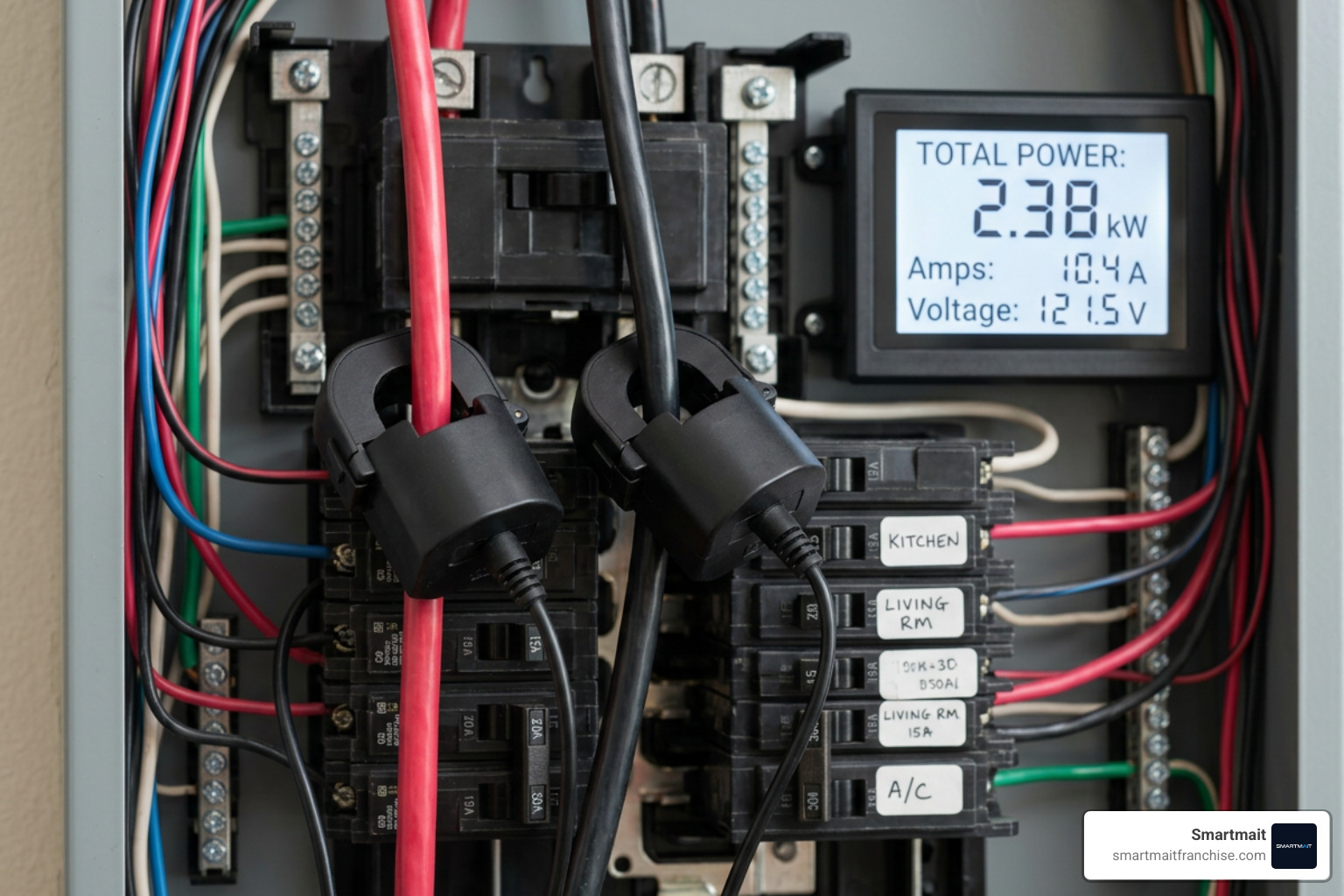
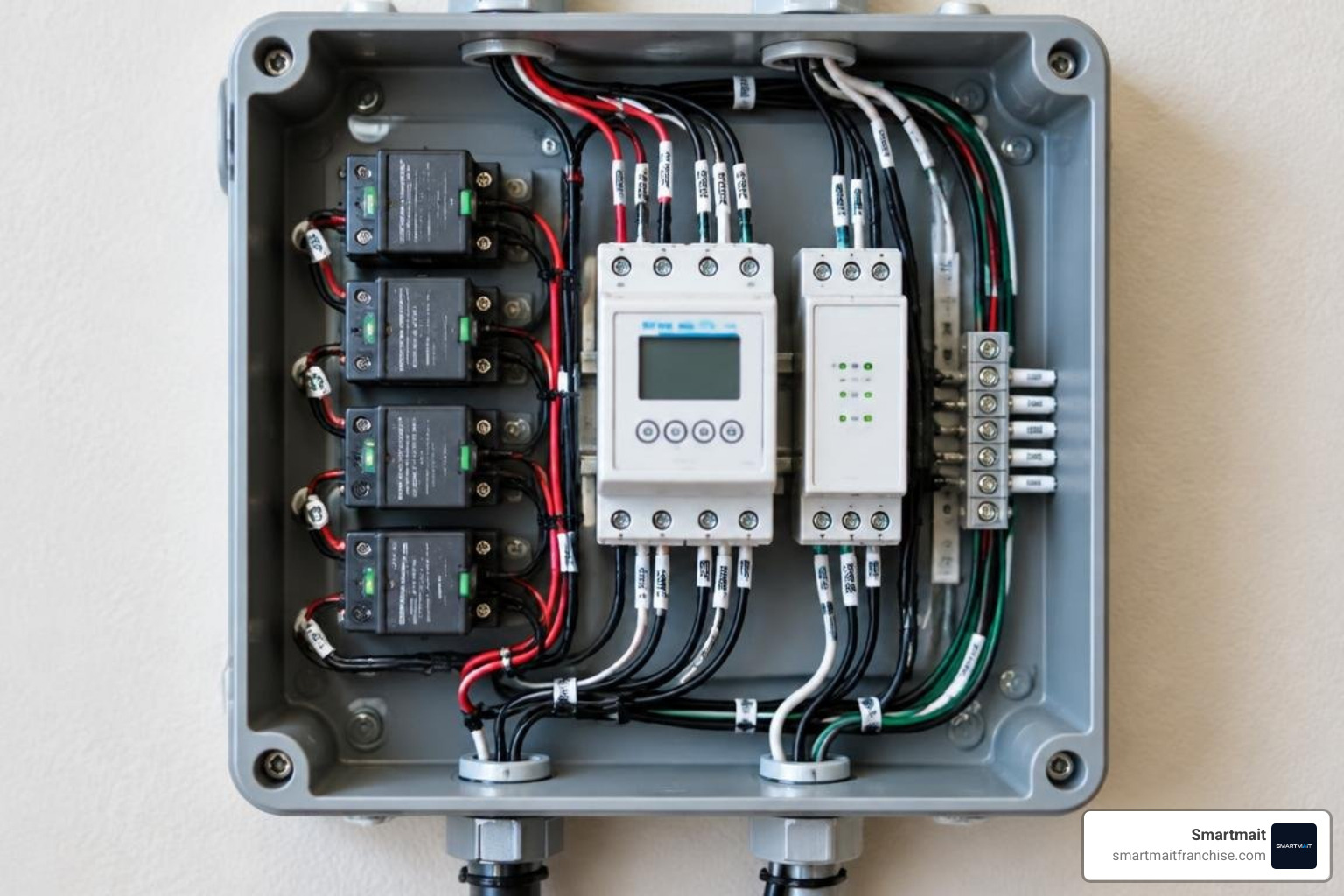
split-core current transformer sensors and digital panel display

At the heart of any high-performance electrical monitoring system is the hardware responsible for sensing, calculating, and transmitting energy metrics. While basic consumer gadgets simply estimate wattage by tracking active runtime, professional hardware measures voltage and current simultaneously to deliver True-RMS (Root Mean Square) calculations.

Modern residential and light commercial buildings are filled with non-linear loads—computers, variable-frequency heat pumps, LED lighting drivers, and electric vehicle chargers. These devices distort the standard alternating current (AC) sine wave. Without True-RMS measurement and high-frequency sampling (often 156 samples per cycle or higher), standard monitors miscalculate total power factor and introduce severe measurement errors. Implementing holistic smart home power management requires hardware that handles these non-linear loads with high fidelity.

Current acquisition generally relies on three sensor architectures:

  1. Split-Core Current Transformers (CTs): Hinged ferrite or iron core clamps that snap around insulated conductors without requiring service disconnection. Standard ratings range from 50A up to 200A for residential sub-panels.
  2. Rogowski Coils: Flexible, rope-like induction loops designed for high-current applications (up to 4000A) or tight switchgear where rigid CTs cannot physically fit. They do not saturate at high amperage and offer exceptional linearity.
  3. Pass-Through Mechanisms: Integrated terminal blocks where conductors pass directly through internal sensing loops on the meter chassis, eliminating external sensor wiring entirely while minimizing burden on the measured circuit.

Measurement Precision and Industrial Accuracy Classes

Metering performance is governed globally by standards such as IEC 62053-21 and IEC 62053-22. Standard utility meters typically offer Class 1.0 or Class 2.0 accuracy, allowing a 1% to 2% margin of error across their operating range. In contrast, revenue-grade and high-tier hardware achieve Class 0.5S or Class 0.2S standards.

The “S” designation signifies that the meter maintains its strict accuracy threshold (0.2% or 0.5% maximum error) across the entire dynamic load curve—even at low loads below 5% of rated current. This precision makes the difference between catching a 12-watt phantom standby load and losing it in sensor noise. Advanced multi-function meters like the Elite 500 capture these micro-variations alongside complex power-quality parameters, including voltage sags, swells, and total harmonic distortion (THD).

Data Capture, Sampling Frequencies, and Real-Time Logging

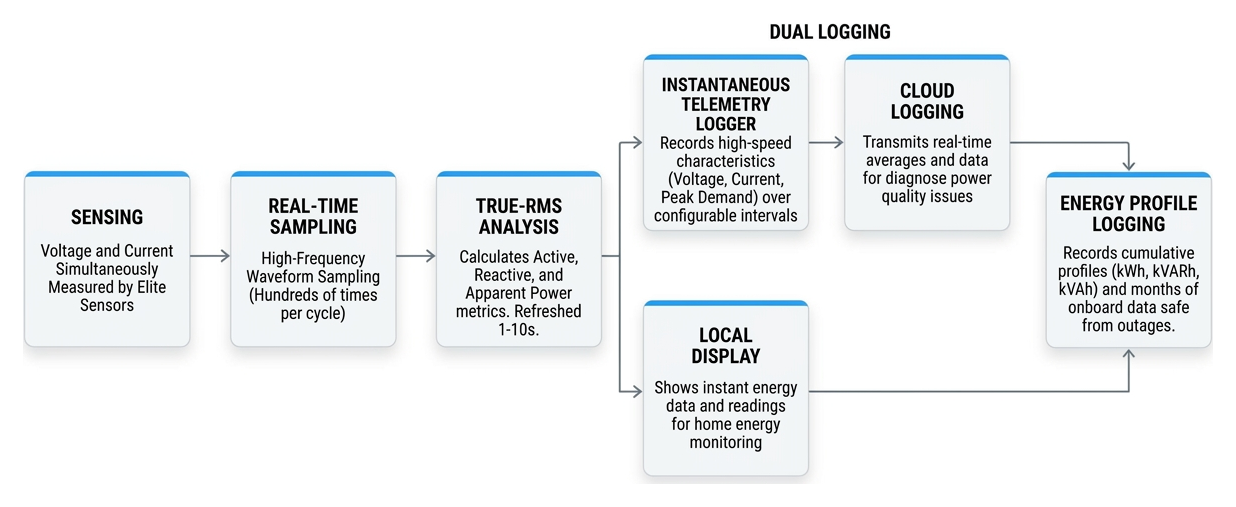
Sampling speed dictates what an energy monitor can expose. Inexpensive monitors update their telemetry once every 30 to 60 seconds. An elite system samples electrical waveforms hundreds of times per cycle, calculating real-time averages refreshed every 1 to 10 seconds.

Sequence of real-time sampling waveform analysis dual logging to cloud and local display

High-end monitoring systems employ dual-logging architectures:

  • Instantaneous Telemetry Loggers: Capture high-speed electrical characteristics (voltage fluctuations, current surges, peak demand) over configurable rolling intervals to diagnose power quality issues.
  • Energy Parameter Loggers: Record cumulative active (kWh), reactive (kVARh), and apparent (kVAh) energy profiles across specific time-of-use (TOU) tariff windows, holding months of onboard data safe from network outages.

Comparing Top Models: Features, Capacity, and Protocols

Selecting the right monitor requires matching the hardware’s physical capacity and software integration capabilities with your electrical distribution setup.

Specification / Feature SONOFF POW Elite (POWR320D) Secure Meters Elite 100 / 300 Secure Meters Elite 500
Primary Target Market Residential Appliance / Dedicated Circuit Commercial / Light Industrial Panel Industrial Substation / Smart Facility
Current Capacity Up to 20A direct 50mA to 6A (via external CT) Up to 4000A (via CT or Rogowski coil)
Accuracy Standard Typical Consumer (~1%) Class 1.0 / Class 0.5S (IEC 62053) Class 0.2S / Class 0.5S (IEC 62053-22)
Display Type Real-Time Monochrome LCD High-Visibility LED / Multi-Line LCD 3.5-inch Color TFT Graphical Display
Communication Protocols Wi-Fi (2.4 GHz), LAN, Matter/eWeLink Modbus RTU (RS-485) Modbus TCP/RTU, BACnet IP, Profinet, IEC 61850
Harmonic Analysis None Up to 31st Harmonic THD Up to 31st Individual Harmonic + THD
Mounting Format DIN Rail Mount DIN-96 Panel Cutout (92x92mm) DIN-96 Panel Cutout (Modular Expansion)

Evaluating the SONOFF POW Elite Smart Energy Monitor for Circuit Protection

For targeted branch circuits or high-draw appliances (such as dedicated workshop tools, portable air conditioners, or pool pumps), the SONOFF POW Elite provides an accessible entry point.

Featuring load capacities of 16A (POWR316D) or 20A (POWR320D), it features an on-chassis LCD display that shows instantaneous wattage, amperage, and voltage without requiring a smartphone. Internally, the unit stores 6 months of historical consumption data at hourly intervals, which can be exported directly to Excel spreadsheets for cost analysis.

Crucially, it acts as a smart circuit interruptor. Users can configure automated safety thresholds—if voltage drops below 100V or power exceeds 4000W, the internal relay trips within milliseconds, protecting sensitive electronics from utility brownouts or dangerous thermal overloads.

Industrial Accuracy: The Secure Meters Elite Smart Energy Monitor Series

For comprehensive main panel monitoring, sub-metering, and three-phase building installations, multi-line panel meters deliver utility-grade analytics. The Elite 100 and 300 series uses a pass-through current termination mechanism, allowing simple, robust connections with minimal measurement burden.

These units feature True-RMS tracking across 3-phase 3-wire and 3-phase 4-wire systems, tracking active and reactive power, power factor, and harmonic distortion up to the 31st harmonic order. With DIN-96 panel mounting and RS-485 Modbus RTU communication, they link into broader energy management platforms. Exploring smart energy monitoring setups reveals how this level of data granularity forms the bedrock of professional building efficiency.

Uncovering Hidden Household Power Drains and Standby Waste

electrical diagnostics tool measuring power draw on home equipment

The primary financial return from deploying an elite energy monitor stems from unmasking phantom loads—appliances drawing continuous power even when seemingly switched off. In typical homes, continuous standby power accounts for 5% to 15% of total electric consumption.

An elite monitor with sub-second resolution and high accuracy classes reveals distinct operational signatures:

  • HVAC Compressor Degradation: As heat pump or air conditioner compressors wear down, their starting inrush current spikes significantly higher, and running wattage climbs over time for identical cooling loads. Catching this early prevents mid-summer system failures.
  • Refrigeration Cycle Anomalies: A failing door seal or dirty condenser coil causes a refrigerator’s compressor cycle to extend from 20 minutes per hour to 45 minutes per hour, creating an unexplained 200W constant draw.
  • Water Heater Element Scaling: Mineral buildup on electric water heater elements forces the unit to fire longer and more frequently to reach temperature setpoints, visibly expanding daily run-times on load profile charts.

Integrating continuous energy tracking into a wider smart home automation system allows homeowners to configure automated load shedding—cutting power to entertainment centers, standby home offices, and secondary appliances during expensive peak tariff windows.

Integrating Monitors with Solar Arrays, Batteries, and EV Chargers

Modern electrification demands bi-directional energy visibility. Traditional utility meters frequently fail to convey whether rooftop solar generation is being self-consumed efficiently or exported to the grid at unfavorable feed-in rates.

Elite monitors measure bidirectional power flow across all service phases. When integrated with smart battery storage solutions, the monitoring system commands the battery inverter to absorb surplus solar production instantaneously rather than letting it backfeed into the grid.

Similarly, for Level 2 EV chargers, real-time current telemetry enables dynamic load balancing. If the home’s total demand approaches the service panel’s 100A or 200A capacity limit (for example, when the oven and HVAC turn on simultaneously), the energy monitor signals the EV charger to throttle down charge amperage, preventing main breaker trips without requiring expensive electrical service upgrades.

Practical Installation Workflows and Sensor Configuration

Safe and accurate deployment requires strict adherence to standard electrical installation steps:

  1. Service De-energization: Switch off the main breaker before removing the dead-front panel cover. Always verify zero voltage across all busbars using a calibrated CAT III/IV multimeter.
  2. Current Sensor Placement: Snap split-core CTs around the primary incoming service feeds (Line 1, Line 2, and Neutral for single-phase split systems; L1, L2, L3 for three-phase systems).
  3. Sensor Orientation: Verify that the directional arrow stamped on each CT casing points directly toward the load (away from the utility meter). Reversing orientation results in negative wattage readings and inverted solar calculations.
  4. Voltage Reference Wiring: Connect fused reference taps from dedicated breakers to the monitor’s voltage sense terminals to enable True-RMS active power and phase-angle calculations.
  5. Phase Matching: Ensure the CT on Phase A corresponds precisely to the Voltage Reference input for Phase A. Mismatched phase pairing causes severe power factor calculation errors.

Frequently Asked Questions About Elite Smart Energy Monitors

How does an elite energy monitor differ from a standard utility smart meter?

Standard utility smart meters record gross energy consumption over 15- to 60-minute intervals primarily for monthly billing reconciliation. They provide zero visibility into which specific sub-circuits or appliances are consuming power. An elite smart energy monitor samples current and voltage continuously at sub-second speeds, tracks circuit-level power factor and harmonic distortion, updates local displays in real time, and exposes open communication protocols (Modbus, BACnet, Wi-Fi) for local automation and independent data verification.

Can an elite monitor detect failing appliances before they break?

Yes. Electrical equipment rarely fails without warning; motors and compressors exhibit increased electrical friction prior to mechanical breakdown. Elite monitors track inrush current spikes, total run duration, harmonic distortion, and power factor shifts. An unexpected 15% increase in baseline running wattage or an extended cycling frequency provides an early predictive maintenance indicator, allowing repairs before catastrophic failure occurs.

Do elite energy monitors require ongoing monthly subscriptions?

The professional-grade hardware detailed in this guide—including Secure Meters Elite series and SONOFF POW Elite units—operates without mandatory monthly subscriptions. They feature onboard non-volatile memory, local LCD/TFT displays, and open data export options (such as direct CSV/Excel downloads, local LAN control, or Modbus registers). While some cloud-centric consumer apps offer optional premium analytics tiers, core real-time monitoring and automation features function entirely subscription-free.

Conclusion

Understanding where your power goes is the foundation of modern building efficiency and electrical reliability. Whether tracking down vampire power drains on dedicated circuits with compact smart switches or monitoring full facility power quality with Class 0.2S multi-function meters, the right hardware turns complex electrical telemetry into actionable savings.

At Smartmait, we provide turnkey solutions that bridge the gap between advanced hardware installation and long-term optimization. Our certified technicians handle everything from panel retrofits and CT sensor calibration to solar, battery, and automation integration—ensuring your systems operate safely and at peak efficiency year after year. Explore Smartmait professional energy management services to take control of your property’s electrical infrastructure today.
Step-by-Step Intercom Installation for Modern Properties

Install an Intercom System Without Costly Rework

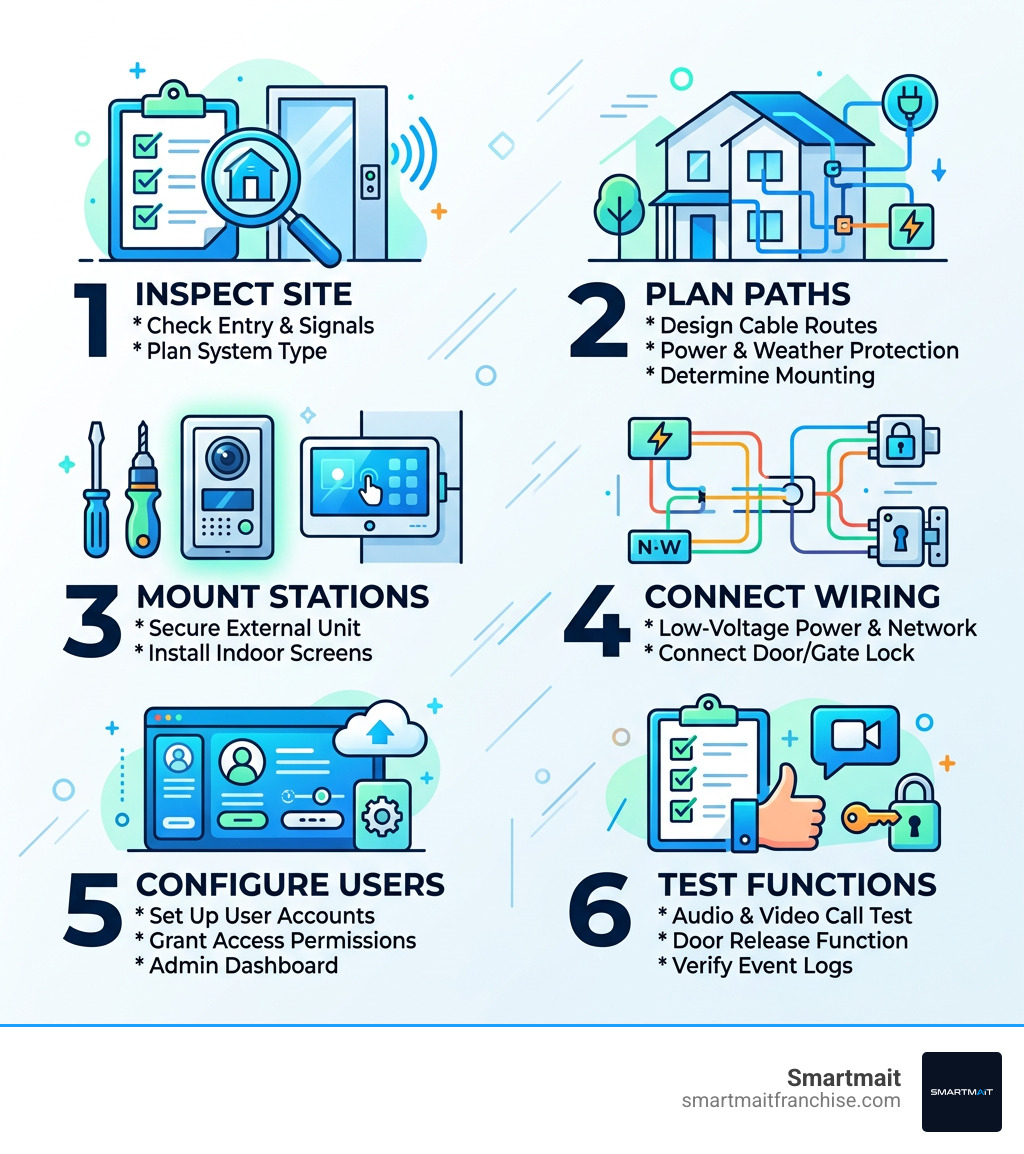
To install an intercom system reliably, start by checking the entry point, power source, cable route, door lock or gate release, and network or cellular signal. Then choose the system type that fits the property, mount the equipment securely, connect power and communications wiring according to the manufacturer diagram, configure users, and test every call and door-release function before handoff.

A simple installation sequence looks like this:

  1. Inspect the site and choose wired, wireless, IP, or cellular equipment.
  2. Plan cable paths, power, weather protection, and mounting height.
  3. Mount exterior and interior stations on solid, accessible surfaces.
  4. Connect low-voltage power, network wiring, and the strike or gate relay.
  5. Set up users, mobile access, and admin permissions.
  6. Test audio, video, lock release, backup behavior, and event records.

The details matter. Keep low-voltage intercom cable away from electrical lines to reduce noise, use weather-rated hardware outdoors, and verify signal strength before permanently mounting a Wi-Fi or cellular unit. For multi-unit properties, clear wire labels and a documented wiring map can save hours during future repairs.

I am Dominic Hesano, a home and business automation professional focused on low-voltage systems, security, networking, and connected-property technology. Through Smartmait, I help owners plan and install intercom system solutions that are practical to use, service, and support over time.

Intercom installation steps from site survey through testing infographic

Install intercom system word guide:

Planning and Choosing the Right Intercom System Architecture

Modern entry communication serves as the front line of access control, identity verification, and visitor management. Whether retrofitting a multi-tenant residential complex or adding an entry terminal to a private residence, choosing the right system architecture upfront prevents operational bottlenecks.

A successful installation requires evaluating physical building constraints alongside user management demands. An effective system must handle high call volumes, provide instantaneous video feeds, resist outdoor environmental wear, and seamlessly tie into broader smart home integration platforms.

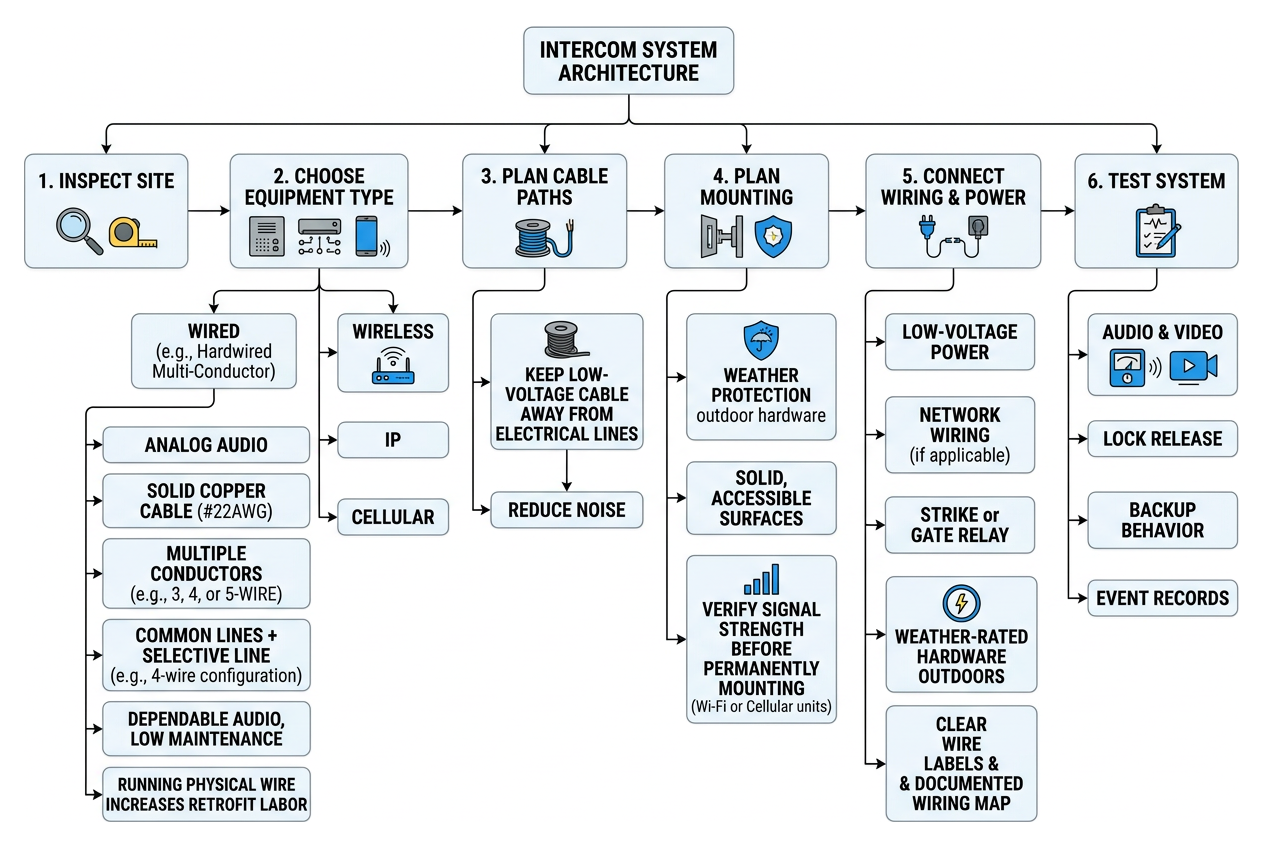
Intercom system architectural decision tree

Wired vs. Wireless and Cellular Solutions

Intercom hardware falls into three main architectural frameworks, each tailored to distinct building layouts:

  • Hardwired Multi-Conductor Systems: Traditional setups rely on 22-gauge (#22AWG) solid copper twisted-pair cables. These systems often utilize 3-wire, 4-wire, or 5-wire runs branching from a master central amplifier to interior substations. Standard 4-wire configurations—such as those detailed in multi-unit intercom wiring guidelines—utilize three common lines combined with one selective line per unit. They deliver dependable analog audio and low maintenance, but running extensive physical wire through finished structural walls drives up retrofit labor costs.
  • IP-Based Ethernet & PoE Systems: Modern smart intercoms primarily run on Cat5e or Cat6 outdoor-rated network cabling. Utilizing 48V Power over Ethernet (PoE, IEEE 802.3af/at Class 0), a single cable delivers both power (drawing up to 5W to 15W) and bi-directional 1080p high-definition video data over distances up to 100 meters (328 feet). IP setups provide flexible expansion, integration with local network video recorders, and simple remote management dashboards.
  • Cellular & Wireless Solutions: Cellular door panels employ 4G VoLTE-enabled voice and SMS nano-SIM cards to route visitor calls directly to tenant smartphones or landlines without requiring in-unit indoor monitor hardware. Wireless IP stations leverage 2.4GHz or 5GHz Wi-Fi backhauls. While wireless models eliminate the need for extensive interior riser cabling, they require reliable cellular signal strength (minimum RSSI level 13 on 4G) or robust Wi-Fi mesh coverage at the mounting threshold.

Assessing Building Infrastructure Before You Install Intercom System Hardware

Conducting a comprehensive pre-wiring audit significantly reduces long-term maintenance costs and post-installation failures. When evaluating an installation site, prioritize:

  1. Cable Pathways and Conduit Run Viability: Verify if existing riser shafts, low-voltage conduits, or crawl spaces are clear. Older buildings often conceal complex structural obstructions that account for widespread installation delays.
  2. Locking Hardware Compatibility: Determine whether the entrance operates via an electric door strike, magnetic lock (maglock), motorized deadbolt, or an automated vehicular gate controller. When connecting to an exterior barrier, ensure the relay configuration harmonizes with your smart electric gate opener for smooth vehicular and pedestrian access.
  3. Environmental and Physical Exposure: Exterior units face direct sunlight, rain, dust, and temperature swings. Select outdoor panels carrying an Ingress Protection rating of at least IP54 to IP55, rated for operational ranges between -30°C and 40°C (-22°F to 104°F).
  4. Accessibility and Ergonomics: Layout plans must accommodate all users. Ensure outdoor panels and interior stations comply with regional accessibility guidelines, maintaining a clear reach range and viewing angle.

How to Install Intercom System Hardware and Wiring Step by Step

Executing an intercom installation demands precise electrical isolation, clean cable routing, and proper enclosure sealing.

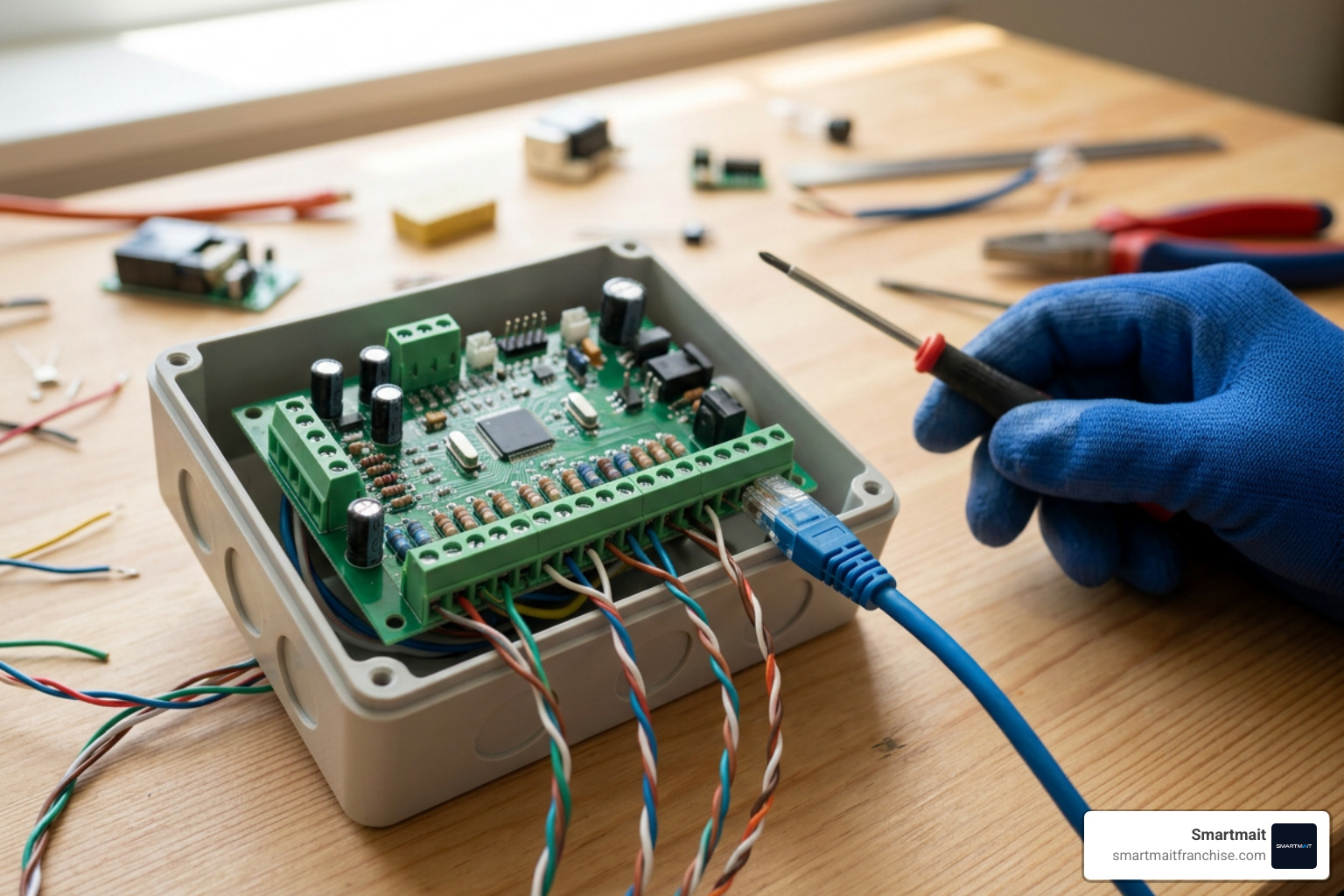
low voltage wiring on intercom amplifier board

Site Preparation and Low-Voltage Cable Routing

Begin by isolating electrical circuits at the breaker box to guarantee installer safety. When routing low-voltage cables (such as 22-gauge twisted pair or shielded Cat6):

  • Avoid High-Voltage Interference: Never route communication lines inside the same conduit as 120V/240V AC power lines. Cross high-voltage electrical lines strictly at 90-degree angles. Parallel runs cause electromagnetic interference (EMI) from fluorescent lighting, high-draw appliances, or main power feeds, introducing buzzing and video artifacts.
  • Use Proper Fishing Tools: Utilize a non-conductive fiberglass fish tape, glow rods, and flexible drill bits to navigate wall cavities without damaging insulation or vapor barriers.
  • Preserve Cable Jackets: Maintain minimum bend radiuses (typically 4x the cable diameter for Cat6) and avoid excessive pull tension to ensure wire pairs remain tightly twisted to preserve noise-cancellation properties.
  • Integration with Existing Systems: If you are tying the entryway into a comprehensive home security system installation, run additional supervisory pairs back to your central alarm enclosure to handle tamper switch monitoring.

Mounting Exterior Door Stations and Interior Terminals

Proper physical placement protects hardware and ensures an optimal field of view:

  1. Determine Station Elevation: For standard residential visual framing, mount the exterior video unit around 160 cm (63 inches) from the finished floor to the camera center. Where strict ADA compliance is required, set the operating interface at or below 48 inches (122 cm) to keep pushbuttons, directional rotating rings, and keypads accessible.
  2. Prepare the Mounting Box: Install a flush-mount backbox or surface-mount rain hood. On insulated exterior walls, maintain a 10 cm clearance from soft insulation materials to avoid moisture pooling.
  3. Ensure Weatherproof Sealing: Apply a commercial-grade silicone sealant along the top and side perimeters where the faceplate meets the substrate. Always leave the bottom edge unsealed to create a weep path for condensation drainage.

Power Supply Integration and Door Strike Connections

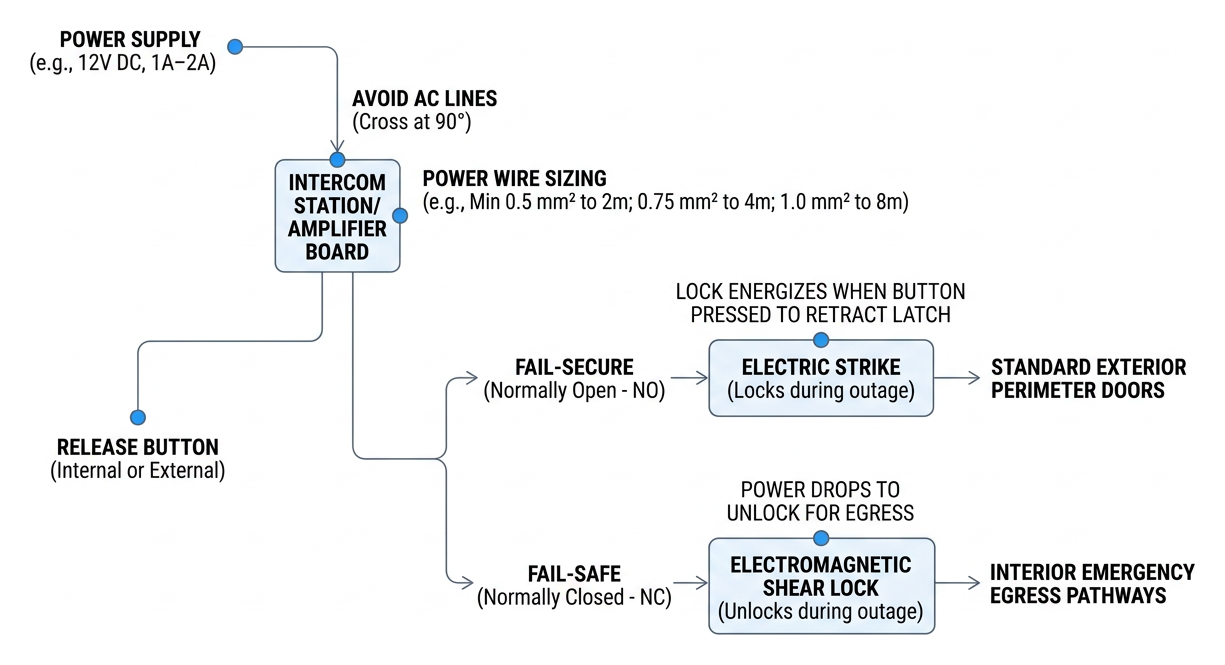
Intercom stations typically interface with a dedicated low-voltage DC transformer (12V DC, 1A–2A) or an AC power supply (16VAC transformer for legacy multi-tenant amplifiers). Power calculations must account for the steady-state standby draw alongside instantaneous lock release current surges.

Intercom power supply and strike relay wiring flow

When wiring the access control release relays:

  • Fail-Secure (Normally Open – NO): The lock remains physically locked when power drops. This configuration is standard for exterior perimeter doors to maintain building security during outages. An electric strike energizes briefly to retract the latch when the release button is pressed.
  • Fail-Safe (Normally Closed – NC): The lock unlocks automatically when power drops. This is standard for electromagnetic shear locks along interior emergency egress pathways to ensure occupants can exit safely during a power loss.
  • Power Wire Sizing: To minimize line voltage drop across extended power runs to cellular or video master panels, use minimum 0.5 mm² wire for distances up to 2 meters, 0.75 mm² up to 4 meters, and 1.0 mm² for runs up to 8 meters. Avoid undersized single conductors on high-amperage lines.
  • Integration with Surveillance: Wire relay status outputs into your commercial video surveillance systems to log visual confirmation whenever an entryway release command is triggered.

Network Configuration, App Provisioning, and System Testing

After the physical components and low-voltage lines are secured, configure the system’s digital networking and access rules.

technician provisioning intercom system directory

Essential Commissioning Steps to Install Intercom System Networks

Commissioning transforms installed hardware into a secure, responsive access network. Follow these structured verification steps:

  • Establish Network Stability: Prefer a dedicated, hardwired Cat6 Ethernet connection. If using Wi-Fi, ensure RSSI signal strength exceeds -65 dBm at the exterior station. Reserve a permanent Static IP address via the property router’s DHCP reservation table to avoid connectivity drops following power reboots.
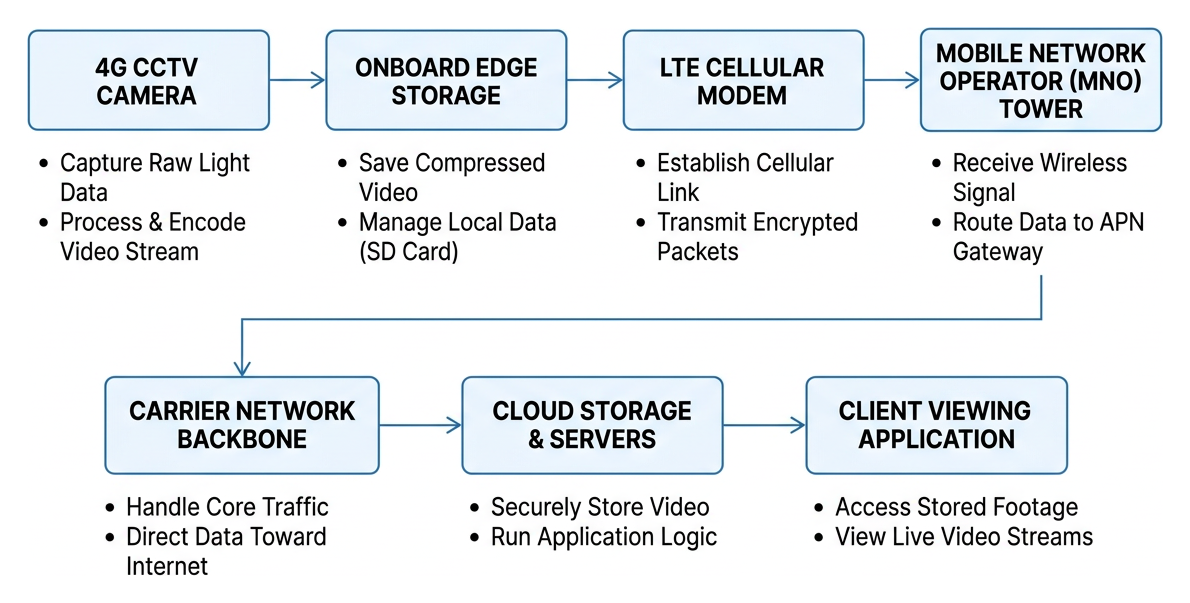
  • Configure Cellular Profiles: When deploying a 4G/5G cellular multi-tenant intercom, insert a VoLTE-compatible nano-SIM card. Configure the Access Point Name (APN) via direct SMS command strings or bench programming tools before final enclosure closure. Confirm cellular signal reception registers above level 13 (out of 31).
  • Provision Administrative Portals: Establish administrative accounts using multi-factor authentication (MFA). Build resident directories, map ring groups to specific apartment substations or mobile extensions, and establish distinct user permission tiers (e.g., Master Admin, Standard Resident, Time-Restricted Guest).
  • Establish Scheduling and Access Codes: Program distinct PIN codes, RFID keyfobs, or Bluetooth Low Energy (BLE) proximity credentials for staff and regular visitors. Set automated schedule overrides for package delivery windows without sharing master access codes.

Testing Audio, Video, and Remote Door Release Functions

Before completing the handoff, conduct thorough testing across all operational modes:

  1. Two-Way Audio Clarity: Conduct live calls between exterior stations and indoor monitors (or paired smartphones). Adjust master amplifier microphone gain and speaker volume to eliminate feedback screeching, echo loops, and wind noise.
  2. Video Stream Resolution: Verify clear 1080p video feeds under daylight and low-light conditions. Confirm infrared (IR) night-vision LEDs illuminate visitor faces clearly within a 2-meter target zone without washing out backgrounds.
  3. Relay Trigger Validation: Test the unlock mechanism from every physical pushbutton, indoor monitor release key, PIN keypad entry, and remote mobile app trigger. Confirm the door strike holds open for the programmed duration (typically 3 to 5 seconds) before reliably re-latching.
  4. Audit Log Verification: Review the system log dashboard to confirm that call attempts, authorized unlocks, tamper alarm trips, and access rejections are recorded with accurate timestamps.

Intercom System Installation Cost and Ownership Factors

Balancing immediate installation expenses against long-term operational efficiency is key when choosing an intercom architecture.

System Type Hardware Cost Range (per unit/station) Labor & Installation Complexity Maintenance & Software Fees Ideal Application
Traditional Wired Audio $120 – $250 per station High; intensive multi-conductor wire routing through walls Minimal; low component failure, no cloud subscriptions Budget retrofit for existing low-voltage apartment risers
IP Video + Mobile App $450 – $900 per station Moderate; simplified single-cable PoE wiring Optional cloud fees for remote storage and off-site calling Single-family luxury homes and commercial office suites
Cellular Multi-Tenant $1,500 – $3,500 (Master panel) Low; no in-unit wiring needed, requires exterior power Monthly cellular data & resident management SaaS fees Multi-family properties and gated communities
Smart Touch Panels (8+ Rooms) $500 – $1,200 per station Moderate to High; in-wall retrofitting and integration Low; local network operation with periodic firmware updates High-end automated estates and large corporate facilities

Note: Data derived from recent intercom system installation cost breakdown benchmarks.

While wireless IP and cellular intercom configurations can lower labor requirements by 30% to 50% during installation, multi-tenant properties must factor in long-term total cost of ownership (TCO). Standard wired platforms feature higher upfront wiring labor but carry zero monthly recurring charges. Conversely, cloud-managed and cellular platforms lower capital expenditure on day one while requiring modest recurring software and connectivity fees.

Frequently Asked Questions About Intercom System Setup

Can existing low-voltage wiring be reused for modern video intercoms?

Existing wiring can often be reused if the copper conductors are intact, free of shorts, and meet the electrical requirements of the new system. For example, traditional 4-wire runs can support select modern multi-station retrofits. However, running high-bandwidth, uncompressed IP video feeds over legacy non-twisted wire often introduces static, frame drops, or data degradation. If existing conductors show insulation breakdown or severe oxidation, pulling new Cat6 cabling avoids chronic service calls.

What happens to intercom access control during a power outage?

System behavior depends directly on the configuration of your locking hardware and backup power sources:

  • Lock States: Fail-secure electric strikes stay locked, securing the perimeter, whereas fail-safe magnetic locks automatically release to ensure unhindered emergency egress.
  • Uninterruptible Power Supplies (UPS): Professional installations incorporate 12V DC battery backup modules or auxiliary UPS units that power the master panel, network switches, and strikes for 4 to 24 hours during utility outages.
  • Physical Overrides: Master exterior entryways should always incorporate a mechanical key override cylinder so property managers and emergency services retain manual access if backup batteries completely discharge.

What is the optimal mounting height for accessible intercom stations?

The ideal mounting height depends on whether the unit is an audio station, a keypad, or an integrated video camera:

  • Ergonomic Video View: For private residential entrances without ADA constraints, mounting the camera center at approximately 160 cm (5 feet 3 inches) provides an optimal field of view for visitors standing 1 to 2 meters away.
  • Universal Accessibility: To comply with ADA standards in commercial or multi-family properties, all operable buttons, keypads, touchscreen controls, and card readers must be positioned no higher than 48 inches (122 cm) above the finished grade. Many modern video intercoms utilize ultra-wide 170-degree fisheye lenses, allowing the unit to be mounted at the 48-inch height while maintaining full head-to-waist visibility of standing visitors.

Conclusion

Installing a dependable intercom system requires matching the right hardware architecture to your property’s physical wiring and network layout. By conducting a thorough pre-wiring audit, separating low-voltage signals from electrical lines, sealing exterior enclosures against weather, and systematically testing lock release relays, you establish an entry access system built for years of trouble-free operation.

At Smartmait, we specialize in delivering scalable, professional installations paired with ongoing system optimization and preventative maintenance. Connect with us to deploy professional smart property solutions tailored to protect your home, multifamily residence, or commercial facility.

The Ultimate Guide to Smart Home Performance Monitoring

Why Smart Home Performance Monitoring Matters

Smart home performance monitoring helps you track whether your system is saving energy, responding quickly, staying connected, and protecting your property. Start by putting the most useful data in one dashboard:

  1. Energy use: Track whole-home and major-appliance electricity use in kWh and watts.
  2. System health: Watch device response time, Wi-Fi or mesh signal strength, battery levels, and offline events.
  3. Security activity: Review lock, camera, door, and motion alerts for unusual patterns.
  4. Comfort and efficiency: Compare room temperature, humidity, CO2, and heating runtime to spot drafts, open windows, or waste.

A smart home should do more than turn lights on from an app. It should reveal problems before they become expensive frustrations: a weak network signal, an appliance drawing abnormal power, a lock with a low battery, or a room losing heat faster than the rest of the home.

The best monitoring systems combine local sensors, reliable networking, and clear alerts. That gives you a practical view of your home’s health without forcing you to check dozens of separate apps.

I am Dominic Hesano, a home and business automation professional building SmartMait around connected systems, security, networking, lighting, and ongoing technology support. My work in smart home performance monitoring focuses on helping owners turn complex device data into reliable, useful action.

Smart home monitoring metrics for energy, network health, security, and comfort infographic

Simple smart home performance monitoring glossary:

Core Metrics and Benchmarks in Smart Home Performance Monitoring

Tracking a smart home requires balancing physical comfort, electrical efficiency, and digital reliability. Instead of looking at vanity numbers like how many times an automation runs, we focus on measurable telemetry that impacts operational costs and system longevity.

Performance Metric Ideal Benchmark Collection Frequency Primary Diagnostics Role
K-Coefficient (Thermal Loss) Lower is better (Room-dependent) 7-day rolling average Identifies insulation degradation and draft points
Appliance Power Draw Baseline ±10% rated wattage Real-time (1 Hz to 10s) Detects mechanical wear and motor failure
Network Latency < 50 ms (Local), < 150 ms (Cloud) Continuous polling Pinpoints RF interference and weak routing nodes
Packet Drop Rate < 0.5% Hourly summary Highlights mesh instability across Zigbee/Z-Wave/Thread
Battery Discharge Rate Predictable linear curve Daily polling Prevents sudden peripheral lockouts
CO2 / VOC Levels < 800 ppm CO2, < 250 ppb VOC 1-minute intervals Guides occupancy-driven ventilation cycles

Thermal Loss and Empirical Insulation Tracking

Traditional building assessments rely on theoretical Energy Performance Certificate (EPC) calculations derived from architectural blueprints and static material ratings (U-values). However, real-world construction often hides air infiltration, thermal bridging, and degraded wall insulation. Empirical thermal monitoring bridges this gap.

Using empirical thermal calculation frameworks, we calculate the actual heat loss coefficient ($K$) in Watts per degree Celsius ($text{W}/^circtext{C}$):

$$K = frac{text{Energy Supplied (Wh)}}{Delta T times text{Duration (Hours)}}$$

Where $Delta T$ represents the real-time difference between indoor and outdoor temperatures. A room maintaining temperature with minimal active heating earns an optimal insulation rating, while a spiking $K$-coefficient reveals active thermal loss.

When you configure home automation basics inside a local automation ecosystem, multi-zone temperature analysis automatically flags anomalies. If a window is left cracked during winter, a steep drop in temperature paired with a heating spike triggers an immediate notification, preventing wasted energy. Maintaining a continuous 7-day rolling average smooths out temporary environmental spikes from human activity or cooking, giving homeowners an undeniable baseline of structural efficiency.

Device Latency, Reliability, and Network Uptime

Smart devices cannot protect or automate a home if their wireless control path drops. High telemetry latency causes lag when turning on lights, while packet loss causes automations to miss state changes entirely.

To maintain high availability:

  • Zigbee and Z-Wave Telemetry: We track Link Quality Indicator (LQI) and Received Signal Strength Indicator (RSSI) across all routing nodes.
  • Mesh Topology Monitoring: Dynamic routing maps pinpoint battery-powered endpoints routing through weak, distant repeating plugs rather than adjacent hardwired switches.
  • Network Uptime Diagnostics: Knowing how to troubleshoot smart home issues starts with isolating local controller responsiveness from broad ISP outages.

Diagnostic sequence for identifying RF mesh drops and device latency

Hardware and Infrastructure: From Micro-Modules to Cloud Storage

Deploying an enterprise-grade monitoring system requires robust embedded silicon at the edge and high-throughput data processing in the back end.

Micro-relays and energy meters installed inside junction boxes

Hardware Architecture for Smart Home Performance Monitoring

Modern energy monitoring relies on ultra-compact micro-modules installed directly behind switches or inside breaker panels. Compact inline power meters measure up to 16A or 8A loads within tiny enclosures, delivering sub-watt precision over local Wi-Fi without proprietary hubs. These devices double as Bluetooth Low Energy (BLE) range extenders, bridging peripheral sensors throughout the building.

At the silicon level, industrial hardware pioneers develop advanced wireless communication modules, Wi-Fi 6 hardware, and System-in-Package (SiP) IoT solutions that handle heavy edge computation without overheating. Their automotive and industrial engineering breakthroughs—such as embedding silicon carbide (SiC) dies into multilayer ABF substrates and adopting Single-Side Copper Exposed (SSC) module packaging—deliver exceptional thermal management and power density. These hardware advancements ensure sub-metering nodes run continuously for decades inside harsh electrical enclosures. Applying these enterprise hardware principles directly supports comprehensive smart home power management across high-draw residential circuits.

Edge Processing vs Enterprise Cloud Storage

Handling millions of continuous telemetry data points across temperature, power, and security sensors presents a clear architectural choice: local edge execution versus scalable cloud retention.

Telemetry data flow from edge controller to local flash and long-term cloud storage

  1. Edge-First Controllers: Central automation engines—such as dedicated local servers or a home energy management system—process mission-critical automation routines locally. This guarantees that lighting, security trips, and peak load shedding execute instantly even during complete internet outages.
  2. Local Telemetry Aggregation: High-frequency electrical metrics (e.g., 1 Hz voltage harmonics) are filtered and compressed locally on solid-state storage.
  3. Enterprise Long-Term Retention: Compressed summaries migrate to enterprise-grade server infrastructure utilizing SAS, SATA enterprise arrays, 10Gb Ethernet backbones, and optical transceivers. This high-throughput storage tier allows multi-year trend analysis, letting us compare seasonal heating performance, verify post-renovation efficiency gains, and build historical health baselines without slowing local smart home hubs.

Integrating Access Control, Occupancy Dynamics, and Predictive HVAC

Optimizing energy usage requires understanding exactly how and when a home is occupied. Integrating precision access hardware with indoor environmental telemetry transforms static heating schedules into dynamic, occupancy-aware systems.

Smart lock and indoor environmental sensor setup

Security Hardware and Access Telemetry

Access hardware serves as the first trigger for occupancy-based automations. Precision-engineered smart deadbolts integrate discreet, high-torque gearboxes directly inside the door borehole while maintaining strict ANSI/BHMA AAA security ratings.

Beyond digital keys and mobile access credentials, lock telemetry delivers critical operational data:

  • Lock Activity Timestamps: Distinguishes between manual interior turns and external authenticated entries to instantly arm or disarm HVAC zones.
  • Battery Voltage Depletion: Continuous telemetry monitoring ensures batteries are replaced long before physical motor stalls occur.
  • Automated Setbacks: Locking the deadbolt from the exterior when all household members depart instantly shifts thermostats into eco-mode, aligns battery storage optimization priorities, and closes motorized shading.

Occupant Behavior and Wearable Sensor Integration

Static scheduling often fails because human routines change daily. Integrating wearable solutions and connected devices allows homes to anticipate occupant needs.

Coupling wearable presence detection with real-time indoor air quality sensors unlocks advanced HVAC optimization. Research into occupancy dynamics demonstrates that tracking fluctuating carbon dioxide ($text{CO}_2$) spikes provides a direct proxy for room population density. Instead of running ventilation fans on rigid timers, predictive algorithms evaluate $text{CO}_2$ accumulation curves alongside wearable location telemetry. The system dynamically boosts fresh air circulation to occupied living spaces while throttling airflow in empty rooms, maintaining pristine indoor air quality while reducing compressor runtime.

Predictive Diagnostics and Sustainability Frameworks

Modern performance monitoring shifts homeowners from reactive repairs to predictive maintenance. By catching subtle equipment degradation early, we prevent costly emergency replacements and lower whole-home environmental impact.

Advanced Diagnostics and Smart Home Performance Monitoring Protocols

Electrical motors, compressors, and pumps rarely fail without warning; they signal distress through acoustic changes and electrical current fluctuations weeks prior to breakdown.

  • Acoustic and Vibration Analysis: High-frequency audio and vibration sensors placed on heat pump compressors or furnace blowers identify worn bearings before mechanical seizure occurs.
  • Current Signature Diagnostics: Inline power meters continuously track startup current spikes (inrush amps). A capacitor beginning to degrade draws extended inrush current, triggering an automated diagnostic ticket.
  • Proactive Maintenance Execution: Implementing predictive maintenance technology protects major HVAC investments, ensuring systems operate at peak efficiency throughout their operational lifespan. When hardware reaches end-of-life, telemetry provides clear historical data to guide smart planning for smart home system upgrades.

Data Privacy and Multi-Device Aggregation Security

Collecting thousands of environmental, presence, and power data points introduces real privacy risks. A comprehensive monitoring system must be secure by design:

  1. Local-First Communication: Device communication should remain isolated on dedicated IoT Virtual LANs (VLANs) utilizing local APIs (MQTT, Matter, or local HTTP) rather than routing telemetry through unvetted third-party cloud servers.
  2. End-to-End Cryptographic Encryption: All inter-device telemetry—from BLE gateways to central controllers—must employ TLS 1.3 encryption and secure key management.
  3. Data Anonymization: Historical power and presence datasets exported for long-term predictive modeling should be stripped of personally identifiable metadata.
  4. Firmware Integrity: Automated tracking monitors device firmware versions, isolating unpatched hardware to protect local networks against known IoT vulnerabilities.

Aligning residential energy management with globally recognized sustainability metrics allows owners to monitor verified carbon reductions. Emulating enterprise ESG performance—such as earning top 5% placement in the S&P Global Corporate Sustainability Assessment and top distinction in the S&P Global Sustainability Yearbook—proves that rigorous, data-driven optimization drives measurable environmental stewardship.

Frequently Asked Questions About Smart Home Health

How does empirical thermal monitoring differ from theoretical EPC ratings?

Theoretical EPC ratings calculate expected heat loss based on standard building material tables, assuming flawless construction and perfect insulation fitting. Empirical thermal monitoring uses live sensor telemetry (indoor temperature, outdoor temperature, and exact heater wattage) to calculate the actual $K$-coefficient ($text{W}/^circtext{C}$). This real-world measurement captures hidden thermal bridges, leaking window gaskets, and draft points that theoretical lab ratings miss completely.

What communication modules are required for real-time telemetry?

High-speed, low-latency telemetry relies on dedicated Wi-Fi 6 modules, dual-mode Bluetooth Low Energy (BLE) gateways, and low-power sub-GHz transceivers. For high-density sensor networks, using industrial-grade IoT communication chips ensures zero packet drop, real-time power metering updates, and seamless bridging across disparate communication protocols.

Can smart home monitoring operate during an internet outage?

Yes, provided the system is built on a local-first control architecture. Edge controllers like local automation servers process sensor inputs, execute schedules, track thermal loss, and balance high-load appliances entirely over the local area network. When the internet goes down, real-time control continues uninterrupted, and long-term historical data caches locally until cloud connectivity is restored.

Conclusion

A high-performing smart home should run quietly, efficiently, and reliably in the background. By tracking empirical insulation ratings, sub-metering critical circuits, securing access points, and watching for early mechanical wear, smart home performance monitoring transforms home automation from simple convenience into long-term infrastructure health.

At Smartmait, we believe intelligent systems require continuous care. We combine expert installation with proactive maintenance and diagnostic monitoring to keep your connected home running smoothly year after year. Explore our professional smart home optimization services to build a resilient, efficient, and truly intelligent living space.

A Homeowner’s Guide to Choosing an Integrated Smart Home System

Choose One System, Not a Pile of Smart Gadgets

An integrated smart home system connects devices such as lights, locks, cameras, thermostats, speakers, sensors, and shades so they can work together through one app, voice assistant, hub, or control panel. Instead of managing separate brands and apps, you can create reliable routines: lock the doors, turn off lights, adjust the temperature, and arm security with one command or based on a schedule.

The key is not simply buying more connected devices. It is choosing a compatible ecosystem, a dependable network, and controls that still make sense as your needs grow. A well-planned system can improve daily convenience, support accessibility, strengthen security, and help reduce avoidable heating, cooling, and lighting use.

Many homes start with standalone gadgets. That can work at first, but separate apps, weak Wi-Fi, and incompatible devices often create more maintenance than value. Integration turns those individual products into one coordinated home experience. For a broader view of how connected devices have evolved, the smart home entry on Wikipedia explains the underlying automation concepts and common system architectures.

I am Dominic Hesano, a franchise development professional and business operator building SmartMait around professional automation, low-voltage, security, networking, lighting, and audio/video solutions. My work with connected-home technology focuses on helping customers plan, install, and support an integrated smart home system without unnecessary complexity.

Standalone smart devices versus an integrated smart home system infographic

Integrated smart home system terms at a glance:

What Is an Integrated Smart Home System and How Does It Work?

Most homeowners dive into technology by purchasing isolated products: a video doorbell here, a smart plug there, maybe a colored light bulb for the living room. Before long, your smartphone looks like a digital junk drawer filled with twelve different apps, each demanding its own login and firmware updates. When dinner is ready, you find yourself tapping through three separate screens just to dim the dining lights, turn off the television, and play some ambient music.

An integrated system fundamentally changes that dynamic. Rather than operating in isolated silos, all connected equipment communicates through a centralized controller or unified software layer. This enables real cross-device communication. For instance, when your smart door lock detects an authorized code entry at 6:00 PM, the system can automatically disarm the alarm, adjust the climate control to your preferred evening temperature, illuminate the entryway, and cue your favorite playlist.

Unified smart home automation workflow

Achieving seamless cross-brand orchestration requires a structured approach to hardware and protocol compatibility. Reviewing a comprehensive guide to reliable smart home integration will help you understand how centralized controllers translate signals between different device architectures so your hardware acts in unison.

Key Components of an Integrated Smart Home System

To build an ecosystem that runs smoothly, you need four primary hardware and software categories working in harmony:

  1. The Central Hub / Gateway: The brain of your home. The hub manages communications, stores automations, and executes logic rules. In modern architectures, hubs increasingly handle commands locally rather than routing every request through distant cloud servers.
  2. Smart Sensors: The sensory organs of your residence. Contact sensors on windows and doors, motion detectors, ambient light sensors, environmental temperature monitors, and water leak detectors gather continuous environmental data.
  3. Actuators and Controllers: The physical workers. Smart switches, motorized window shades, smart radiator valves, relays, and deadbolts receive instructions from the hub and alter physical states throughout the property.
  4. User Interfaces: The touchpoints where you interact with your system. These encompass dedicated in-wall touchscreen panels, smartphone apps, keypads, and voice assistants (such as Amazon Alexa, Google Assistant, or Apple Siri).

If you are beginning your journey, mastering these core building blocks is essential. Exploring this in-depth guide to home automation basics will give you a clear baseline for how hardware sensors trigger actions across your home.

Connectivity Protocols: Matter, Thread, Zigbee, Z-Wave, and Wi-Fi

Devices need a common language to share information reliably without crashing your home router. In 2026, the smart home communication landscape balances both mature wireless standards and universal open frameworks.

Protocol Power Consumption Network Topology Range per Node Best Use Cases
Wi-Fi High Star (Central Router) Moderate to High High-bandwidth hardware (Cameras, Video Doorbells, Smart Displays)
Zigbee Very Low Self-healing Mesh Short to Moderate (30–60 ft) Battery-powered sensors, smart lighting, remotes
Z-Wave Very Low Mesh (Sub-1GHz) Long (up to 100 ft) Locks, sensors, panels requiring zero Wi-Fi frequency interference
Thread Very Low Low-latency IPv6 Mesh Short to Moderate (30–60 ft) Low-power devices designed for modern local Matter integration
Matter N/A (Application Layer) Operates over Thread, Wi-Fi, Ethernet Depends on underlying transport Cross-platform interoperability across Apple, Google, Amazon, and Samsung

Matter has simplified cross-ecosystem purchasing by establishing a universal application layer, while Thread provides a responsive, low-power mesh foundation. However, established protocols like Z-Wave and Zigbee remain vital for complex installations due to their extensive device catalogs and robust mesh capabilities. To determine the right mix of wireless standards for your floor plan, consult the complete guide to smart home connectivity solutions.

Key Benefits: Why Centralized Automation Outperforms Standalone Devices

The global smart home market is projected to reach $622.59 billion in 2026, growing at a compound annual growth rate of 20.8% from 2020. With over 63.4 million U.S. households owning smart devices and more than 400 million connected home products shipping annually worldwide, consumer demand is clear. Yet, while the average smart home owner manages around 7 connected devices, nearly 44% report that convenience and unified control represent the ultimate value of their investment.

Standalone gadgets often deliver fragmented novelty; an integrated system provides lasting lifestyle improvements:

  • Holistic Living Routines: Instead of configuring six distinct timers, a single “Goodnight” command turns off every light, closes motorized drapery, lowers the thermostat, verifies exterior garage doors are shut, and arms the perimeter alarm.
  • Enhanced Accessibility: Voice controls, hands-free presence automations, and intuitive wall keypads empower individuals with mobility limitations or visual impairments to manage their living space independently.
  • Unified Remote Oversight: Check every status indicator across your home through a single interface when traveling, without toggling between vendor applications.

To see how these principles translate into day-to-day living, our beginner’s guide to getting started with smart homes walks through the practical transition from simple voice remotes to comprehensive home orchestration.

Energy Efficiency and Utility Savings

Automated thermostat and smart lighting dashboard

One of the most compelling arguments for deep system integration is cost containment. Residential energy management from coordinated smart home systems can reduce heating, cooling, and lighting expenses by up to 30% annually.

Rather than relying on simple thermostat schedules that run whether you are home or not, an integrated ecosystem synchronizes multiple data streams:

  • HVAC and Sensor Synchronization: If window contact sensors detect an open casement for more than two minutes, the system automatically pauses climate conditioning in that zone.
  • Automated Shading and Solar Heat Gain: Motorized shades lower during peak afternoon sun exposure in summer months to reduce air conditioning strain, then rise in winter to harvest natural warmth.
  • Occupancy-Based Load Shedding: Presence sensors detect empty rooms and extinguish architectural lighting while powering down phantom-load entertainment centers.

Discovering these mechanical and electrical synergies is simple when you review our detailed guide to practical home automation solutions, which highlights real-world energy-saving configurations.

Advanced Security and Automated Scenarios

Traditional alarm systems are reactive: an intruder breaks a contact point, the siren blares, and a call center receives a notification. An integrated smart home delivers proactive, coordinated deterrence and comprehensive life-safety support.

  • Geofencing & Automated Arming: As your smartphone crosses an exterior geofence perimeter, the system verifies all smart locks are secure, drops garage bay doors, and arms interior security zones.
  • Presence Simulation: When you depart for vacation, the system analyzes your past 30 days of standard activity and replicates natural lighting and shading routines throughout the evening, making the residence appear actively occupied.
  • Emergency Life-Safety Responses: If a smoke or carbon monoxide detector triggers, the system turns off HVAC blowers to prevent smoke circulation, unlocks all exterior deadbolts for rapid egress, and illuminates pathways with high-visibility red lighting.

To explore top-performing hardware options for these security workflows, check out our roundup of the best smart home automation products of the year.

Overcoming Interoperability, Network, and Privacy Challenges

Despite rapid technological improvements, integrating complex electronics into a residence presents real engineering challenges. When systems are built haphazardly, homeowners encounter ecosystem lock-in, sluggish command latency, and ghost automations where lights turn on unprompted at 3:00 AM.

When your devices fail to respond or communication falls out of sync, knowing how to find reliable smart home help when your tech goes rogue can save you countless hours of frustration.

Optimizing Network Bandwidth and Local Processing

Smart speakers are found in roughly 35% of U.S. households, and when you combine them with streaming TVs, high-definition security cameras, and dozens of IoT peripherals, standard consumer routers quickly become overwhelmed.

To ensure your home remains responsive:

  • Deploy Robust Mesh Wi-Fi: Distribute dedicated tri-band wireless access points throughout the home to prevent signal dead zones.
  • Segment Your Network (VLANs): Isolate low-power IoT devices on a dedicated 2.4 GHz virtual local area network separated from your primary computers, phones, and media streamers.
  • Prioritize Local Execution: Select hubs that process automation logic on-premise. When routines execute locally across Thread, Z-Wave, or Zigbee networks, your switches react in milliseconds—even if your main internet provider experiences an outage.

To eliminate communication bottlenecks and device drops, follow the network configurations outlined in smart home Wi-Fi setup 101 to stop devices from fighting for bandwidth.

Securing Data and Protecting User Privacy

Because an integrated system captures granular details about your daily habits, occupancy, and physical security, safeguarding this data is paramount.

We recommend the following cybersecurity best practices:

  • Enforce Hardware Isolation: Place all cameras and voice-activated microphones on segregated network channels that cannot communicate with unencrypted consumer hardware.
  • Mandate Multi-Factor Authentication (MFA): Secure every primary administrator account and platform interface with biometric or hardware-token authentication.
  • Disable Universal Plug and Play (UPnP): Turn off UPnP on your router to stop unauthorized smart devices from opening exterior firewall ports without your consent.
  • Audit Cloud Permissions: Opt for hardware architectures that allow you to store video clips and sensor event logs locally on an encrypted Network Attached Storage (NAS) or hub hard drive rather than remote servers.

Designing and Planning Your Setup: Existing vs. New Construction

Structured wiring and smart panel installation

The path you take when designing an automation ecosystem depends largely on your home’s structural stage. Retrofitting a century-old historic residence demands different engineering strategies than pre-wiring a custom architectural build from the ground up.

Designing an Integrated Smart Home System for Existing vs. New Homes

  • Existing Homes (Retrofit): In existing spaces where opening drywall is impractical or cost-prohibitive, wireless communication standards (Thread, Zigbee, Z-Wave) paired with smart in-wall switches are the ideal choice. Installing smart switches rather than smart bulbs preserves standard physical wall control for guests while keeping your automation network powered at all times.
  • New Construction / Major Renovations: If you have open stud walls, take advantage of the opportunity to install low-voltage structured cabling. Run Power over Ethernet (PoE) Cat6a lines to every exterior camera location, touchscreen position, wireless access point, and primary entertainment zone. Structured wiring guarantees rock-solid reliability, frees up wireless airwaves, and dramatically enhances long-term property value.

Future-Proofing and Upgrading Over Time

Technology will always evolve, but a properly designed infrastructure should last for decades without requiring complete demolition.

  1. Choose Open, Modular Protocols: Prioritize products supporting universal standards like Matter, Thread, and open API frameworks so you are never locked into an obsolete single-vendor cloud.
  2. Design with Serviceability in Mind: Install central head-end equipment racks in climate-controlled, accessible utility rooms so equipment can be serviced and swapped easily.
  3. Establish a Phased Roadmap: Start with a solid network backbone, lighting control, and climate automation before expanding into motorized shades, multi-room architectural audio, and exterior landscape illumination.

When planning long-term improvements, review the smart way to plan your next smart home system upgrade and learn the ins and outs of finding a reliable smart home service to partner with qualified technicians who understand lifecycle maintenance.

Frequently Asked Questions About Smart Home Integration

How much energy can an integrated smart home system save annually?

A properly integrated smart home system can reduce total household heating, cooling, and lighting energy usage by up to 30% each year. By unifying automated thermostat schedules with occupancy sensors, window contact monitors, and dynamic shading, the home actively eliminates waste in unoccupied rooms and optimizes climate control around real-time daily habits.

Will an integrated smart home system work if the internet goes offline?

Yes, provided the system is designed around a hub that supports local processing. Automations built across local protocols such as Thread, Zigbee, Z-Wave, and local IP Matter continue to run seamlessly without an active internet connection. Wall keypads, motion-triggered lighting, and local scheduled routines will still function; only remote app access and cloud-dependent voice commands are temporarily paused.

What level of professional management does an integrated smart home system require?

While basic single-room setups can be managed by homeowners, whole-home integrated systems benefit significantly from proactive professional management. Professional support ensures your low-voltage networking, gateway firmware updates, cross-protocol bridge synchronizations, and smart security integrations receive continuous optimization. This prevents network drift, maintains robust cybersecurity, and keeps complex automations running smoothly year-round.

Conclusion

A truly modern home is not defined by how many high-tech gadgets you own, but by how seamlessly those devices work together to make your life simpler, safer, and more comfortable. Moving away from isolated smart products toward a centralized integrated smart home system eliminates daily friction, cuts down energy waste, and creates a tailored living environment that responds naturally to your family’s routine.

At Smartmait, we believe exceptional home technology should be dependable and straightforward to live with. We combine expert architectural design and low-voltage installation with ongoing maintenance and network optimization, ensuring your system continues to perform effortlessly long after setup day. If you are ready to elevate your residence with professional, headache-free automation, explore our smart home design and management services today.
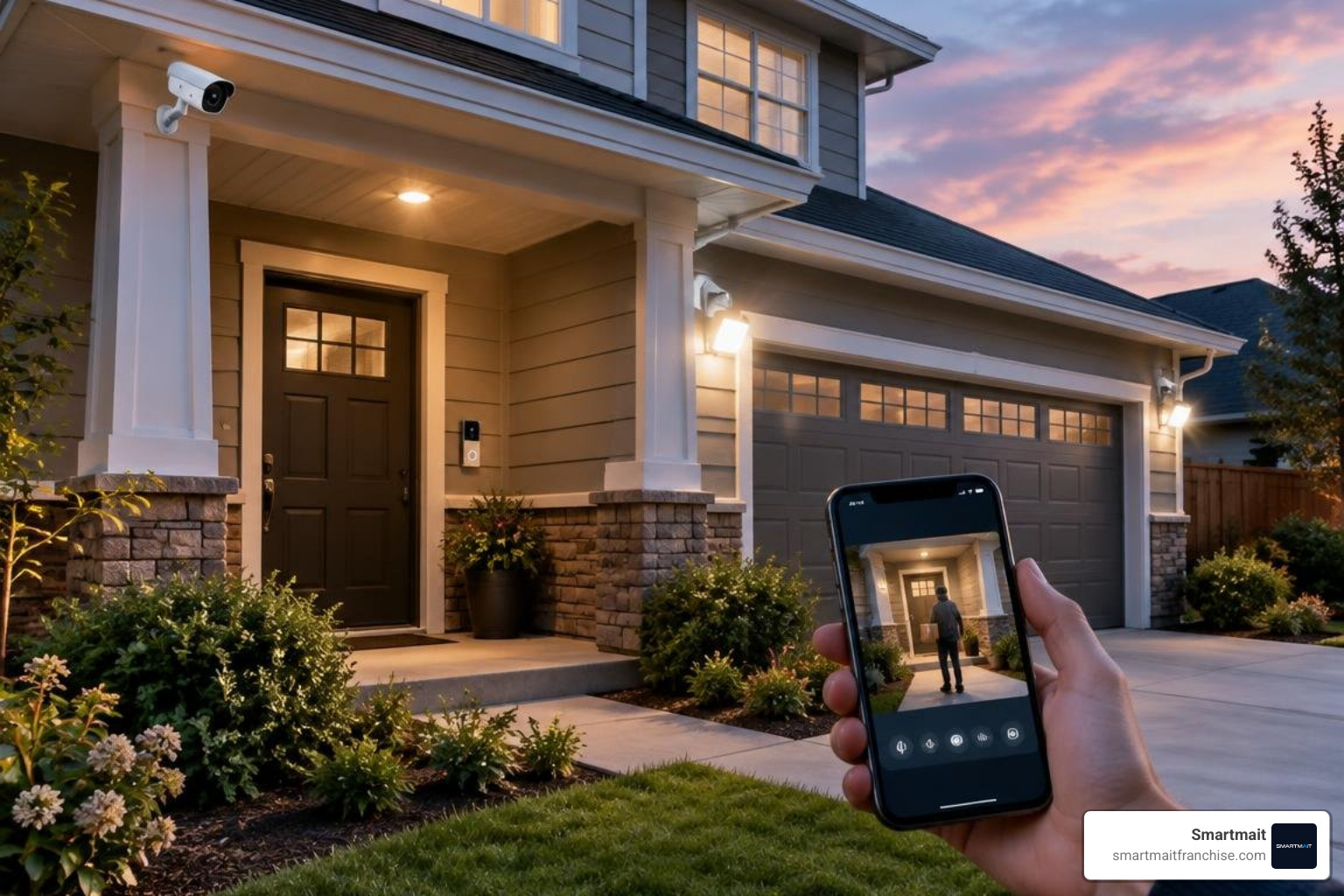
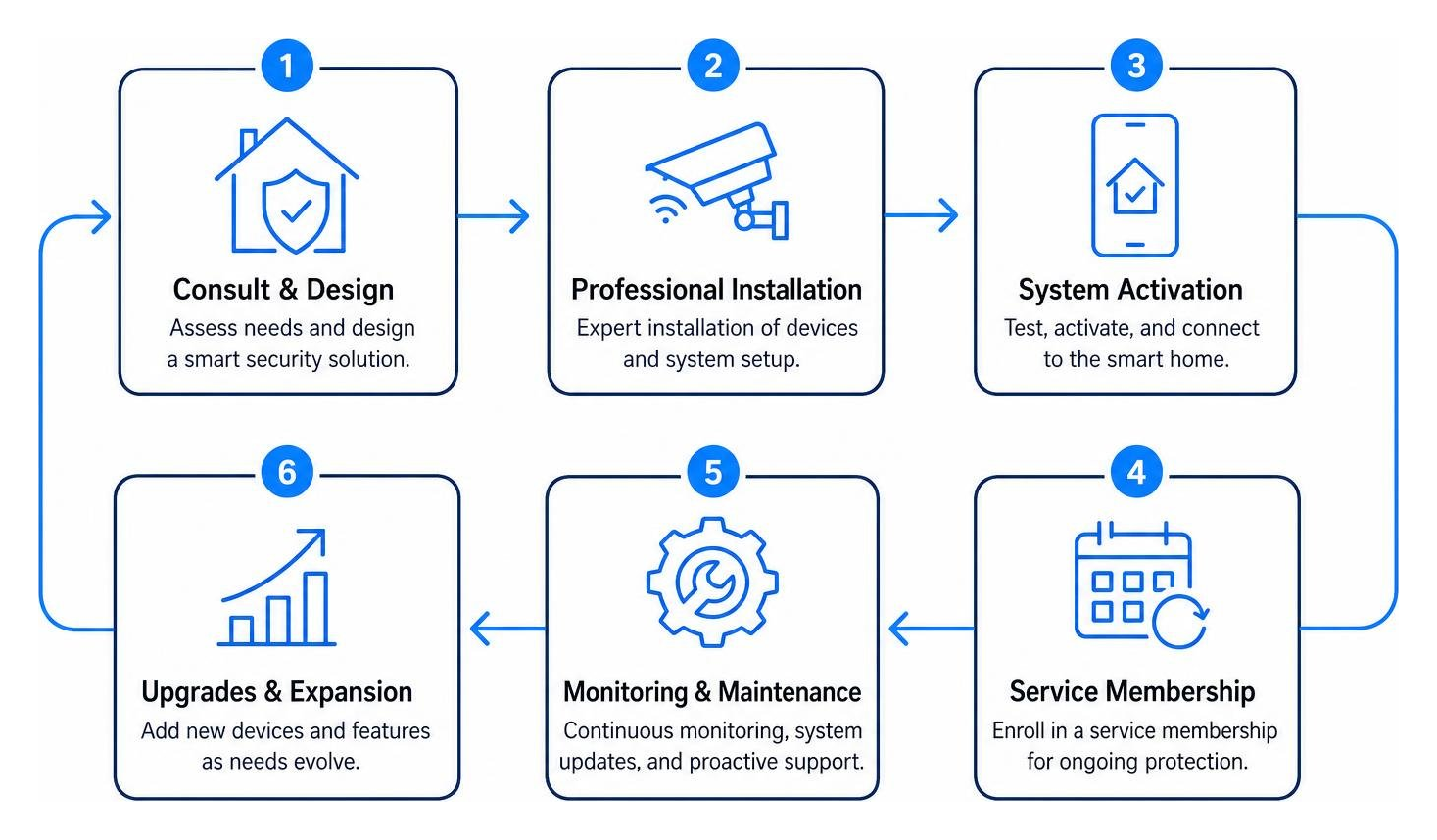
Guarding Profits: Why Smart Home Franchise Security Systems Are Booming

Why Smart Home Franchise Security Systems Are Attracting Investors

Smart home franchise security systems can be a strong fit for entrepreneurs who want more than one-time installation revenue. The best models combine security-system installation with maintenance memberships, upgrades, and ongoing support. That creates repeat customer contact and can make revenue more predictable than a business built only on project work. For many owners, the appeal is not just the initial hardware sale but the long-term relationship that follows: a customer who trusts you to protect their home or business is likely to stay with you for years.

When evaluating a franchise, look for four things:

  1. Recurring service revenue from maintenance, monitoring, and system health checks.
  2. Practical training for owners who do not have a technical background.
  3. Low-overhead operations, including the ability to begin from a home office rather than a storefront.
  4. Marketing and operating systems that help turn local demand into installations and long-term accounts.

Security is a natural entry point into smart-home technology. Nearly 70% of consumers identify home security as a primary reason to adopt connected devices, while the broader smart-security market has been projected to grow at a 14.5% compound annual rate from 2021 through 2028. For homeowners and small businesses, the value is simple: professionally installed cameras, sensors, alarms, access controls, and reliable help when technology needs attention. According to the smart home industry overview, connected security devices now represent one of the fastest-growing categories in residential technology.
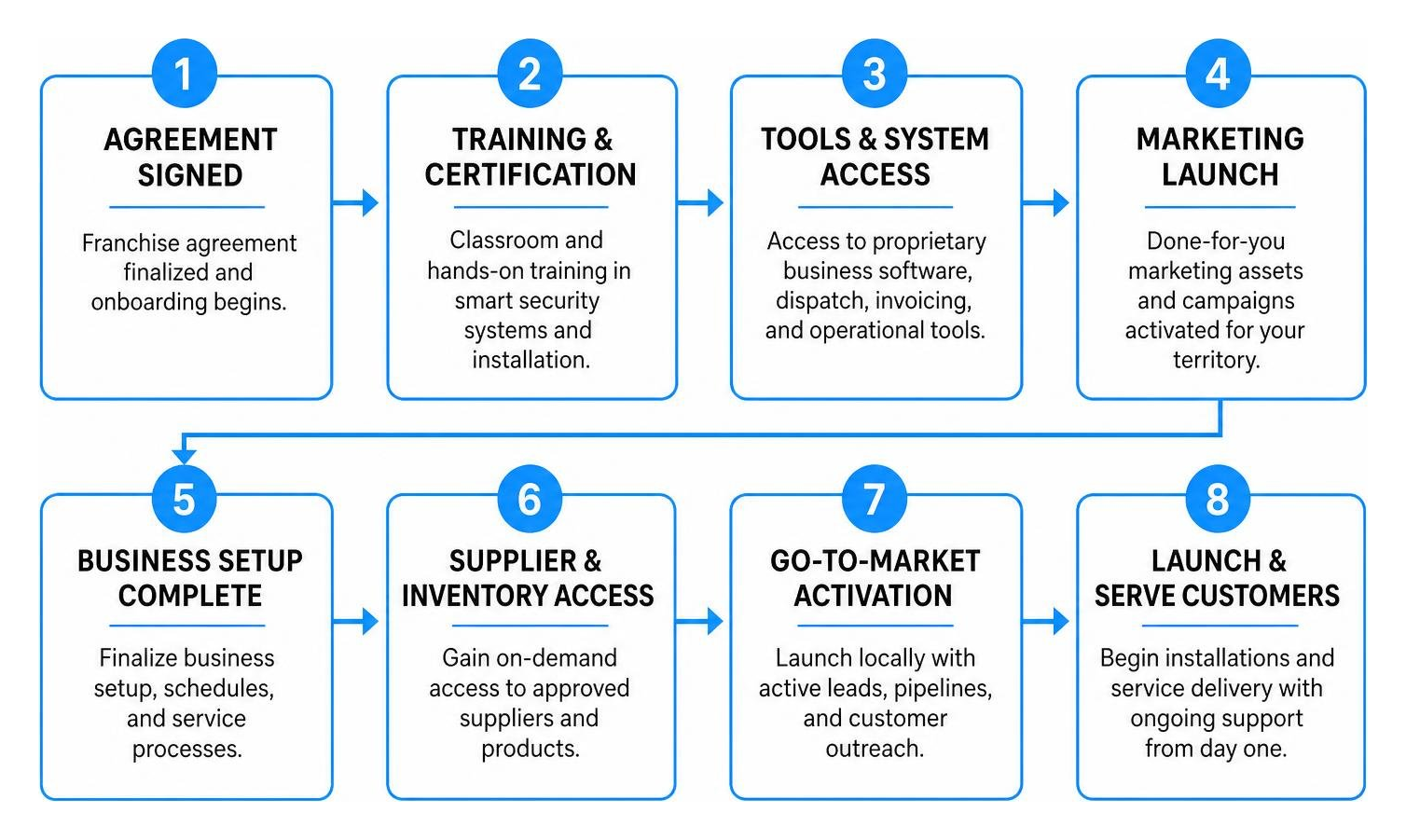
SmartMait is built around that ongoing need. Its model pairs smart-home and low-voltage installation with service memberships, so franchise partners can support customers after the initial system goes live instead of disappearing after the sale. That continuity is what separates a durable local business from a one-time contractor.

I am Dominic Hesano, a franchise development professional and business operator helping build SmartMait around smart home franchise security systems, automation, low-voltage technology, and long-term local service. My experience in franchising, sales, operations, and service businesses informs the practical evaluation points in this guide.

Infographic comparing installation revenue, maintenance memberships, upgrades, and commercial service infographic

Smart home franchise security systems basics:

Evaluating Smart Home Franchise Security Systems for Maximum ROI

modern connected home security setup

The connected property sector has matured rapidly. As of September 2026, connected devices are no longer novelty items reserved for tech hobbyists. Property owners demand comprehensive solutions that integrate alarms, surveillance, smart locks, and environmental monitors into a unified, reliable ecosystem. This shift has created a durable business opportunity for franchise owners who can deliver both installation expertise and long-term service.

When evaluating potential business investments, understanding the distinction between one-off contractors and sustainable franchise ecosystems is essential. Standalone installation businesses often suffer from a feast-or-famine cycle: once the hardware is mounted, revenue drops to zero until another buyer is sourced. In contrast, evaluating automated home security systems through a franchise framework allows you to capture upfront hardware margins, professional setup fees, and multi-year service agreements simultaneously. The result is a more stable revenue base that does not depend on constantly finding new customers.

Franchisees operating in the smart home security sector typically achieve healthy profit margins between 15% and 25% after their initial ramp-up year. These returns are supported by surging consumer demand, commercial integrations, and high operational efficiency. The home security market continues to expand as more property owners prioritize connected protection and remote monitoring.

Core Advantages of Smart Home Franchise Security Systems

Investing in a specialized security franchise delivers distinct operational edges over independent startups:

  • Predictable Cash Flow: Recurring monitoring fees generate stable monthly revenue ($20 to $50 per customer per month) with industry-leading retention rates.
  • Bulk Supplier Discounts: Direct manufacturer pricing on high-end hardware ensures competitive bidding without sacrificing your gross profit margins.
  • Built-in Brand Equity: Homeowners and commercial managers seek trusted, vetted professionals to enter their properties.
  • Comprehensive Integration: Modern setups require more than basic alarms. By comparing security system monitoring and pairing it with smart lighting, automated locks, and climate automation, our franchise owners deliver complete building intelligence.

Diagram showing customer lifecycle from installation to recurring maintenance

Expanding Portfolios Across Residential and Commercial Sectors

A dynamic franchise model does not rely on suburban residential clients alone. Expanding into commercial properties significantly increases ticket sizes and establishes long-term corporate contracts. Commercial clients often require more complex installations, which means larger projects and more consistent service demand.

We train our partners to handle comprehensive security installations across diverse environments:

  • Residential Hubs: Video doorbells, perimeter cameras, smart deadbolts, window sensors, smoke detection, and automated leak shut-off valves.
  • Commercial Facilities: Multi-channel CCTV, card and biometric access control systems, visitor logging, energy controls, and multi-site remote management.

Implementing professional business camera installation strategies allows franchise owners to secure high-value commercial accounts that require ongoing compliance inspections, system recalibrations, and regular hardware upgrades. These accounts often become multi-year relationships that provide steady revenue and referrals.

Operational Blueprint of a Modern Security Franchise

Traditional retail franchises carry heavy financial liabilities: long-term commercial leases, expensive buildouts, extensive inventory storage, and high utility bills. A modern smart security franchise completely disrupts this high-friction structure. By operating from a home office and deploying mobile service vehicles, franchise owners can focus capital on marketing, training, and customer acquisition rather than fixed real estate costs.

Operational Factor Traditional Retail Security Franchise SmartMait Mobile Franchise Model
Real Estate Overhead High (Commercial Lease + Utilities) Zero (Home-based / Mobile Office)
Initial Inventory Capital Substantial (Showroom stock required) Lean (Direct on-demand supplier access)
Launch Timeline 6 to 12 Months 60 to 90 Days
Service Flexibility Bound to retail walk-in radius Mobile, on-site service at customer property
Gross Margin Potential Compressed by high fixed expenses Expanded (15% to 25% average after Year 1)

Reviewing the data when analyzing smart home franchise investment viability shows that low fixed overhead directly shortens the runway required to achieve operational profitability. The franchising model has long favored businesses that can scale without proportional increases in fixed costs, and mobile service franchises are a clear example of that principle.

Comprehensive Training and Operational Support

A common misconception is that running a tech franchise requires an engineering degree or decades of wiring experience. At SmartMait, we have engineered an onboarding framework that transforms motivated entrepreneurs into fully certified smart home professionals. The training is designed to be practical and repeatable, so you can build confidence quickly even if you have never installed a security camera before.

Diagram of franchisee onboarding pathway from agreement to launch

When navigating smart tech franchise opportunities, evaluate the depth of the franchisor’s operational ecosystem:

  1. Classroom & Practical Certification: Hands-on instruction covering low-voltage wiring, wireless protocols (Zigbee, Z-Wave, Matter, Wi-Fi), and field troubleshooting.
  2. Proprietary Business Software: Integrated mobile applications managing field scheduling, automated dispatch, customer invoicing, and system performance logs.
  3. Turnkey Marketing Engines: Done-for-you local search engine optimization, digital ad campaigns, and professional collateral designed to generate inbound client inquiries immediately upon launch.
  4. Dedicated Field Coaching: Ongoing mentorship and direct phone/video access to tier-two technical support specialists whenever complex field integrations arise.

Scaling Revenue with Smart Home Franchise Security Systems

Sustainable business valuation relies on client lifetime value. While a single camera installation creates immediate cash flow, preventative maintenance memberships ensure recurring monthly revenue. The goal is to build a customer base that pays you every month, not just when something breaks.

Implementing proven customer retention strategies turns a single setup into years of steady cash flow:

  • Quarterly Health Checks: Remote diagnostic scans to verify sensor signal strength, battery status, and Wi-Fi latency.
  • Firmware and Security Patching: Keeping smart cameras and network video recorders protected against cyber vulnerabilities.
  • Priority On-Site Support: Membership clients receive guaranteed response windows when device recalibrations or physical repairs are required.
  • Automated Equipment Upgrades: Preferred member pricing on next-generation cameras, sensors, and smart automation add-ons.

Strategic Territory Expansion and Customer Acquisition

Scaling a franchise requires guaranteed market boundaries. Our franchise partners receive exclusive, protected territories mapped using demographic and real estate data to ensure ample market depth. This approach prevents internal competition and gives each owner a clear area to develop.

digital territory mapping interface

Securing your business by securing exclusive territory rights guarantees that you are the sole provider of our brand’s services within your designated footprint. Our operational framework equips you with targeted lead-generation tools:

  • Localized Google Business Profile and search visibility optimization.
  • B2B outreach templates for commercial property managers, general contractors, and real estate developers.
  • Direct referral incentive programs for residential communities and homeowner associations.

These tools are designed to help you build a steady pipeline of qualified leads without relying on expensive paid advertising alone. By combining local search visibility with direct outreach and referral partnerships, you can create multiple channels for customer acquisition that compound over time.

Frequently Asked Questions About Smart Home Security Franchises

Do I need prior technical experience to operate a franchise?

No. Our comprehensive training curriculum is designed specifically for individuals without a formal technology or low-voltage background. We cover every aspect of hardware installation, wireless network configuration, diagnostic troubleshooting, and customer service delivery. The training includes hands-on practice, so you can build confidence before working with real customers.

What is the typical timeline to launch and generate revenue?

Most franchise owners launch within 60 to 90 days after signing their franchise agreement. Because there is no commercial storefront to build out, onboarding focuses on certification, territory setup, tool outfitting, and launching localized digital marketing campaigns. Many owners begin generating revenue from their first installations within the first few months of operation.

Can a security franchise be operated as a home-based business?

Yes. Franchisees manage administration, client communications, and scheduling from a home office while deploying mobile service vehicles directly to customer properties. This structure minimizes monthly overhead, eliminates commercial rent, and allows you to reinvest capital directly into marketing and business development. As your customer base grows, you can add additional service vehicles and technicians without the burden of a retail lease.

Conclusion

The demand for smart security and property automation is expanding at an unprecedented rate. Homeowners and commercial operators want seamless, professional installations backed by trustworthy experts who provide ongoing support. This is not a short-term trend; it is a structural shift in how people protect and manage their properties.

By combining low-voltage installation expertise with recurring maintenance memberships, SmartMait offers an agile, high-margin business model tailored for long-term growth. The combination of upfront installation revenue and ongoing service income creates a business that can grow steadily while building lasting customer relationships. If you are ready to build an asset with scalable recurring revenue, start your smart home security franchise journey today.

Arlo Security Cameras: Breakdown of Features, Battery Life, and Video Quality

Choose Arlo Security Cameras by Coverage, Power, and Privacy

Arlo security cameras fit three clear needs: choose Essential for low-cost, simple indoor or plug-in coverage; Pro for a flexible battery-powered camera with 2K HDR and longer battery life; and Ultra when you need 4K HDR detail and the widest view for large outdoor areas. For most homes, a mix works best: an Essential Indoor for private interior spaces and Pro or Ultra cameras for doors, driveways, and yards.

Arlo’s current camera lineup reaches up to 4K video, offers fields of view from 130 to 180 degrees, and supports options such as rechargeable batteries, solar charging, and wired power. The right choice depends less on the most expensive model and more on where you need coverage, how often you want to charge batteries, and whether cloud video history and AI alerts are worth a monthly plan.

Arlo also goes beyond cameras with a home security system that combines a keypad hub and multi-purpose sensors for motion, entry, water leaks, freeze conditions, and more. It can bring cameras, alerts, and professional monitoring into one app.

I am Dominic Hesano, a home and business automation professional building SmartMait around practical security, networking, and connected-device solutions. My experience planning reliable smart systems helps homeowners and small businesses evaluate Arlo security cameras as part of a setup that remains useful after installation.

Arlo camera lines compared by resolution field of view power and best use infographic

Explore more about arlo security cameras and home security.

Comparing Arlo Security Cameras: Ultra, Pro, and Essential Series

With over 10 million families trusting the brand for smart property protection, Arlo offers a tiered hardware portfolio tailored to varying surveillance requirements. Whether you are securing a commercial storefront or upgrading your front porch monitoring, evaluating the exact hardware tiers helps you find the best home security options for your budget and architectural layout.

Feature / Model Arlo Ultra 3 (3rd Gen) Arlo Pro 6 (6th Gen) Arlo Essential 3rd Gen (Indoor / Outdoor)
Max Resolution 4K UHD with HDR (8MP) 2K HDR (3840×2160 sensor) 2K (2304×1296 sensor)
Field of View (FOV) 180° Ultra-Wide Diagonal 160° Wide Diagonal 130° Diagonal
Power Source Wire-free Rechargeable Battery / USB-C Wire-free Swappable Battery / USB-C Plug-in Power (16 ft USB-C Cable / PoE)
Battery Life Up to 6 Months Up to 8 Months Continuous Plug-in (No Battery)
SmartHub Required? Yes (SmartHub / Base Station) Optional (Direct Wi-Fi or SmartHub) No (Direct Wi-Fi 2.4/5 GHz)
Night Vision Color Night Vision + Dual Spotlights Color Night Vision + Integrated Spotlight Color Night Vision (Outdoor) / IR (Indoor)
Digital Zoom 12x with Auto-Zoom & Tracking 12x Digital Zoom 12x Digital Zoom
Retail Price (Sale) $279.99 (Orig. $349.99) $124.99 Indoor: $29.99 / Outdoor: $64.99

Arlo Ultra 3 4K: Elite Wide-Angle Protection

The Arlo Ultra 3 4K Wireless Outdoor Security Camera -3rd Gen sits at the peak of the lineup. Engineered for large perimeters, driveways, and expansive backyards, its 8MP image sensor records in full 4K HDR. The flagship highlight is its expansive 180-degree diagonal field of view, delivering edge-to-edge coverage that eliminates blind spots along broad fence lines or multi-car garages without introducing severe fish-eye distortion.

Equipped with dual microphones, the Ultra 3 features active noise cancellation and wind noise reduction, delivering crisp, bidirectional audio communication. It operates through an Arlo SmartHub (models VMB5000 or VMB4540), establishing a secure personal RF network that reduces local Wi-Fi congestion and enables local video backup via microSD or USB drives. At a current sale price of $279.99, it represents Arlo’s most advanced residential hardware solution.

Arlo Pro 6 2K: Versatile Everyday Property Coverage

Balancing performance and flexibility, the Arlo Pro 6 2K Wireless Outdoor Security Camera – 6th Gen is designed for versatile residential and light commercial property coverage. Capturing 2K HDR video, it provides crisp detail that balances exposure across harsh sunlight and deep shadows. Its 160-degree diagonal viewing angle is well-suited for entryways, alleyways, and standard suburban yards.

The Pro 6 delivers extended autonomy, operating up to 8 months on a single charge—a 15% increase over previous generations. It features a swappable battery design and charges via USB-C. It also supports direct dual-band Wi-Fi pairing (2.4 GHz and 5 GHz) directly to your home router without requiring an intermediary SmartHub. Priced at $124.99, it offers high-end performance for mainstream installations.

Arlo Essential 3rd Gen: Budget-Friendly Indoor and Outdoor Security

For budget-conscious deployments and continuous monitoring, the Essential generation eliminates the need for battery recharges. The Arlo Indoor 2K Security Camera with Smart Alerts – 3rd Gen (sale price $29.99) delivers sharp 2K resolution, a 130-degree field of view, and an automated mechanical Privacy Shield that physically covers the camera lens when disarmed.

For outdoor perimeters with accessible exterior power outlets, the Arlo Wired 2K Outdoor Security Camera, Plug-In Power – 3rd Gen (sale price $64.99) pairs 2K clarity and an integrated spotlight with continuous, hardwired power via an included 16-foot weatherproof outdoor power cable. Connecting directly to 2.4 GHz or 5 GHz Wi-Fi, both Essential cameras operate independently of base stations, making them simple plug-and-play additions to any property.

Video Performance, Resolution, and Field of View Breakdown

When implementing a complete DIY home security camera setup, choosing the correct camera resolution and lens angle directly impacts evidentiary video quality.

Comparison of security camera field of view angles and digital zoom clarity

Visual Clarity: 4K HDR vs. 2K Resolution Analysis

Pixel density determines whether recorded footage can clearly identify critical forensic details, such as facial features, clothing branding, or distant vehicle license plates.

  • 4K UHD (Ultra Series): Boasting 3840×2160 pixels, 4K resolution provides four times the pixel density of standard 1080p. Paired with 12x digital auto-zoom and tracking, it allows you to crop into distant areas of a scene without turning the image into an unreadable pixelated blur.
  • 2K HDR (Pro and Essential Series): With a resolution of 2304×1296 (up to 3840×2160 sensor input on select models), 2K footage offers high clarity for small-to-medium residential perimeters. Integrated High Dynamic Range (HDR) automatically balances overexposed highlights (such as direct sunlight) and underexposed dark corners.

Color Night Vision vs. Infrared Night Vision

Standard infrared security cameras illuminate nighttime scenes using 850nm IR LEDs, producing monochrome black-and-white images that obscure vehicle paint tones, hair color, and clothing shades. For properties requiring detailed overnight monitoring, reviewing the best night vision CCTV cameras highlights how vital full-spectrum illumination is.

Arlo resolves this limitation by integrating motion-activated LED spotlights directly into the Ultra 3, Pro 6, and Essential Outdoor models. When motion is detected, the spotlight illuminates the target area, allowing the camera sensor to produce full Color Night Vision. For private indoor environments where sudden spotlight activation would be intrusive, the Essential Indoor camera uses traditional black-and-white infrared night vision.

Battery Life, Power Management, and Hardware Accessories

Proper power management ensures continuous surveillance without frequent maintenance. Understanding how environmental conditions and charging hardware interact is essential when learning how to install a security system for year-round reliability.

Camera hardware power and maintenance workflow

Power Options and Battery Longevity for Arlo Security Cameras

Arlo wire-free cameras are engineered with intelligent power-saving states, waking up high-power RF radios and image processors only when PIR (passive infrared) sensors detect thermal motion:

  • Arlo Pro 6: Achieves up to 8 months of operation per charge under typical usage (approx. 4–5 events per day).
  • Arlo Ultra 3: Delivers up to 6 months of battery life—a 15% improvement over the Ultra 2—despite the higher power demands of 4K streaming and dual microphones.
  • XL Rechargeable Battery Housing: For remote, hard-to-reach commercial areas or second homes, Arlo’s XL housing accessories expand battery capacities significantly, extending maintenance cycles up to an entire year.

All outdoor battery models operate across extreme weather conditions, certified with operating temperatures ranging from -4°F to 113°F (-20°C to 45°C).

Solar Chargers, Mounting Hardware, and Continuous Wired Power

To minimize ladder trips, Arlo provides several specialized power and mounting accessories:

  • Arlo Solar Panel Chargers: Certified USB-C solar panels continuously trickle-charge the Pro 6 and Ultra 3 batteries using direct sunlight.
  • Power over Ethernet (PoE) Adapters: Available for Essential series installations, PoE adapters supply hardwired data and steady power through a single Cat5e/Cat6 ethernet run.
  • Dual Charging Stations & Magnetic Mounts: Multi-bay desktop charging stations allow you to quickly charge spare swappable batteries, while heavy-duty magnetic and screw-in ceiling mounts offer stable, tamper-resistant installation.

Arlo Secure, AI Detection, and Smart Home Integration

Hardware represents only half of the modern surveillance equation. Paired with comprehensive video surveillance system installation, the cloud software stack delivers actionable intelligence and real-time perimeter protection.

Arlo Secure Plans, Cloud Storage, and Smart Alerts

While Arlo cameras provide live video feeds and basic push notifications out of the box, enrolling in an Arlo Secure plan unlocks advanced cloud-based computer vision:

  • Arlo Secure Single/Multi-Camera (Starts at $9.99/month): Provides up to 60 days of rolling 2K/4K cloud video history, customizable cloud Activity Zones to eliminate false alerts from swaying branches, and advanced AI detection that distinguishes between people, packages, animals, and vehicles. It also includes audio detection that flags smoke and CO alarms.
  • Arlo Secure with Professional Monitoring ($24.99/month): Designed to work with the Arlo Home Security System with Alarm & Sensors, this plan adds 24/7 Live Security Expert monitoring, One-Tap Emergency Response, video verification dispatch, and cellular/battery backup support.

Integrating Arlo Security Cameras into Smart Home Ecosystems

Arlo hardware integrates smoothly across the major smart home platforms:

  • Amazon Alexa: View live camera feeds on Echo Show displays and configure Alexa routines to trigger smart plugs or exterior lighting when an Arlo camera detects motion.
  • Google Home: Stream live feeds directly to Nest Hub smart displays and Google TV devices using hands-free voice commands.
  • Samsung SmartThings: Integrate camera motion triggers directly into complex home automation scenes alongside smart locks, sirens, and environmental controls.

Privacy Shield and Automated Data Security Protocols

Arlo employs strong security controls to safeguard user privacy:

  • Automated Privacy Shield: On the Essential Indoor (3rd Gen), an automated physical shutter drops over the camera lens and disconnects the microphone whenever the system is disarmed or placed in privacy mode.
  • Data Protection: Video data is safeguarded using bank-grade AES-128/256 bit encryption in transit and at rest, supported by mandatory Multi-Factor Authentication (MFA) and strict user permission controls.
  • Local Video Storage: When paired with an Arlo SmartHub, users can retain encrypted local video recordings on external storage drives, keeping video archives on-premise.

Frequently Asked Questions About Arlo Systems

Do I need a paid Arlo Secure subscription for basic camera functionality?

No. Without a paid subscription, all Arlo cameras continue to support real-time live streaming, two-way audio communication, basic motion push notifications, and local storage playback (when connected to a compatible Arlo SmartHub). However, cloud video history, AI object filtering (people/vehicles/packages), and custom cloud activity zones require an active Arlo Secure subscription (starting at $9.99/month).

How does the Arlo Home Security System integrate with standalone cameras?

The Arlo Home Security System centers around the Keypad Sensor Hub, which includes a built-in siren, smoke/CO alarm listener, and an integrated 12-hour backup battery. It coordinates seamlessly with Arlo cameras through the unified Arlo Secure App. The system’s All-in-One Sensors feature 8 distinct detection functions in a single chassis—including motion, door/window open-close, water leaks, freeze warnings, tilt, ambient light, and acoustic alarm monitoring. When a sensor triggers, nearby cameras can automatically begin recording or activate integrated spotlights.

What is the maximum battery life achievable on wire-free models?

Under optimized power management settings and moderate trigger traffic (3–5 recorded events daily), the Arlo Pro 6 provides up to 8 months of battery life, while the Arlo Ultra 3 delivers up to 6 months. Battery life can be extended indefinitely by pairing the cameras with outdoor solar panel chargers or connecting them to permanent USB-C power sources.

Conclusion

Arlo security cameras provide a flexible, high-performance ecosystem for modern residential and light commercial security. By selecting the Ultra 3 for wide-angle perimeter clarity, the Pro 6 for balanced outdoor protection, and the Essential series for budget-friendly indoor or plug-in coverage, property owners can build a tailored security setup.

At Smartmait, we help home and business owners across the United States design, install, optimize, and maintain connected security and smart-building architectures. If you are interested in entering the rapidly expanding IoT and home automation industry with a proven business model focused on tech installation and recurring service maintenance, explore our smart home franchise opportunities to learn how you can build a thriving local business.

4G CCTV Camera Solutions: Reliable Off-Grid Video Surveillance

Why a 4G CCTV Camera Makes Off-Grid Security Possible

A 4G CCTV camera uses a SIM card and cellular data plan to send video and alerts to your phone or computer. It does not need nearby WiFi or wired broadband. To use one, first confirm strong cellular coverage at the site, choose a compatible data plan, and pair the camera with battery, solar, or mains power based on the location.

This makes cellular cameras a practical fit for farms, construction sites, vacant properties, equipment yards, cabins, and other places where running network cable would be difficult or expensive. Many models also support motion-triggered recording, local microSD storage, night vision, and person or vehicle detection, helping reduce unnecessary alerts and mobile-data use.

A 4G connection is not magic, though. Video quality and live-view speed depend on local signal strength, network congestion, camera settings, and how often the camera records or streams. The right setup balances clear footage, reliable power, local backup storage, and a data plan sized for real activity at the property.

I am Dominic Hesano, a franchise development professional and business operator building SmartMait around practical, professionally supported security, networking, and automation systems. My experience with connected property technology helps translate 4G CCTV camera options into clear, dependable solutions for homeowners and small businesses.

4G CCTV camera data flow from SIM card and cellular network to mobile app infographic

Handy 4g cctv camera terms:

Understanding Cellular Surveillance: 4G LTE vs. Traditional Systems

Securing properties that sit beyond the boundaries of standard fiber or coaxial infrastructure has historically posed major logistical hurdles. Traditional video security systems rely heavily on hardwired local area networks (LAN) or standard 2.4 GHz and 5 GHz WiFi bands. When you are managing an expansive physical perimeter, a detached outbuilding, or a temporary commercial project, extending that local network requires extensive trenching, conduit runs, and costly network repeaters.

When comparing video surveillance systems, the architectural divergence between standard broadband units and cellular-driven devices becomes clear. Traditional wireless cameras do not operate autonomously; they demand a local router to negotiate IP addresses and establish an internet gateway. If the central router loses power, or if a physical cable is severed, the entire transmission link fails.

In contrast, cellular architecture treats each camera as an independent network node. Equipped with an onboard cellular baseband modem, the device bypasses the local network infrastructure entirely, communicating directly with regional mobile network operator (MNO) towers.

Operational Feature 4G LTE Cellular Camera System Traditional WiFi / Wired System
Network Dependency Autonomous; connects directly to cellular towers Requires local router, switch, or NVR
Physical Cabling 100% wire-free when paired with solar panels Requires Ethernet (PoE) or local AC wiring
Deployment Range Anywhere within mobile carrier coverage Limited to WiFi range (typically <150 ft) or Ethernet runs (<328 ft)
Vulnerability to Outages Immune to local ISP and utility grid blackouts Fails during local power or broadband outages
Recurring Operating Cost Requires a monthly cellular data SIM plan Uses existing fixed-line broadband service
Installation Time Rapid deployment (minutes per pole/wall) Labor-intensive (trenching, drilling, cable termination)

By shedding the requirement for a fixed internet service provider (ISP), cellular surveillance unlocks continuous coverage flexibility across remote geographical areas.

Core Architecture: How a 4G CCTV Camera Works Without Broadband

At an engineering level, a cellular security device merges high-resolution image processing with mobile telecommunications hardware. Instead of binding to an 802.11 b/g/n wireless access point, the camera’s internal transceiver communicates with cellular base stations via standardized radio frequency bands.

The core components include a CMOS image sensor, a digital signal processor (DSP), an onboard video encoder (supporting modern compression formats), a low-power microcontroller, and an LTE modem. Advanced models such as the 4G LTE Starlight IP Camera w/ WiFi even incorporate integrated local hotspots alongside high-grade video processing.

Diagram of 4G camera cellular communication path to edge storage and cloud servers

When an event occurs:

  1. The optical sensor captures raw light data and converts it to digital signals.
  2. The onboard processor encodes the video stream into compressed packets.
  3. The integrated cellular modem transmits these packets via encrypted LTE channels to mobile base stations.
  4. The carrier routes the encrypted data through an Access Point Name (APN) gateway out to cloud servers and client viewing applications.

Cellular Modules and SIM Card Transmission

The critical communication bridge within these devices is the physical Nano-SIM card slot and its associated cellular module. The SIM card authenticates the camera on the cellular provider’s network, linking the device to an active mobile data plan.

To maintain rock-solid uptime across different regions, enterprise-grade hardware supports a wide array of LTE bands across both Frequency Division Duplex (LTE-FDD) and Time Division Duplex (LTE-TDD) spectrums, including bands B1, B3, B5, B7, B8, B20, and B28 for international operations, alongside North American specific frequencies.

When configuring a cellular unit, proper APN setup ensures secure communication tunneling. By isolating video traffic through private cellular APNs or end-to-end encrypted tunnels, the camera protects outbound video packets and metadata from unauthorized interception on public radio frequencies.

Managing Bandwidth on Your 4G CCTV Camera

Because cellular networks bill for bandwidth consumption, deploying an off-grid camera requires careful data management. Continuous 24/7 uncompressed 4K streaming would burn through hundreds of gigabytes per week. Efficient systems employ intelligent bandwidth-saving techniques:

Cellular camera bandwidth and mobile data usage chart

  • High-Efficiency Video Coding (H.265 / H.265+): Advanced algorithms analyze successive frames and encode only the pixels that change over time, cutting bandwidth consumption by up to 50% compared to legacy H.264 compression without sacrificing visual clarity.
  • Passive Infrared (PIR) Motion Triggering: Rather than uploading video continuously, the camera remains in an ultra-low-power standby mode until physical thermal movement is detected. It then activates its transmitter to push a 15- to 30-second clip.
  • Dynamic Bitrate Adjustment: When carrier signal strength drops, the device automatically lowers the transmission bitrate (ranging from 256 kbps to 4 Mbps) to maintain smooth frame delivery without dropped connections.
  • Always-On Video (AOV) Hybrid Modes: Systems like Hikvision’s AOV architecture maintain continuous low-frame-rate monitoring (e.g., 1 frame per second) to provide uninterrupted historical logging, seamlessly jumping to a full 20 or 30 frames per second only when an incident is triggered.

Essential Hardware and Operational Features

Deploying surveillance equipment in exposed environments requires robust internal components and resilient exterior protection. Enterprise specifications, detailed across specialized optical surveillance datasheets, prioritize thermal stability, low power draw, and optical fidelity.

Solar Power Integration and Extreme Weather Durability

Off-grid reliability relies on the harmony between photovoltaic solar panels, intelligent power management units, and high-capacity battery reserves.

Modern setups integrate monocrystalline solar panels ranging from 6W to 8W paired with onboard lithium-ion or lithium iron phosphate (LiFePO4) battery packs. For example, systems built with a 10,000 mAh battery or high-capacity 68Wh lithium packs can sustain standard operations for up to 7 consecutive days in dense cloud cover or zero sunlight. High-efficiency commercial units with expanded solar power banks, such as the Vosker V300 series, can operate up to 12 months in the field without manual recharging.

Solar powered 4G cellular security camera installed on remote perimeter pole

Operating in remote fields or industrial yards demands high environmental tolerance:

  • Ingress Protection Ratings: IP66 and IP67 enclosures prevent the intrusion of micro-particulates, blowing dust, driving rain, and temporary water immersion up to 1 meter.
  • Extreme Thermal Ranges: Industrial cameras engineered with cold-proof components operate reliably in temperatures ranging from -40°F (-40°C) up to 140°F (+60°C).
  • Power Management Modes: Microcontrollers throttle processing cycles down to ultra-low-power standby draws (consuming as little as 0.04W), reserving full 3W to 7.5W power draw for active PTZ motor movement, illuminator activation, and cellular transmission bursts.

Night Vision, AI Detection, and Local Storage Options

Remote locations are often plunged into pitch-black conditions where ambient streetlighting does not exist. To maintain visual clarity, modern cellular cameras employ specialized sensor technologies:

  • Starlight Sensors & Large Apertures: Advanced optical sensors capture usable color imagery in illumination levels as low as 0.0005 lux, allowing property managers to distinguish vehicle colors and clothing details long after dusk.
  • Dual-Light Hybrid Systems: Infrared (IR) arrays illuminate targets up to 164 feet (50 meters) without drawing attention. When an intrusion is confirmed, the camera can trigger warm-white spotlights to capture full-color evidentiary video and visually deter trespassers.
  • Deep-Learning AI Classification: Legacy motion detection struggled with blowing leaves, snowfall, and small animals. Modern edge processors run neural network algorithms directly on the camera hardware, distinguishing between human shapes, vehicles, and irrelevant background movement with high accuracy.
  • Edge Storage Redundancy: Relying solely on real-time cloud uploads creates risk if local cell towers become congested. Onboard MicroSD card slots (supporting capacities from 64GB and 256GB up to 1TB) provide local physical backup. Devices such as Dahua’s industrial line also incorporate built-in eMMC chips for permanent emergency recording should external cards fail.

For a deeper dive into optimizing optical performance during low-light hours, explore our guide to the best night vision CCTV cameras.

Practical Deployment and Real-World Use Cases

Because cellular cameras do not require existing building infrastructure, they serve as versatile security assets across commercial and residential sectors. Deploying robust physical cameras for business security protects valuable capital, tracks assets, and deters loss across diverse environments.

Deploying a 4G CCTV Camera in Remote Locations

  • Active Construction Sites: Unfinished job sites hold valuable materials, copper wiring, and heavy machinery, yet rarely have active power or internet. A solar-powered cellular unit provides rapid perimeter monitoring, deterring equipment theft and documenting subcontractor timelines.
  • Farms, Ranches, and Agricultural Fields: Covering expansive acreages with WiFi is impractical. Solar cellular units track remote livestock gates, water troughs, and grain storage bins, sending instant alerts if unauthorized vehicles cross boundary lines.
  • Vacation Homes and Cabins: Remote seasonal properties can sit unmonitored for months. Cellular units operate completely independently of home power grids or intermittent rural broadband connections.
  • Commercial Storage Yards and Parking Lots: Wide-angle pan-tilt-zoom (PTZ) units featuring 340° to 355° pan ranges provide situational awareness across vehicle lots, staging depots, and equipment docks.

Optimizing Installation and Power Efficiency

Proper physical placement directly dictates whether your system delivers reliable security or chronic downtime.

When commissioning your installation:

  1. Survey Cellular Signal First: Before drilling holes, use a handheld signal meter or mobile diagnostic app to verify strong signal reception (minimum 3 to 4 bars of steady LTE coverage) at the exact mounting location.
  2. Maximize Solar Irradiance: Mount solar panels facing true south (in the Northern Hemisphere) at an angle between 30° and 45°, ensuring clear exposure free from roof eaves or seasonal tree canopies.
  3. Mount at Optimal Elevation: For PIR sensors to detect human movement effectively, mount cameras between 8 to 10 feet above ground level, angling the lens downward to maximize the 30- to 40-foot sensor detection cone.
  4. Configure Targeted Detection Zones: Draw precise detection masks across access gates and entry drives, ignoring distant tree lines or public roads to minimize false triggers and preserve battery power.

Review our comprehensive security camera installation checklist for professional deployment standards.

Frequently Asked Questions About Cellular Security

Do 4G security cameras require an active internet or WiFi connection to operate?

No. A 4G cellular security camera is completely autonomous and does not require local WiFi, a home network, or fixed-line broadband internet. It connects directly to cellular towers using an inserted SIM card, exactly like a smartphone.

If the camera happens to temporarily lose cellular connectivity due to severe weather or carrier tower maintenance, it continues operating locally: the PIR sensors detect motion, and the camera encodes and saves recorded video clips directly to its internal MicroSD card. Once the cellular link re-establishes, the clips become accessible remotely through the companion mobile application.

How much cellular data does an off-grid security camera consume each month?

Data usage depends on video resolution, frame rates, and how often movement triggers recording. Typical usage tiers break down as follows:

  • Light Usage (1GB to 3GB per month): Ideal for low-activity properties. Covers approximately 10 to 20 motion-triggered events per day (15-second video clips) and occasional brief live viewing sessions.
  • Standard Usage (3GB to 10GB per month): Suitable for moderate-traffic sites like commercial yards or active residential driveways, delivering 30 to 60 daily video alerts alongside regular remote check-ins.
  • Heavy Usage (10GB+ per month): Necessary for high-traffic construction zones, continuous low-bitrate AOV monitoring, 4K high-bitrate streaming, or extensive daily live-viewing sessions.

Selecting data-efficient H.265 compression and tuning motion sensitivity zones keeps ongoing cellular costs minimal.

How reliable is motion detection and streaming quality over cellular networks?

Modern 4G security hardware matches the operational reliability of hardwired systems when installed within adequate cellular coverage zones. By combining dual-technology PIR hardware sensors with onboard deep-learning AI classification, false alarms caused by rain, wind, or changing light are virtually eliminated.

Streaming latency averages just 1 to 3 seconds under stable 4G LTE signal conditions (LTE Category 1 or Category 4 speeds with downlinks up to 10 Mbps). If the network experiences congestion, dynamic adaptive bitrate engines adjust the stream smoothly, prioritizing consistent frame playback and immediate alert delivery over raw bitrate.

Conclusion

Securing remote perimeters and off-grid facilities no longer requires compromises or expensive infrastructure projects. A standalone 4G CCTV camera powered by renewable solar energy delivers continuous, real-time situational awareness across properties that traditional security systems simply cannot reach.

However, maximizing system reliability requires proper hardware selection, environmental planning, solar orientation, and precise network configuration. At Smartmait, we provide turnkey smart property and security installations backed by professional commissioning and ongoing maintenance plans to ensure your surveillance infrastructure operates without disruption year-round.

Ready to secure your remote property, agricultural facility, or construction site? Contact our team today or explore our complete guide to comprehensive video surveillance system installation to build a customized, fully autonomous protection plan for your assets.